Spreadsheets your team builds and works in together.
Write formulas, chart and pivot the numbers, and edit the same spreadsheet at the same time as everyone else, on the desk or a phone. Any tab can also be filled from the records your business keeps.
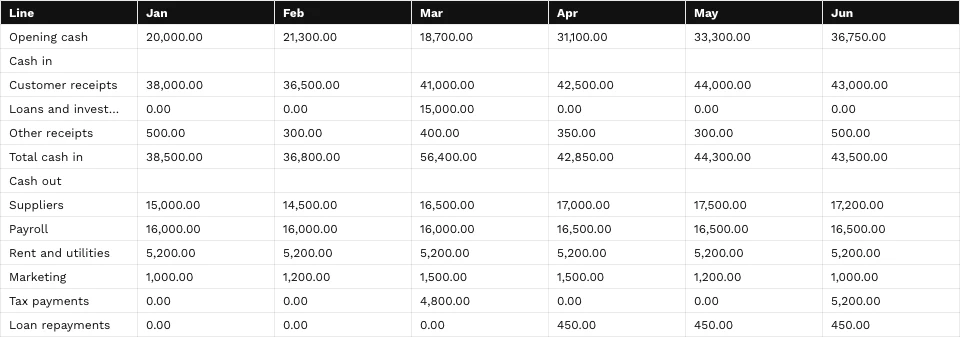
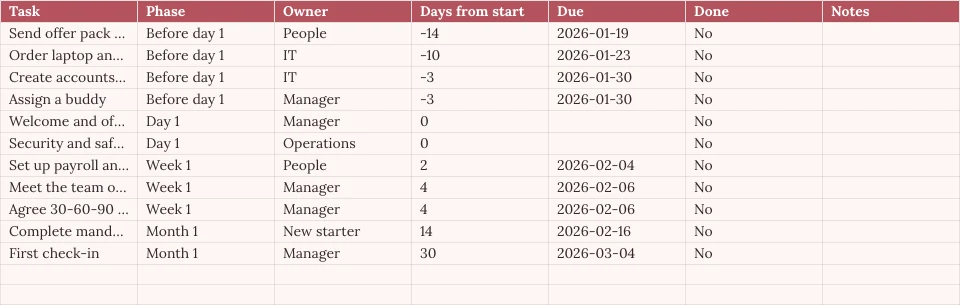
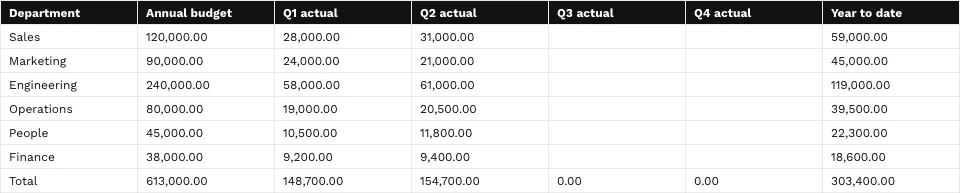
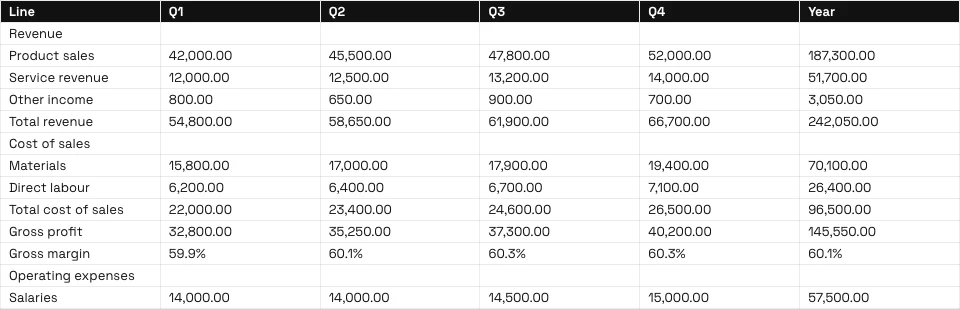




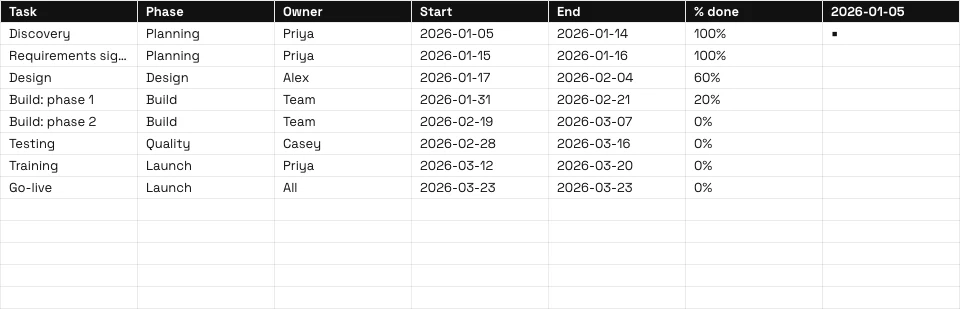
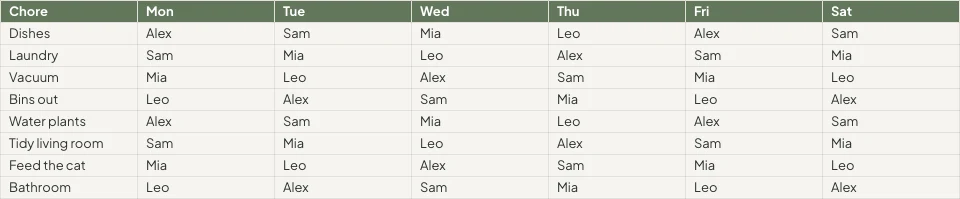

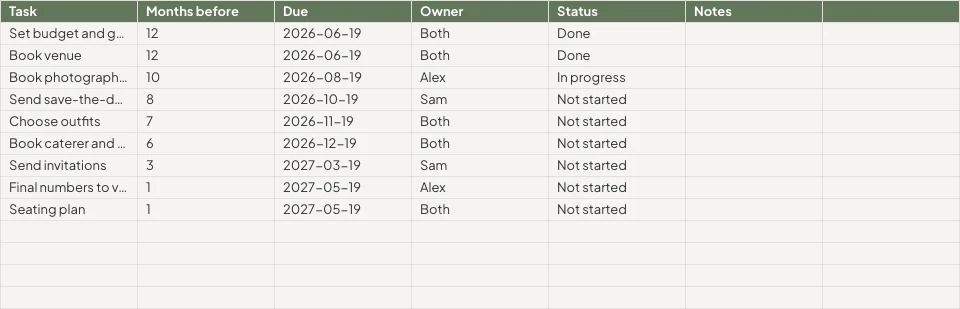
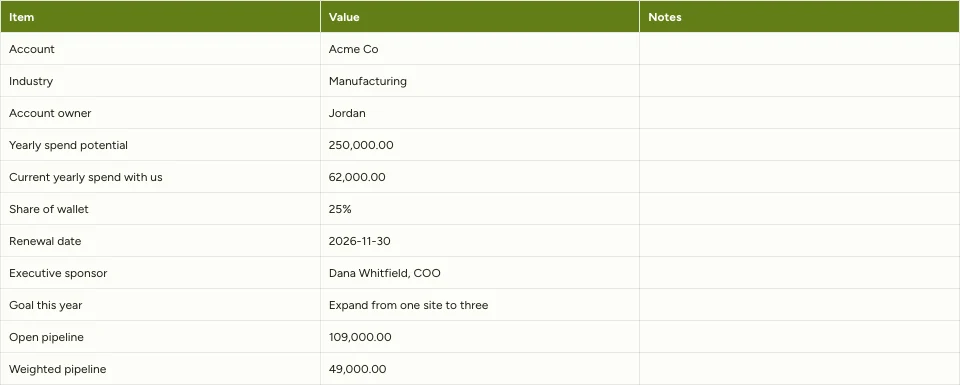

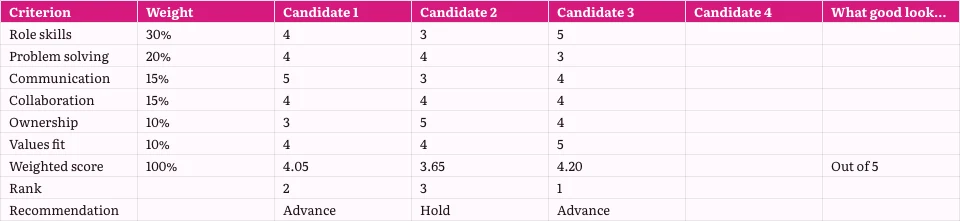
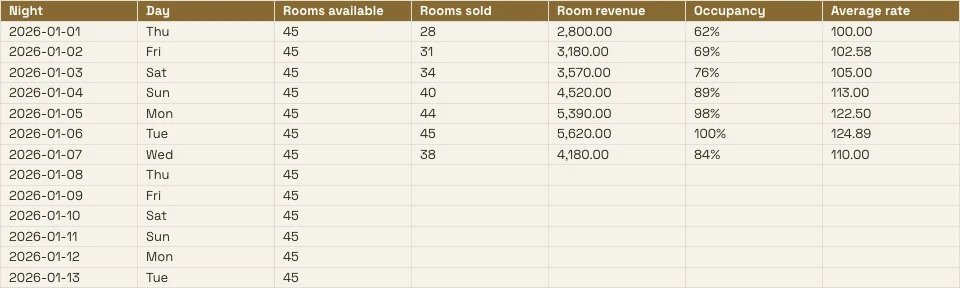
Every spreadsheet the business keeps, and the records behind it
A budget, a price list or a rota is a spreadsheet here, and any tab can be read from the apps that hold the records.
The Grid
Formulas, formats and rules.
Start
Blank, a template or a file.
Data From Calisto
A tab read from your records.
Analyze
Charts, pivots and questions.
Together
Cell by cell, with comments.
Share
People, a link, a TV, a file.
Act
Rows that become work.
On a Phone
Read, edit and comment.
Write Formulas, Format Cells and Set the Rules
Type a formula from 245 functions, or describe what you need beside the formula and get one back. Format from the chip on the selected cells or the Format panel. Each column’s and row’s menu sorts, filters, freezes, groups and cleans up.
Describe a Formula
Say what you need, such as the average of column D where status is Active, and the formula is written for you.
Rules on Cells
Conditional formatting, alternating colors, and validation with lists as chips and tick boxes.
Named Ranges and Filter Views
Name a range once; save a filtered view without changing anyone else’s.
- Fees'Projects'!E2:E14Edit
- Hours'Projects'!D2:D14Edit
- OpenProjects'Projects'!A2:F9Edit
- TaxRate'Settings'!B2Edit
- Retainers'Retainers'!A2:D8Edit
- None (The Sheet’s Own Filter)
- Open, by client2
- Over 100 hours
- Owen’s projects
- Invoiced this quarter
Every Command by Name
⌘K finds any command and any function, by its name or its family.
Find and Replace
Across every tab, by whole cell, by case or by pattern, and inside formulas.
Chips for Dates, People and Files
A date, a contact or a file from Depot as a chip in a cell.
Clean Up
Remove duplicates, trim spaces, split text into columns.
Start Blank, From a Template or From a File
Describe the spreadsheet on Home and the closest template opens, or choose a template by type and industry, or start blank. Nothing is saved until you save it. Open an XLSX, ODS, CSV or TSV file, from the device or from Depot, and its formulas recalculate.
Create a New Spreadsheet
How would you like to start?
Or open a file you already have: XLSX, ODS, CSV or TSV. Column types are detected and formatted automatically.
Choose FileDescribe It on Home
Say what the spreadsheet is for, and the closest template opens in your theme.
Good morning, Chloe.
Fill a Tab From the Records Your Apps Keep
Pick bookings, deals, payments, stock, members, ticket holders or the roster, and the tab is filled from the records themselves, with no export. Choose Live to read them again on every open, Manual for a Refresh button, or Snapshot.
Chart It, Pivot It and Ask It Questions
Charts belong to the workbook: seven types, placed over the cells, drawn from the cells as they are now, and shown on a phone and on the published link. A pivot table summarizes a tab onto a tab of its own.
Charts
Column, bar, line, area, scatter, pie and donut, placed over the cells.
Pivot Tables
Rows, columns and values summarized onto a tab of their own.
Ask About This Data
A question in plain words, answered from the tab.
Unlimited members paid $18,960, PT Bundle $11,880 and 10-Pack $6,420.
Each Unlimited member paid $1,264 on average, across 15 members.
=AVERAGEIF(B2:B41,"Unlimited",E2:E41)Insert Into the Selected CellCopy FormulaSmart Fill and Auto-Classify Columns
A column completed from its pattern; each column given its type and number format.
Improve, Summarize or Translate
The selected cells improved, shortened, put in your brand’s voice, summarized or translated.
Pastel de nata, saído do forno de hora a hora.Tosta mista no pão da Gleba, com queijo da Ilha.Galão cremoso, em copo alto, com leite dos Açores.Bolo de laranja da avó Lurdes, com calda a escorrer.
ReplaceRetryColumn Stats
Count, sum, average, lowest, highest and median of any column.
- Filled
- 18
- Empty
- 2
- Distinct
- 11
- Errors
- 1
- Sum
- 14,20,000
- Average
- 83,529.41
- Median
- 75,000
- Min
- 25,000
- Max
- 2,50,000
Edit Together, and Decide Who Sees Which Cells
Several people edit one spreadsheet at once, merged cell by cell. Pin a comment to a cell, mention someone or hand them the thread, and find what is yours to answer on Home. Every save is a version you can compare and restore.
Comments on Cells
Pinned to a cell, with replies and mentions, and handed to someone to answer.
Version History
Sales!B2changedSales!B4changedSales!D6changedSales!A9addedGraphic novel workshopSales!B9added24Sales!A10removedSales!C8changedCompare two versions cell by cell and restore either.
Protected Ranges and Tabs
A tab or a range only its owner edits, or a range that warns before a change.
Cells Your Data Rules Hide
Purview’s Data Rules keep a cell from reaching a person’s screen, and keep it intact when they save.
Notices as Rules
Automation
Steps that run by themselves when something happens in your business.
| Automation | When | Then | Last 7 days | Last run | Status | |
|---|---|---|---|---|---|---|
| Tell the people on a spreadsheet about a new commentComment added | Comment added | Tell the people | 86 | 10/11/2026 11:42 | Active | Pause |
| Tell a person when they are mentioned in a commentPerson mentioned in a comment | Person mentioned in a comment | Tell the person | 41 | 10/11/2026 10:15 | Active | Pause |
| Tell a person when a comment thread is assigned to themComment thread assigned | Comment thread assigned | Tell the person | 23 | 09/11/2026 17:08 | Active | Pause |
| Tell the people in a comment thread about a replyReply in a comment thread | Reply in a comment thread | Tell the people | 52 | 10/11/2026 09:31 | Active | Pause |
| Tell people when a spreadsheet is shared with themSpreadsheet shared | Spreadsheet shared | Tell the people | 9 | 08/11/2026 14:50 | Paused | Resume |
| Tell the person who pulls invoices into a sheet that some are overdueOverdue invoices pulled into a sheet | Overdue invoices pulled into a sheet | Tell the person | 3 | 06/11/2026 08:57 | Active | Pause |
A share, a comment, a reply or a mention tells people through rules you can pause in Automations.
Turn Rows Into Invoices, Tasks, Decks and Records
Generate an invoice in Ledger from a tab’s lines, create a task in Dispatch, or present a chart in Slides, where it stays linked to this spreadsheet. A form linked to a spreadsheet adds one row per response, with a new column for each new question.
Invoice in Ledger
The tab’s lines become an invoice you check and create in Ledger.
Invoice Partially Paid
Invoice detail
| Description | Qty | Unit Price | Total |
|---|---|---|---|
| Group stay, 6 rooms, 3 nights | 18 | R 1 650,00 | R 29 700,00 |
| Cape Malay breakfast, guests | 36 | R 145,00 | R 5 220,00 |
| Airport transfers, minibus | 2 | R 950,00 | R 1 900,00 |
| Bo-Kaap walking tour | 12 | R 280,00 | R 3 360,00 |
| Cooking class, Cape Malay | 12 | R 620,00 | R 7 440,00 |
| Late checkout, 6 rooms | 6 | R 250,00 | R 1 500,00 |
Task in Dispatch
A task with its assignee, due date and priority, linked to the spreadsheet.
Chart in Slides
A deck whose chart stays linked to this spreadsheet.
Rows From a Form
A linked form adds one row per response.
Rows in Automations
A new row starts a rule, and a rule adds a row, once whatever the retries.
Overdue Invoices Found
A Ledger pull that finds overdue invoices tells the person who pulled it, as a rule you can pause.
Invoice Partially Paid
Invoice detail
| Description | Qty | Unit Price | Total |
|---|---|---|---|
| Group stay, 6 rooms, 3 nights | 18 | R 1 650,00 | R 29 700,00 |
| Cape Malay breakfast, guests | 36 | R 145,00 | R 5 220,00 |
| Airport transfers, minibus | 2 | R 950,00 | R 1 900,00 |
| Bo-Kaap walking tour | 12 | R 280,00 | R 3 360,00 |
| Cooking class, Cape Malay | 12 | R 620,00 | R 7 440,00 |
| Late checkout, 6 rooms | 6 | R 250,00 | R 1 500,00 |
Read, Edit and Comment From a Phone
The same spreadsheet in a phone’s shape: edit a cell, filter a column, fill a tab from your records, answer comments and present a chart. A spreadsheet shared from another app opens in Sheets.
Where Sheets Touches Everything Else
3 of these 8 connections are in your plan today; the others are their own apps.
Forms
A linked form adds one row per response, with a new column for each new question.
Depot
Every spreadsheet is in Depot and its Hubs, and a spreadsheet file in Depot opens in Sheets.
Slides
Present in Slides makes a deck whose chart stays linked to the spreadsheet.
Ledger
Ledger’s statements, invoices and transactions fill a tab, and Generate Invoice makes the invoice in Ledger.
Workforce
The team and the schedule fill a tab, read again whenever it is opened.
Dispatch
Create Task makes a task in Dispatch from the spreadsheet.
Deals
Deals’ pipeline fills a tab, and Attach to Deal files the spreadsheet on a deal as a PDF.
Display
A published spreadsheet is shown on a TV as a data table.
No setup cost. Pay when you start using.
Spreadsheets your team works in together.
Calisto Work is one subscription per person for Docs, Sheets, Slides, Forms, Agenda, Equipo, and Depot, with a branded mailbox for each person.
Recommended for you
Works well together.
Calisto Forms
Calisto Depot
Calisto Slides
Calisto Ledger
Calisto Ops
Double-entry books set up your way, every Calisto app’s money posted to them, invoices and who owes, supplier bills read and matched, receipts as expenses, the bank reconciled, money held for others, and the statements your accountant files from.
Learn more →Calisto Workforce
Calisto Ops
The schedule built from what is booked and when people can work, clock-in on any phone or a shared tablet, time off and timesheets signed off once, a pay report for your payroll and payslips back, labor rules, the team and hiring from your careers page.
Learn more →Calisto Dispatch
Calisto Ops
Requests and work orders, tasks assigned by who is free and near, templates and recurring work, the team and its contractors, routes by road, service levels and analytics, and the day worked from a phone with no signal.
Learn more →Calisto Deals
Calisto Commerce
The CRM: leads routed and claimed, a pipeline on your own stages, quotes as versions and the contracts they become, people and companies, the day’s follow-ups, the handoff after the sale, commissions and the forecast.
Learn more →Calisto Display
Calisto Display
Runs the TVs in a business: kitchen displays, pickup and now-serving boards, guest TVs, menu boards, signage and designed screens, with schedules, alerts and performance.
Learn more →Calisto Automations
Calisto Ops
Rules that start from your Calisto apps, a schedule or a date and act across them all, every app’s automatic messages as rules, sequences that follow up until a person acts, and every run on record.
Learn more →Recommended for
The industries that run Sheets, and what each of them runs it for.
Real Estate BrokersReporting
Commission splits and pipeline reporting.
Real Estate Brokers on Calisto →Property DevelopmentReporting
Payment plans, cost tracking, unit reporting.
Property Development on Calisto →Graphic Designers & ArtistsJob costing sheets
Job costing and retainer tracking.
Graphic Designers & Artists on Calisto →Everything included in Calisto Sheets.
- Calisto’s own spreadsheet engine, with as many tabs as the work needs
- 245 functions by family, found by name in ⌘K
- Describe what you need beside the formula, and get the formula back
- Iterative calculation, set per spreadsheet, so every reader gets the same answers
- Show Formulas, gridlines, Add 1000 Rows, keyboard shortcuts
- Find, and Find and Replace
- The format chip on the selected cells, and one Format panel for everything else
- Number formats in the business’s own currency, percentages, dates and plain numbers; never a currency nobody recorded
- Conditional formatting, alternating colors and color scales
- Data validation: lists shown as chips, tick boxes, numbers, dates, text and custom rules
- Merge, wrap, borders, freeze, hide and group rows and columns
- Each column’s and row’s menu: insert, delete, size, sort, filter, group, stats and clean-up
- Date chips and contact chips that name a customer from your contacts
- Describe it on Home and the closest template opens; or start blank, in a theme, or from a template by type, industry, style and color
- A template is a design worn in a theme; its blanks are asked for before it opens
- Nothing is saved until you save it; leaving with changes asks first
- Open XLSX, ODS, CSV and TSV files, and shared text arrives as a grid
- Open a spreadsheet file from Depot in Sheets
- Make a Copy, Save as Template, Edit Template
- Bookings: every booking, and revenue by channel per currency
- Deals: the open pipeline and what was won
- Payments: transactions
- Inventory: stock on hand, and what is below its reorder point
- Registry: members; Tickets: attendees; Workforce: the team and the schedule
- Ledger Data: the balance sheet, profit and loss, the invoices register and the transaction register
- Catalog Data, and Subscription Metrics (what the business pays Calisto)
- A web address: a public CSV or JSON file
- Live, Manual or Snapshot for each tab, with when it was read
- Money only for people the owner’s settings allow; anyone else reads “Not shared with you”
- Charts kept in the spreadsheet: column, bar, line, area, scatter, pie and donut
- A chart placed over the cells, drawn from the cells as they are now, on every device and the published link
- Pivot tables onto a tab of their own
- Column stats: count, sum, average, lowest, highest and median
- Smart Fill, Auto-Classify Columns and Ask About This Data
- Improve, shorten, summarize or translate the selected cells, or change their tone to your brand’s voice
- Named ranges and filter views
- Editing together, merged cell by cell; everyone in the spreadsheet shown in Share
- Comments pinned to a cell, with replies, mentions and threads handed to someone
- Comments for You on Home: the threads that are yours to answer
- Version history: compare two versions cell by cell, restore, and name a version
- Notices for a share, a comment, a reply, a mention and a handed thread, each a rule you can pause in Automations
- Share with people to view, comment or edit, and change or remove access in place
- Protected tabs and ranges: owner only, or for a range a warning before a change
- Purview’s Data Rules keep a cell from reaching a person’s screen, and keep it intact when they save
- Collections and locks set in Purview apply here too
- Publish a link anyone can open, and take it back
- A published spreadsheet shown on a TV, with Display
- Export XLSX, ODS, CSV, TSV, HTML and PDF, with the page setup, and print
- Send: Email, an Inbox message, Live, a Connect channel, or Attach to Deal (a PDF on the deal)
- Save to a Hub and Folder; every spreadsheet is in Depot
- Copy Link, Star, Details with a description, Trash with 30 days to restore
- Generate Invoice in Ledger from a tab’s lines
- Create Task in Dispatch
- Present in Slides: a deck whose chart stays linked to the spreadsheet
- A linked form adds one row per response, with a new column for each new question
- Automations: a new spreadsheet, a new row, a share and a pulled overdue invoice start rules; a rule adds a row or makes a spreadsheet, each row once whatever the retries
- Refine Design: the theme of a spreadsheet (its colors, the header band, type and row height)
- Brand Check: the words read against your brand guidelines
- The same look on the desk, the phone, the published link, the charts, XLSX and PDF
- The number format new spreadsheets start with, for the business
- Your own preferences, the same in every business: recalculate as you type or on F9, and where Share starts
- Each person chooses which comment notices reach them
- Home, Spreadsheets, Templates and Library in the tab bar; an open spreadsheet fills the screen
- Undo and Redo, Find, the cell’s sheet with its format and filter, Data, Comments and the tabs
- Spreadsheets kept on the device open read-only with no signal; a comment written then is sent later
- Spreadsheets shared from another app open in Sheets
- Notifications that open the comment, with Reply and Mark as Done
- Shortcuts: New Spreadsheet, Recent, Shared with Me and Templates
Questions about Calisto Sheets
XLSX, ODS, CSV and TSV, from the device, from Depot or shared from another app on a phone. Formulas are recalculated by Calisto’s own engine. Legacy XLS files do not open.
From the records the apps keep: bookings, deals, payments, stock, members, ticket holders, the roster and Ledger’s statements and registers. Live reads them again every time the spreadsheet opens, Manual waits for Refresh, Snapshot never changes. Figures a person may not see read “Not shared with you”.
Yes. Edits merge cell by cell, everyone in the spreadsheet is shown in Share, and a comment can be pinned to a cell, mention someone or be handed to them.
Spreadsheets kept on the device open read-only, so an older copy never saves over newer work. A comment written with no signal is sent when the connection returns. Editing needs a connection.
XLSX, ODS, CSV, TSV, HTML and PDF carry the grid. XLSX, PDF and HTML carry its look too. Charts and pictures stay in Calisto, on every device and on the published link.
Sheets is part of Calisto Work, one subscription per person. The pricing section on this page reads the live catalog. Apps a spreadsheet opens into, such as Ledger or Dispatch, are priced in their own apps.
@Lucía Hernández Molinos raised the 25 kg sack again. Do we keep 18 or drop to 15 for the week?
Keep 18. Día de Muertos orders start on Thursday.
Masa madre is back in stock at Granos Ruiz. Two packs should cover the sourdough this week.
ReplyResolveMantequilla price confirmed with San Ángel for November.
Marked as doneReplyReopen