جداول بيانات يبنيها فريقك ويعمل فيها معًا.
اكتب الصيغ، ارسم المخطط وقم بتدوير الأرقام، وعدل نفس جدول البيانات في نفس الوقت مع الجميع، على المكتب أو الهاتف. يمكن أيضاً ملء أي تبويب من السجلات التي تحتفظ بها عملك.
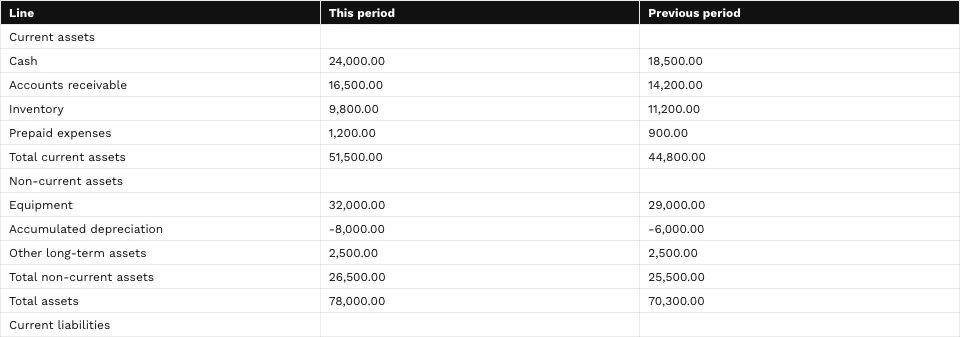
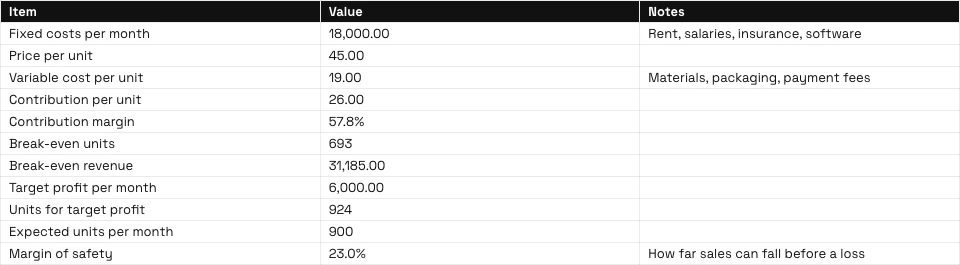
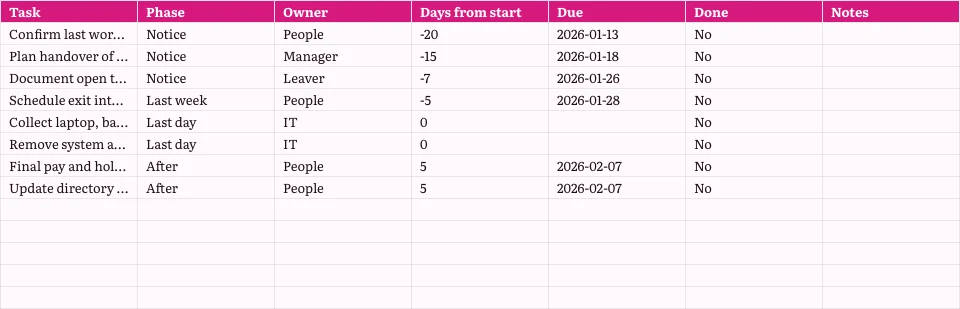
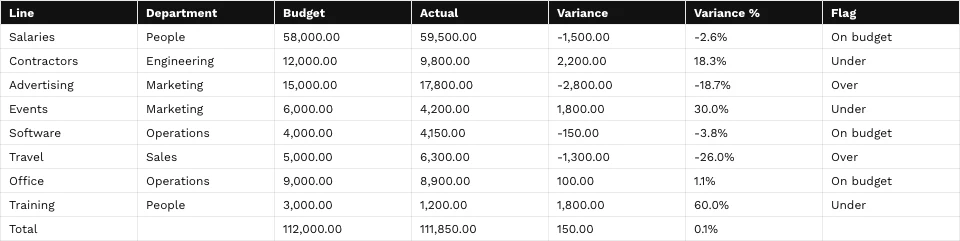
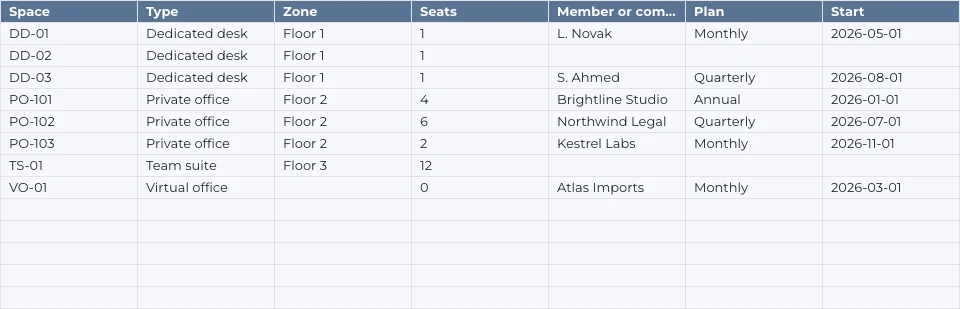
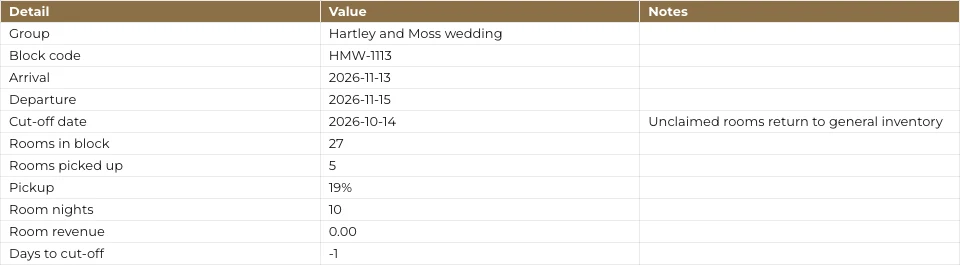
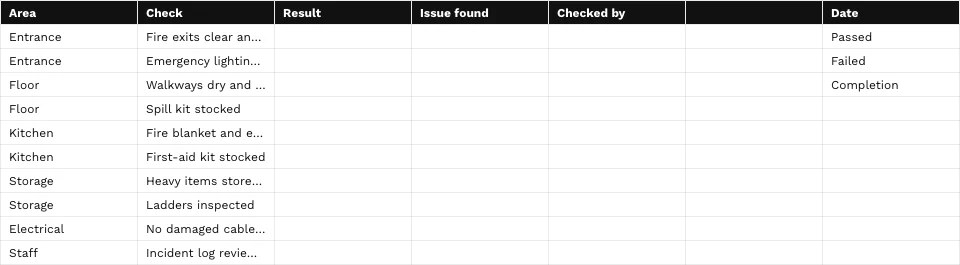
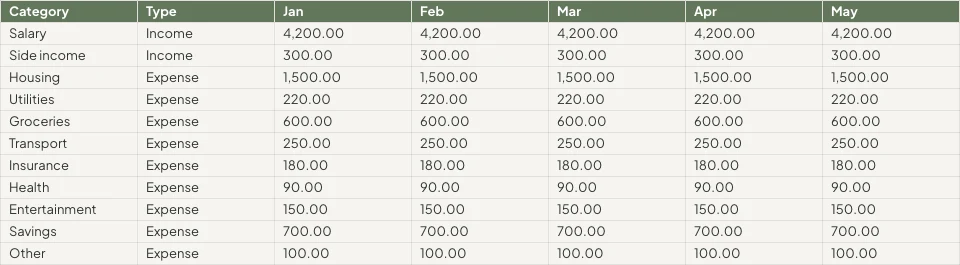

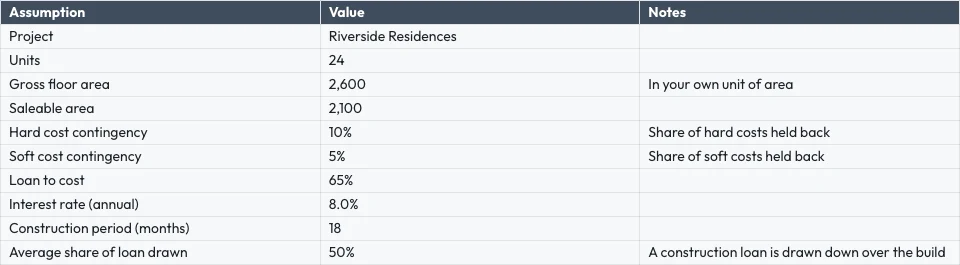


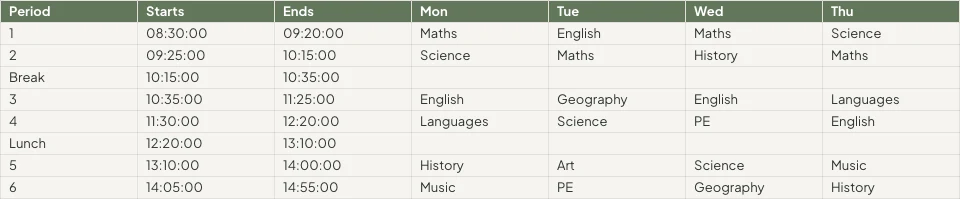
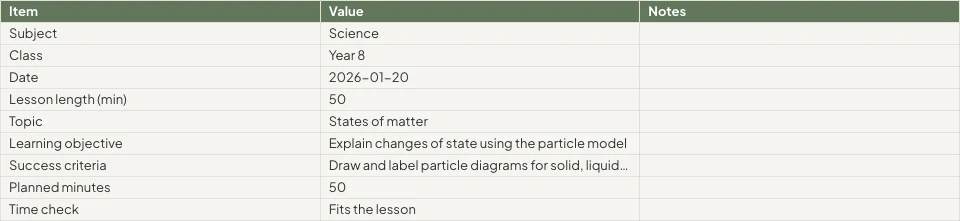
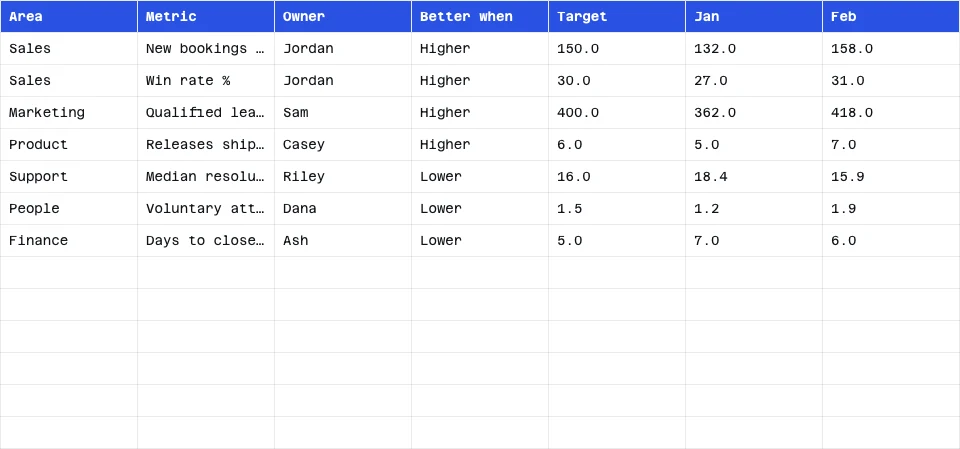

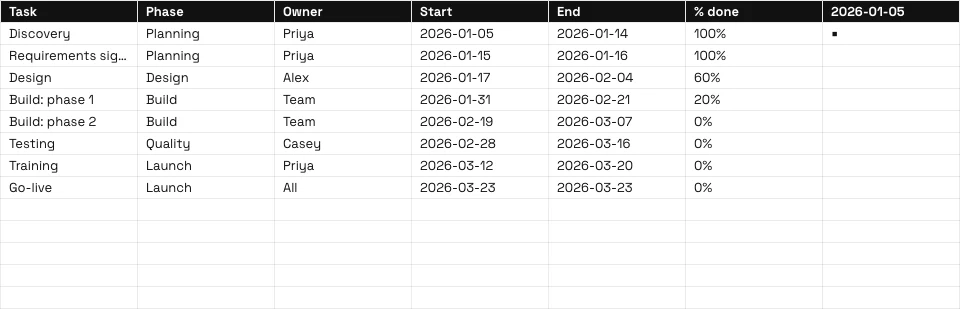
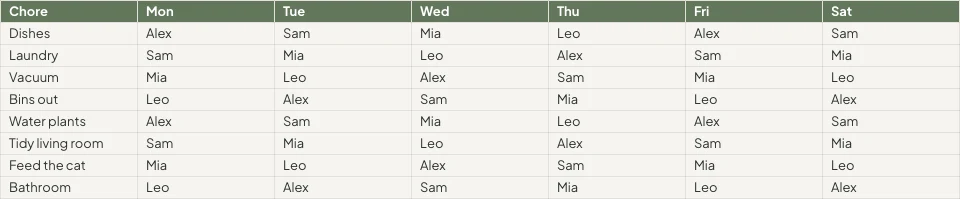

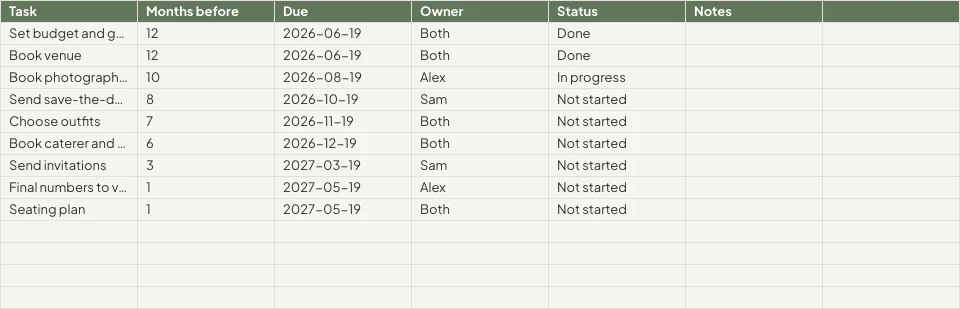
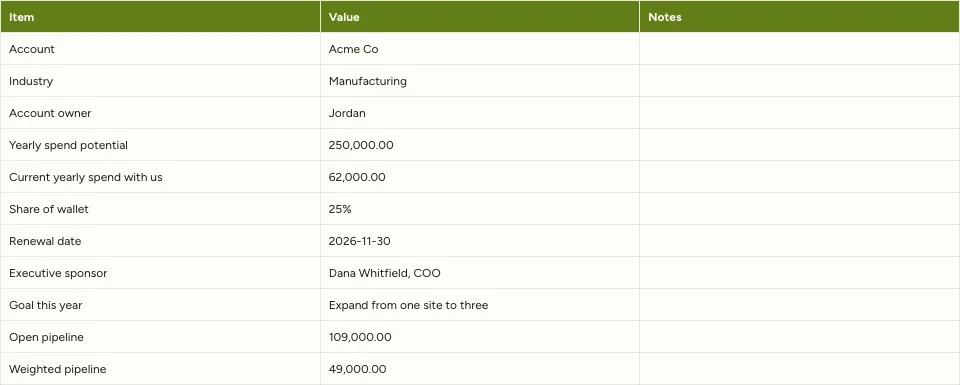

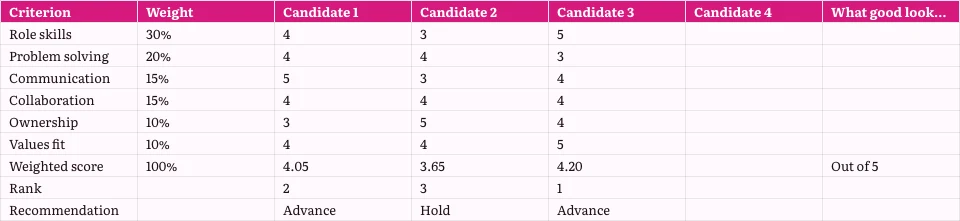
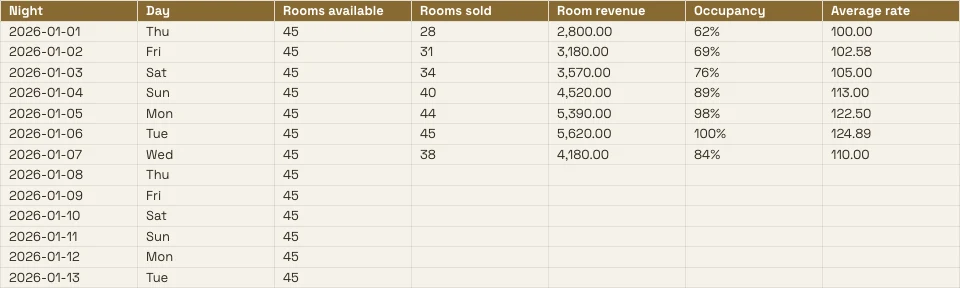
كل جدول بيانات تحتفظ به الأعمال، والسجلات خلفه
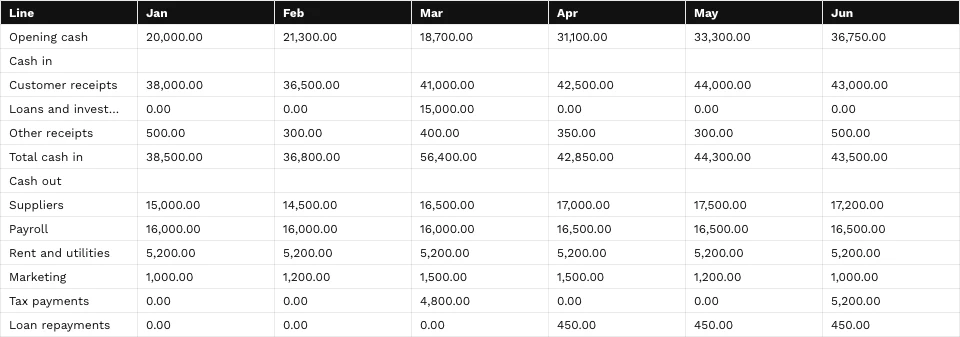
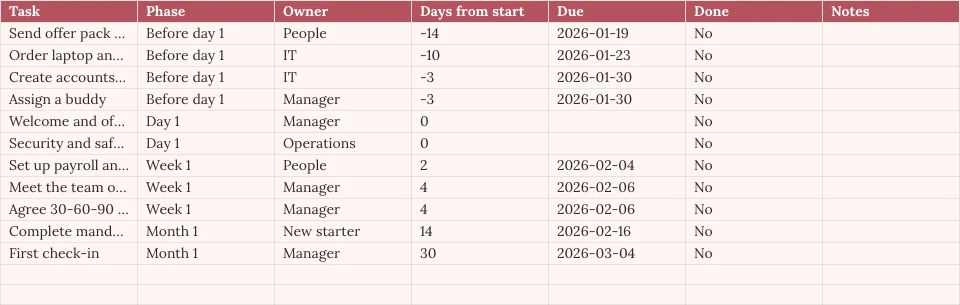
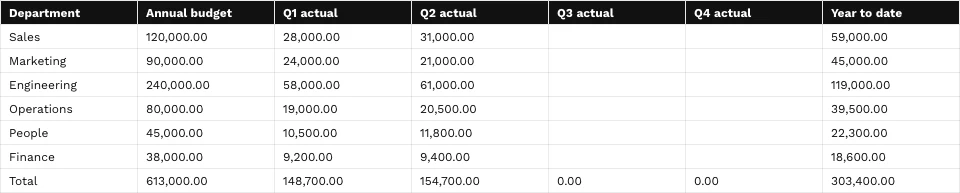
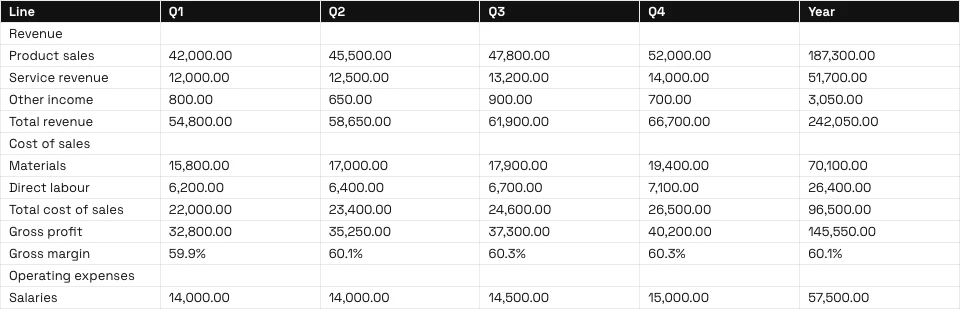
الميزانية، أو قائمة الأسعار، أو جدول الورديات هي جداول بيانات هنا، ويمكن قراءة أي تبويب من التطبيقات التي تحتفظ بالسجلات.
الشبكة
الصيغ، التنسيقات والقواعد.
ابدأ
Blank، قالب أو ملف.
بيانات من Calisto
علامة تبويب تُقرأ من سجلاتك.
التحليل
الرسوم البيانية، البيانات الدائرية، والأسئلة.
معاً
خلية تلو خلية، مع تعليقات.
مشاركة
أشخاص، رابط، تلفاز، ملف.
فعل
الصفوف التي تتحول إلى عمل.
على هاتف
قراءة وتعديل والتعليق.
كتابة الصيغ، تنسيق الخلايا، وتحديد القواعد
اكتب صيغة من 245 دالة، أو صف ما تحتاجه بجانب الصيغة واحصل عليها. تنسيق من الرقاقة في الخلايا المحددة أو لوحة التنسيق. قوائم كل عمود وسطر تقوم بالفرز، الترشيح، التجميد، التجميع، وتنظيف البيانات.
وصف صيغة
اذكر ما تحتاجه، مثل متوسط العمود D حيث الحالة هي "نشط"، وسيتم كتابة الصيغة لك.
قواعد حول الخلايا
تنسيق مشروط، ألوان متبادلة، والتحقق من صحة البيانات باستخدام قوائم على شكل شرائح وعلامة صح.
النطاقات المسمّاة وروايات التصفية
سمِّ مدى مرة؛ احفظ رؤية فلترة دون تغيير أي شخص آخر.
- Fees'Projects'!E2:E14تعديل
- Hours'Projects'!D2:D14تعديل
- OpenProjects'Projects'!A2:F9تعديل
- TaxRate'Settings'!B2تعديل
- Retainers'Retainers'!A2:D8تعديل
- لا شيء (فلتر الورقة نفسه)
- Open, by client2
- Over 100 hours
- Owen’s projects
- Invoiced this quarter
كل أمر حسب الاسم
⌘K يجد أي أمر وأي وظيفة، حسب اسمها أو عائلتها.
البحث والاستبدال
عبر كل علامة تبويب، بخلية كاملة، أو حالة، أو نمط، وداخل الصيغ.
رقائق لالتقاءات، للناس والملفات
تاريخ، أو جهة اتصال، أو ملف من Depot كرقاقة في خلية.
تنظيف
إزالة التكرارات، قص المسافات، تقسيم النص إلى أعمدة.
ابدأ من الصفر، من قالب أو من ملف File
وصف الجدول في الصفحة الرئيسية ليفتح القريب منها، أو اختر قالبًا حسب النوع والصناعة، أو ابدأ من صفحة فارغة. لا يتم الحفظ حتى تقوم أنت بالحفظ. افتح ملف XLSX أو ODS أو CSV أو TSV من الجهاز أو من المخزن، وستُعاد حساب صيغاته.
إنشاء جدول بيانات جديد
كيف تود أن تبدأ؟
أو افتح ملفًا لديك بالفعل: XLSX، ODS، CSV أو TSV. يتم اكتشاف أنواع الأعمدة وتنسيقها تلقائيًا.
اختيار ملفوصفها في الصفحة الرئيسية
اذكر الغرض من جدول البيانات، ويفتح أقرب قالب في موضوعك.
صباح الخير، Chloe.
ملء تبويب من السجلات التي تطبق عليها تطبيقاتك احفظ
اختر الحجوزات، الصفقات، المدفوعات، المخزون، الأعضاء، حاملو التذاكر، أو الجدول الزمني، وستتم تعبئة التبويب من السجلات نفسها دون تصدير. اختر Live لإعادة قراءتها في كل فتح، أو Manual لزر التحديث، أو Snapshot.
ارسمها، حولها واسأل عنها أسئلة
تنتمي الرسوم البيانية إلى ملف العمل: سبعة أنواع، موضوعة فوق الخلايا، مستمدة من الخلايا كما هي الآن، وعرضها على الهاتف وعلى الرابط المنشور. جدول البيانات الدائري يلخص علامة تبويب إلى علامة تبويب خاصة به.
الرسوم البيانية
أعمدة، أشرطة، خطوط، مناطق، نقاط متفرقة، كعك ودونات، موضوعة فوق الخلايا.
جداول المحاور
صفوف وأعمدة وقيم ملخصة على علامة تبويب خاصة بها.
استفسر عن هذه البيانات
سؤال بصياغة بسيطة، يُجيب عليه من التبويب
Unlimited members paid $18,960, PT Bundle $11,880 and 10-Pack $6,420.
Each Unlimited member paid $1,264 on average, across 15 members.
=AVERAGEIF(B2:B41,"Unlimited",E2:E41)إدراج في الخلية المحددةنسخ الصيغةملء ذكي وتصنيف أعمدة تلقائيًا
عمود مكتمل من نمطه؛ يُعطى كل عمود نوعه وتنسيق أرقامه.
تحسين، تلخيص أو ترجمة
الخلايا المحددة تحسّنت، تم تقصيرها، وضعت بصوت علامتك التجارية، أو ملخصت أو مترجمة.
Pastel de nata, saído do forno de hora a hora.Tosta mista no pão da Gleba, com queijo da Ilha.Galão cremoso, em copo alto, com leite dos Açores.Bolo de laranja da avó Lurdes, com calda a escorrer.
استبدالإعادة المحاولةإحصائيات الأعمدة
عد، جمع، متوسط، أدنى قيمة، أعلى قيمة، والوسيط لأي عمود.
- ممتلئة
- 18
- فارغ
- 2
- Distinct
- 11
- الأخطاء
- 1
- المجموع
- 14,20,000
- متوسط
- 83,529.41
- الوسيط
- 75,000
- الحد الأدنى
- 25,000
- أقصى
- 2,50,000
التعديل المشترك، وتحديد من يرى أي خلايا
يعدّ عدة أشخاص جدولًا إلكترونيًا واحدًا في وقت واحد، مدمجًا خلية تلو الأخرى. ألصق تعليقًا بخلية، ذكّر شخصًا ما أو سلمهم الخيط، وابحث عما يجب عليك الإجابة عليه في "الرئيسية". كل حفظ هو نسخة يمكنك مقارنتها واستعادتها.
التعليقات على الخلايا
مثبتة في خلية، مع الردود والإشارات، وتُسلم لشخص للإجابة عليها.
سجل الإصدارات
المبيعات!B2تم التغييرالمبيعات!B4تم التغييرالمبيعات!D6تم التغييرالمبيعات!A9addedGraphic novel workshopالمبيعات!B9added24المبيعات!A10removedالمبيعات!C8تم التغييرقارن نسختين خليةً بخلية واستعد أي منهما.
النطاقات المحمية والعلامات التبعية
علامة تبويب أو نطاق يحرره صاحبه فقط، أو نطاق يحذر قبل التغيير.
قواعد إخفاء بيانات الخلايا
تحافظ قواعد بيانات Purview على عدم وصول خلية إلى شاشة الشخص، وتحافظ على سلامتها عند حفظه.
الإشعارات كقواعد
الأتمتة
خطوات تعمل تلقائيًا عند حدوث شيء ما في عملك.
| الأتمتة | متى | ثم | آخر 7 أيام | آخر تشغيل | الحالة | |
|---|---|---|---|---|---|---|
| Tell the people on a spreadsheet about a new commentComment added | Comment added | Tell the people | 86 | 21/11/2026 11:42 | نشط | إيقاف مؤقت |
| Tell a person when they are mentioned in a commentPerson mentioned in a comment | Person mentioned in a comment | Tell the person | 41 | 21/11/2026 10:15 | نشط | إيقاف مؤقت |
| Tell a person when a comment thread is assigned to themComment thread assigned | Comment thread assigned | Tell the person | 23 | 20/11/2026 17:08 | نشط | إيقاف مؤقت |
| Tell the people in a comment thread about a replyReply in a comment thread | Reply in a comment thread | Tell the people | 52 | 21/11/2026 09:31 | نشط | إيقاف مؤقت |
| Tell people when a spreadsheet is shared with themSpreadsheet shared | Spreadsheet shared | Tell the people | 9 | 19/11/2026 14:50 | متوقف مؤقتًا | استئناف |
| Tell the person who pulls invoices into a sheet that some are overdueOverdue invoices pulled into a sheet | Overdue invoices pulled into a sheet | Tell the person | 3 | 17/11/2026 08:57 | نشط | إيقاف مؤقت |
مشاركة، أو تعليق، أو رد، أو ذكر يخبر الناس عبر قواعد يمكنك إيقافها في الأتمتة.
تحويل الصفوف إلى فواتير ومهام ومجلدات وسجلات
إنشاء فاتورة في دفتر الأستاذ من أسطر التبويب، أو إنشاء مهمة في التوجيه، أو عرض مخطط في شرائح، حيث يظل مرتبطًا بهذا جدول البيانات. النموذج المرتبط بجدول البيانات يضيف صفًا واحدًا لكل رد، مع عمود جديد لكل سؤال جديد.
فاتورة في الدفتر
تتحول أسطر التبويب إلى فاتورة تفحصها وتُنشئها في Ledger.
الفاتورة مدفوع جزئيًا
تفاصيل الفاتورة
| الوصف | الكمية | سعر الوحدة | المجموع |
|---|---|---|---|
| Group stay, 6 rooms, 3 nights | 18 | R 1 650,00 | R 29 700,00 |
| Cape Malay breakfast, guests | 36 | R 145,00 | R 5 220,00 |
| Airport transfers, minibus | 2 | R 950,00 | R 1 900,00 |
| Bo-Kaap walking tour | 12 | R 280,00 | R 3 360,00 |
| Cooking class, Cape Malay | 12 | R 620,00 | R 7 440,00 |
| Late checkout, 6 rooms | 6 | R 250,00 | R 1 500,00 |
مهمة في التوزيع
مهمة مع مُنسبها وتاريخ الاستحقاق والأولوية، مرتبطة بالجدول الإلكتروني.
الرسم البياني في الشرائح
مجموعة شرائح يبقى رسمها البياني فيها مرتبطاً بهذا جدول البيانات.
صفوف من نموذج
إضافة نموذج مرتبط تضيف صفًا واحدًا لكل رد.
الصفوف في الأتمتة
يبدأ الصف الجديد قاعدة، وتضيف القاعدة صفًا، مرة واحدة مهما كانت المحاولات المتكررة.
تم العثور على فواتير متأخرة
سحب سجل المحاسبة الذي يجد الفواتير المتأخرة يخبر الشخص الذي قام بالسحب، كقاعدة يمكنك التوقف مؤقتًا.
الفاتورة مدفوع جزئيًا
تفاصيل الفاتورة
| الوصف | الكمية | سعر الوحدة | المجموع |
|---|---|---|---|
| Group stay, 6 rooms, 3 nights | 18 | R 1 650,00 | R 29 700,00 |
| Cape Malay breakfast, guests | 36 | R 145,00 | R 5 220,00 |
| Airport transfers, minibus | 2 | R 950,00 | R 1 900,00 |
| Bo-Kaap walking tour | 12 | R 280,00 | R 3 360,00 |
| Cooking class, Cape Malay | 12 | R 620,00 | R 7 440,00 |
| Late checkout, 6 rooms | 6 | R 250,00 | R 1 500,00 |
اقرأ، عدّل وأضف تعليقات من هاتف
نفس جدول البيانات في شكل الهاتف: عدّل خلية، فلتّر عموداً، ملأ علامة تبويب من سجلاتك، أجِب التعليقات، وعرض مخطط. جدول بيانات يُشارك من تطبيق آخر يفتح في جداول.
حيث تلمس Sheets كل شيء آخر
3 of these 8 connections are in your plan today; the others are their own apps.
Forms
A linked form adds one row per response, with a new column for each new question.
Depot
Every spreadsheet is in Depot and its Hubs, and a spreadsheet file in Depot opens in Sheets.
Slides
Present in Slides makes a deck whose chart stays linked to the spreadsheet.
Ledger
Ledger’s statements, invoices and transactions fill a tab, and Generate Invoice makes the invoice in Ledger.
Workforce
The team and the schedule fill a tab, read again whenever it is opened.
Dispatch
Create Task makes a task in Dispatch from the spreadsheet.
Deals
Deals’ pipeline fills a tab, and Attach to Deal files the spreadsheet on a deal as a PDF.
Display
A published spreadsheet is shown on a TV as a data table.
لا توجد تكلفة إعداد. ادفع عند البدء في الاستخدام.
Spreadsheets your team works in together.
Calisto Work is one subscription per person for Docs, Sheets, Slides, Forms, Equipo, and Depot, with a branded mailbox for each person.
موصى به لك
تعمل بشكل جيد معًا.
Calisto Forms
Calisto Depot
Calisto Slides
Calisto Ledger
Calisto Workforce
Calisto Dispatch
Calisto Deals
كاليستو للتجارة
The CRM: leads routed and claimed, a pipeline on your own stages, quotes as versions and the contracts they become, people and companies, the day’s follow-ups, the handoff after the sale, commissions and the forecast.
Learn more →Calisto Display
شاشة كاليسو
Runs the TVs in a business: kitchen displays, pickup and now-serving boards, guest TVs, menu boards, signage and designed screens, with schedules, alerts and performance.
Learn more →Calisto Automations
يُوصى بـ
الصناعات التي تشغل Sheets، والغرض من تشغيل كل منها لها.
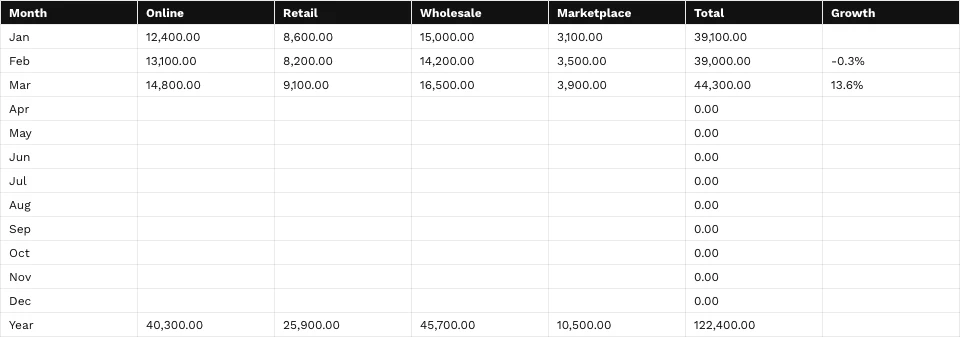
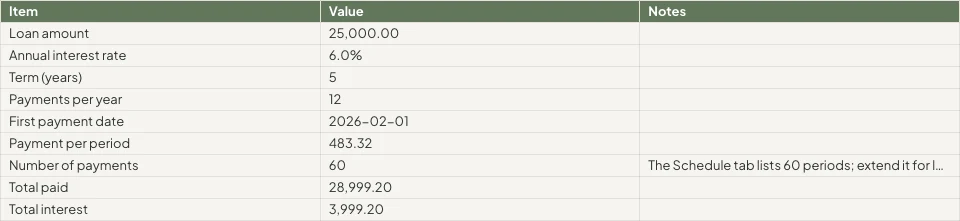
مصممو الجرافيك والفنانينJob costing sheets
Job costing and retainer tracking.
مصممو الجرافيك والفنانين على Calisto →تجار التجزئة عبر الإنترنتالتقارير
Margin, cost and channel reporting.
تجار التجزئة عبر الإنترنت على Calisto →كل ما هو متضمن في Calisto Sheets.
- Calisto’s own spreadsheet engine, with as many tabs as the work needs
- 245 functions by family, found by name in ⌘K
- Describe what you need beside the formula, and get the formula back
- Iterative calculation, set per spreadsheet, so every reader gets the same answers
- Show Formulas, gridlines, Add 1000 Rows, keyboard shortcuts
- Find, and Find and Replace
- The format chip on the selected cells, and one Format panel for everything else
- Number formats in the business’s own currency, percentages, dates and plain numbers; never a currency nobody recorded
- Conditional formatting, alternating colors and color scales
- Data validation: lists shown as chips, tick boxes, numbers, dates, text and custom rules
- Merge, wrap, borders, freeze, hide and group rows and columns
- Each column’s and row’s menu: insert, delete, size, sort, filter, group, stats and clean-up
- Date chips and contact chips that name a customer from your contacts
- Describe it on Home and the closest template opens; or start blank, in a theme, or from a template by type, industry, style and color
- A template is a design worn in a theme; its blanks are asked for before it opens
- Nothing is saved until you save it; leaving with changes asks first
- Open XLSX, ODS, CSV and TSV files, and shared text arrives as a grid
- Open a spreadsheet file from Depot in Sheets
- Make a Copy, Save as Template, Edit Template
- Bookings: every booking, and revenue by channel per currency
- Deals: the open pipeline and what was won
- Payments: transactions
- Inventory: stock on hand, and what is below its reorder point
- Registry: members; Tickets: attendees; Workforce: the team and the schedule
- Ledger Data: the balance sheet, profit and loss, the invoices register and the transaction register
- Catalog Data, and Subscription Metrics (what the business pays Calisto)
- A web address: a public CSV or JSON file
- Live, Manual or Snapshot for each tab, with when it was read
- Money only for people the owner’s settings allow; anyone else reads “Not shared with you”
- Charts kept in the spreadsheet: column, bar, line, area, scatter, pie and donut
- A chart placed over the cells, drawn from the cells as they are now, on every device and the published link
- Pivot tables onto a tab of their own
- Column stats: count, sum, average, lowest, highest and median
- Smart Fill, Auto-Classify Columns and Ask About This Data
- Improve, shorten, summarize or translate the selected cells, or change their tone to your brand’s voice
- Named ranges and filter views
- Editing together, merged cell by cell; everyone in the spreadsheet shown in Share
- Comments pinned to a cell, with replies, mentions and threads handed to someone
- Comments for You on Home: the threads that are yours to answer
- Version history: compare two versions cell by cell, restore, and name a version
- Notices for a share, a comment, a reply, a mention and a handed thread, each a rule you can pause in Automations
- Share with people to view, comment or edit, and change or remove access in place
- Protected tabs and ranges: owner only, or for a range a warning before a change
- Purview’s Data Rules keep a cell from reaching a person’s screen, and keep it intact when they save
- Collections and locks set in Purview apply here too
- Publish a link anyone can open, and take it back
- A published spreadsheet shown on a TV, with Display
- Export XLSX, ODS, CSV, TSV, HTML and PDF, with the page setup, and print
- Send: Email, an Inbox message, Live, or Attach to Deal (a PDF on the deal)
- Save to a Hub and Folder; every spreadsheet is in Depot
- Copy Link, Star, Details with a description, Trash with 30 days to restore
- Generate Invoice in Ledger from a tab’s lines
- Create Task in Dispatch
- Present in Slides: a deck whose chart stays linked to the spreadsheet
- A linked form adds one row per response, with a new column for each new question
- Automations: a new spreadsheet, a new row, a share and a pulled overdue invoice start rules; a rule adds a row or makes a spreadsheet, each row once whatever the retries
- Refine Design: the theme of a spreadsheet (its colors, the header band, type and row height)
- Brand Check: the words read against your brand guidelines
- The same look on the desk, the phone, the published link, the charts, XLSX and PDF
- The number format new spreadsheets start with, for the business
- Your own preferences, the same in every business: recalculate as you type or on F9, and where Share starts
- Each person chooses which comment notices reach them
- Home, Spreadsheets, Templates and Library in the tab bar; an open spreadsheet fills the screen
- Undo and Redo, Find, the cell’s sheet with its format and filter, Data, Comments and the tabs
- Spreadsheets kept on the device open read-only with no signal; a comment written then is sent later
- Spreadsheets shared from another app open in Sheets
- Notifications that open the comment, with Reply and Mark as Done
- Shortcuts: New Spreadsheet, Recent, Shared with Me and Templates
Questions about Calisto Sheets
XLSX، ODS، CSV و TSV، من الجهاز، من Depot أو مشاركة من تطبيق آخر على الهاتف. تعيد Calisto محركاتها الحساب تلقائياً. ملفات XLS القديمة لا تفتح.
من السجلات التي تحتفظ بها التطبيقات: الحجوزات، الصفقات، المدفوعات، المخزون، الأعضاء، الحاملون للتذاكر، وقائمة الموظفين، وقوائم Ledger والدفاتر. تقرأها مباشرة مرة أخرى في كل مرة تفتح فيها جدول البيانات، بينما ينتظر "يدوي" التحديث، ولا يتغير "لقطة". الأرقام التي قد لا يراها شخص ما تقرأ "غير مشترك معك".
نعم. تندمج التعديلات خلية تلو الأخرى، ويتم عرض الجميع في المشاركة، ويمكن تثبيت تعليق على خلية، أو ذكر شخص ما، أو تسليمه لهم.
يتم الاحتفاظ بالأوراق الحسابية على الجهاز مفتوحة للقراءة فقط، بحيث لا يحفظ نسخة قديمة فوق عمل أحدث. يتم إرسال أي تعليق مكتوب دون اتصال عند عودة الاتصال. يتطلب التحرير اتصالاً.
تنقل الشبكة عبر ملفات XLSX و ODS و CSV و TSV و HTML و PDF. تنقل المظهر أيضاً عبر XLSX و PDF و HTML. تبقى الرسوم البيانية والصور في Calisto على كل الأجهزة وعلى الرابط المنشور.
Sheets جزء من Calisto Work، اشتراك واحد لكل شخص. قسم التسعير على هذه الصفحة يعرض الكتالوج الحي. التطبيقات التي تفتح جداول بيانات، مثل Ledger أو Dispatch، تُسعّر في تطبيقاتها الخاصة.
@Lucía Hernández Molinos raised the 25 kg sack again. Do we keep 18 or drop to 15 for the week?
Keep 18. Día de Muertos orders start on Thursday.
Masa madre is back in stock at Granos Ruiz. Two packs should cover the sourdough this week.
ردحلMantequilla price confirmed with San Ángel for November.
تم تحديده على أنه مكتملردإعادة فتح