Fogli di calcolo che il tuo team costruisce e lavora insieme.
Scrivi formule, grafico e ruota i numeri, e modifica lo stesso foglio di calcolo contemporaneamente a tutti gli altri, alla scrivania o da un telefono. Qualsiasi scheda può anche essere compilata dai record che la tua azienda mantiene.
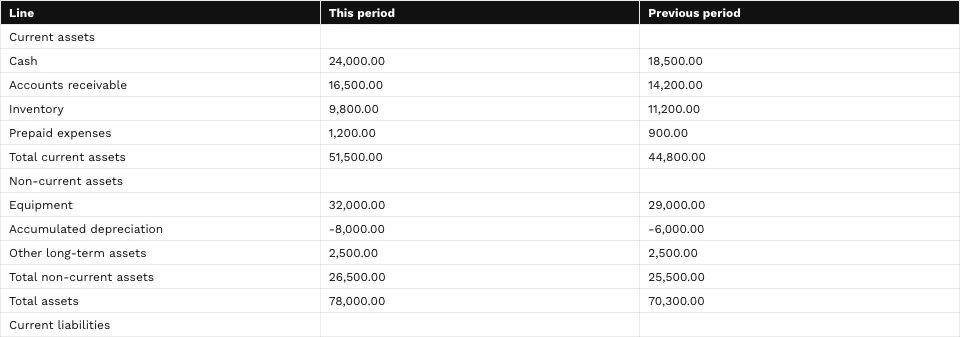
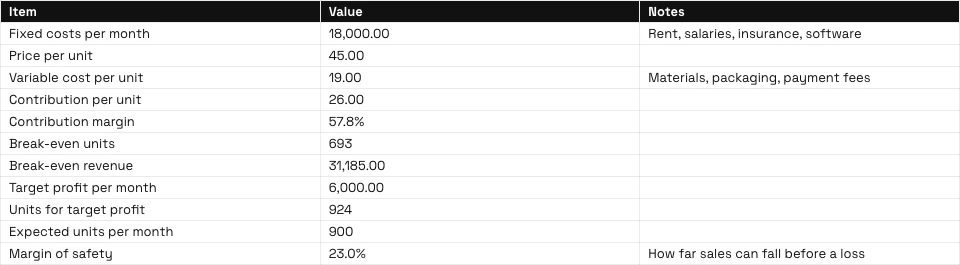
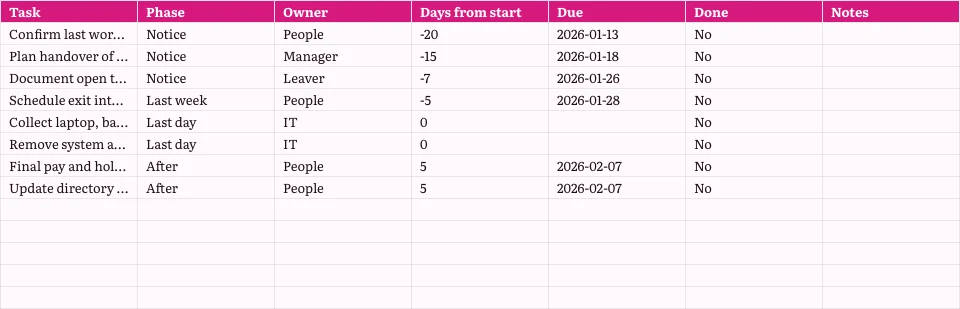
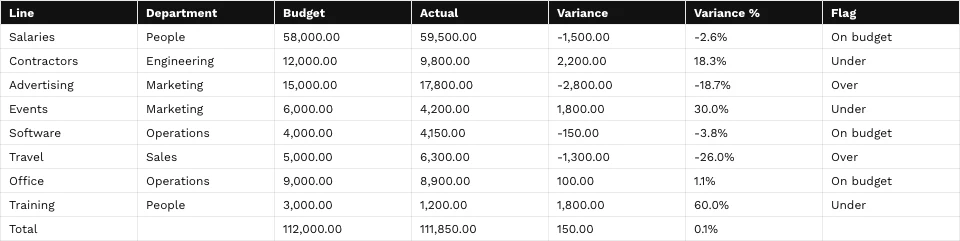
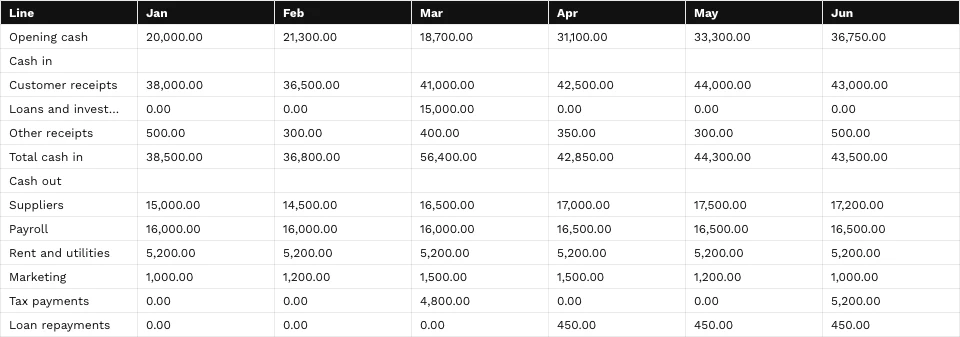
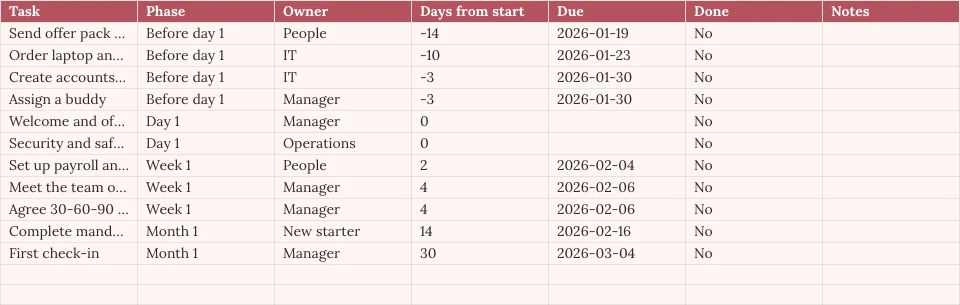
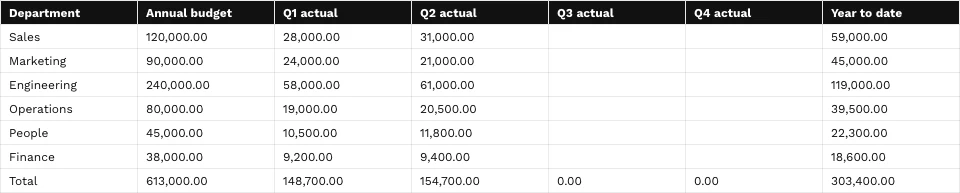
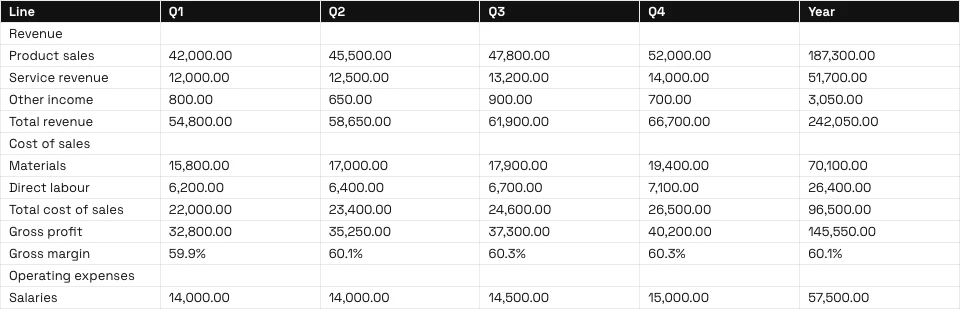
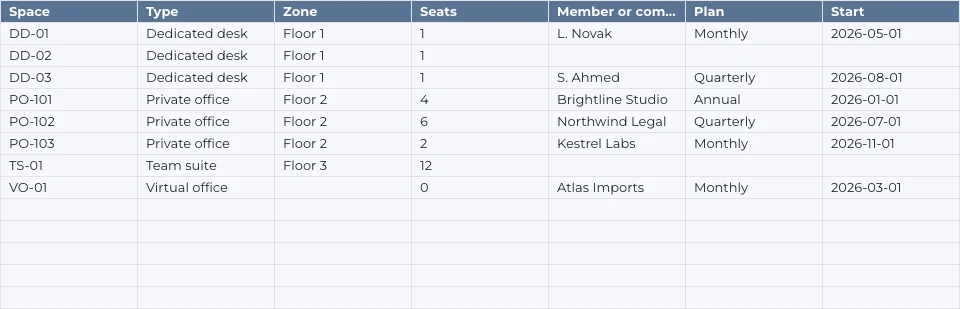
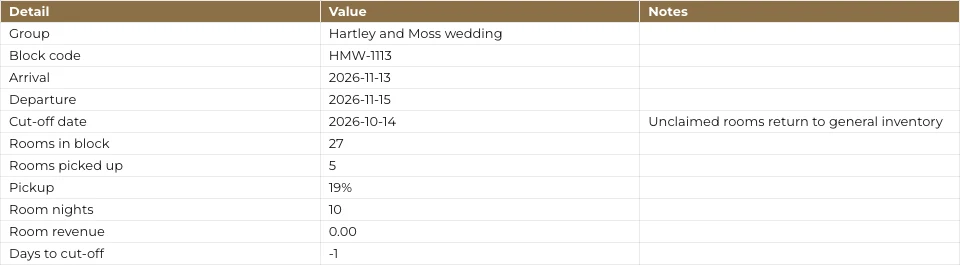
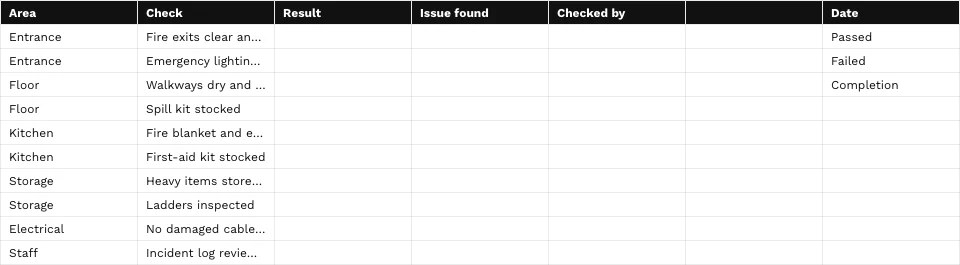
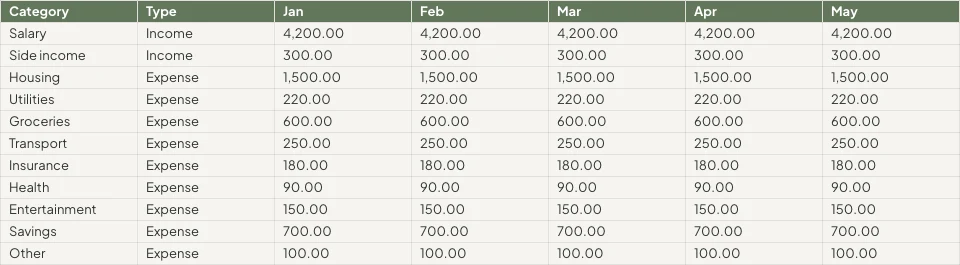
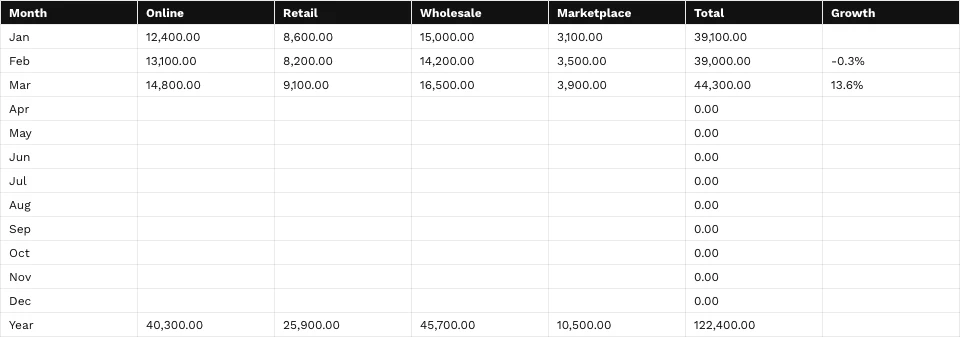

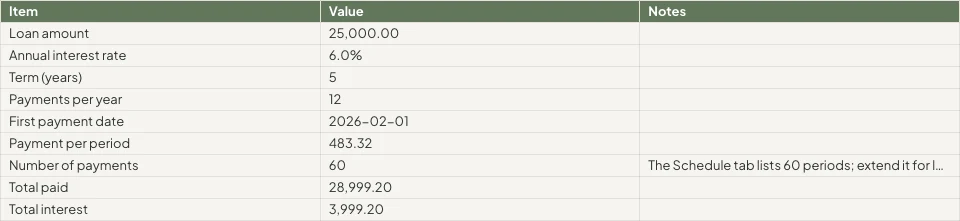
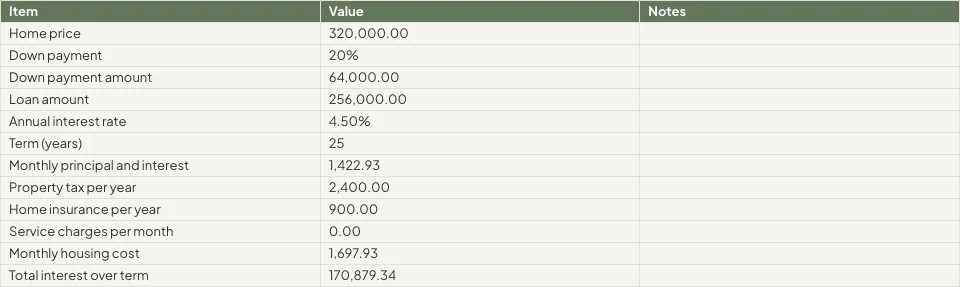
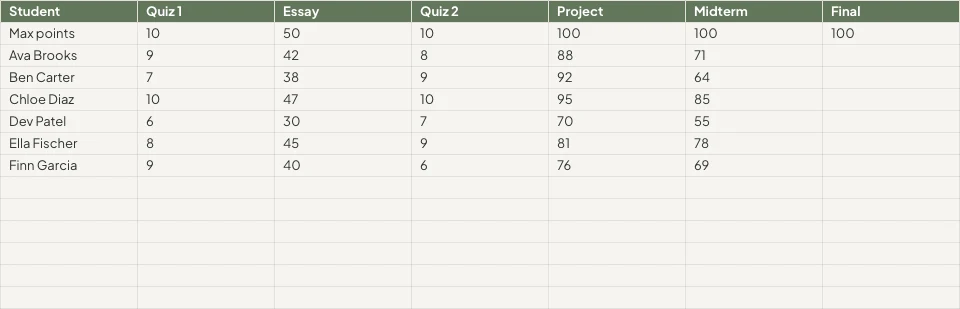
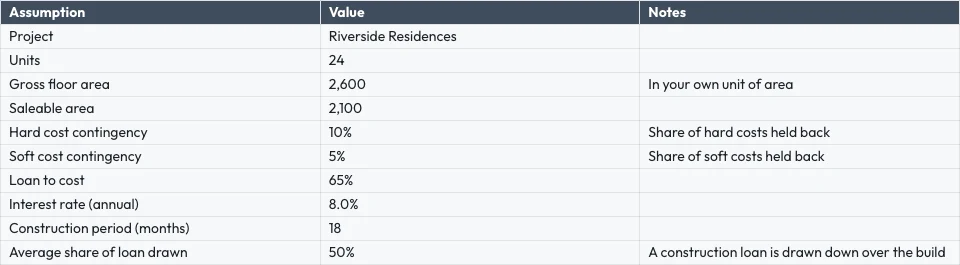


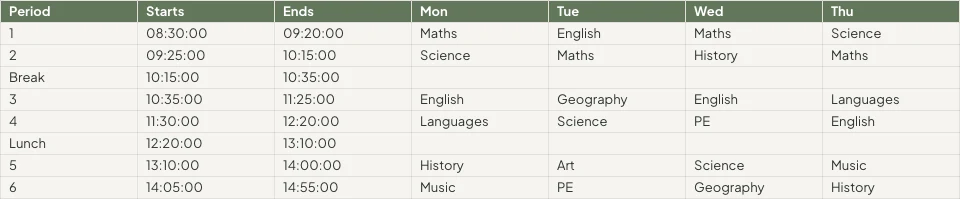
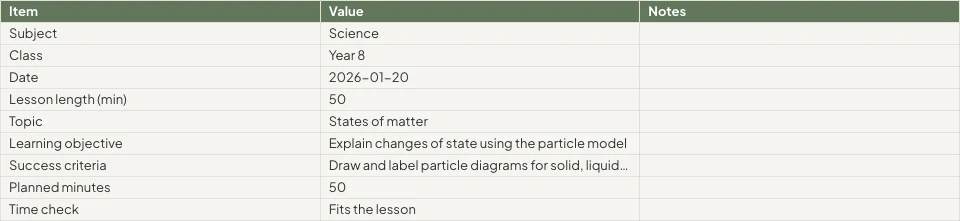
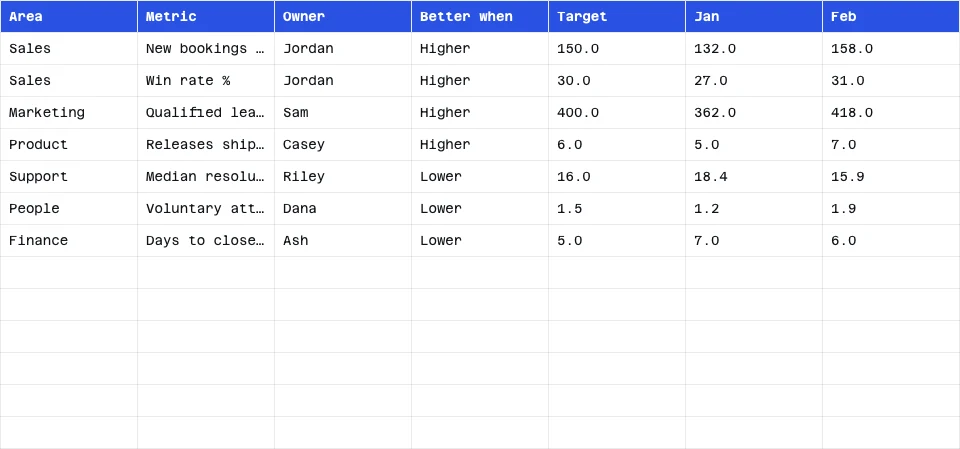

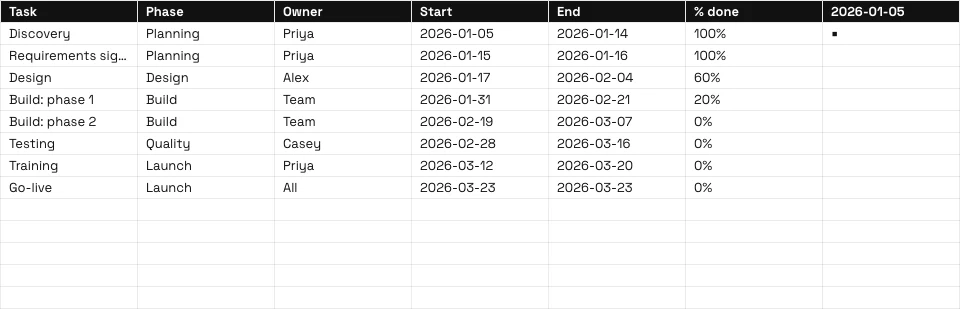
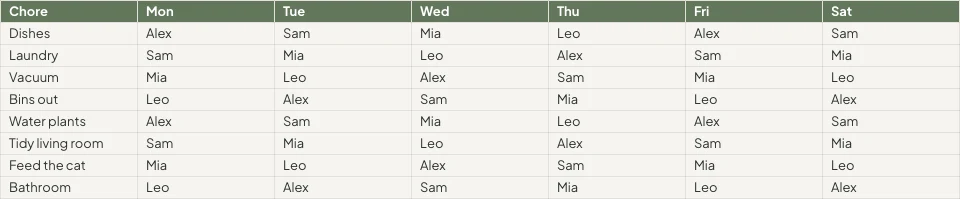

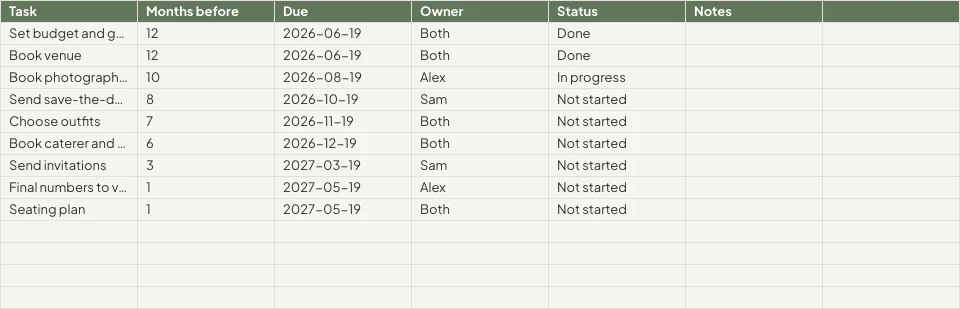
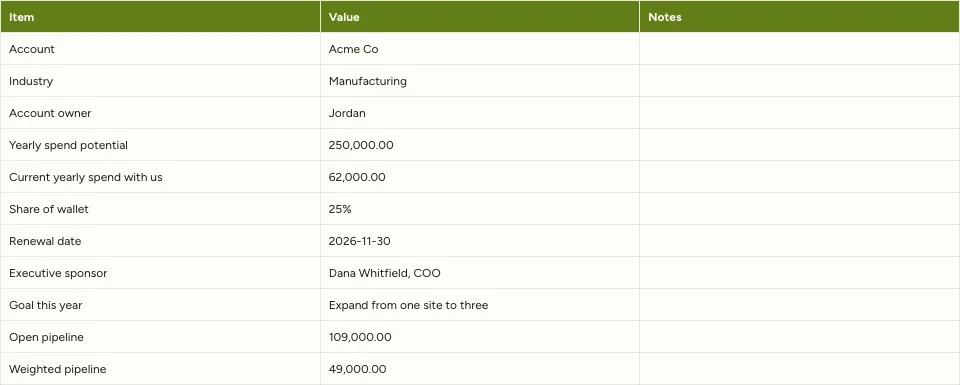
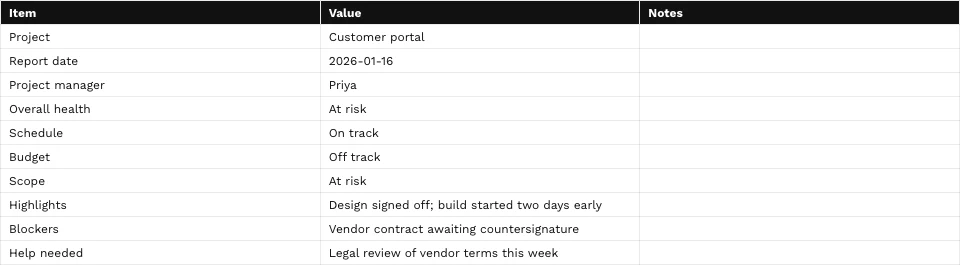
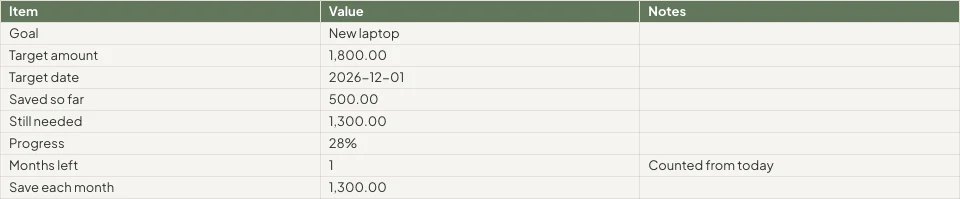

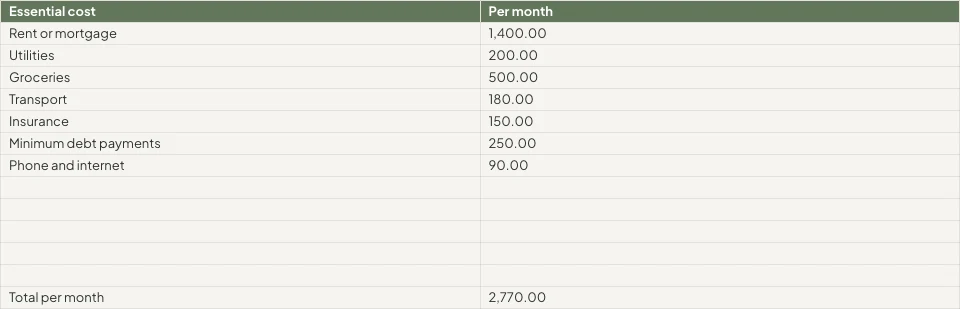
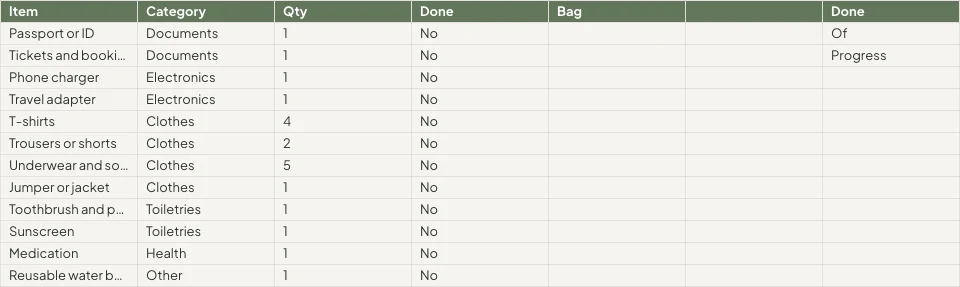
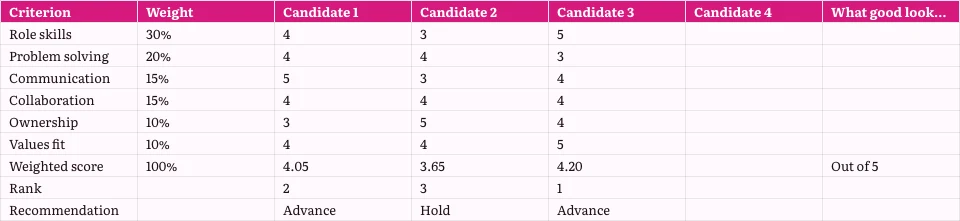
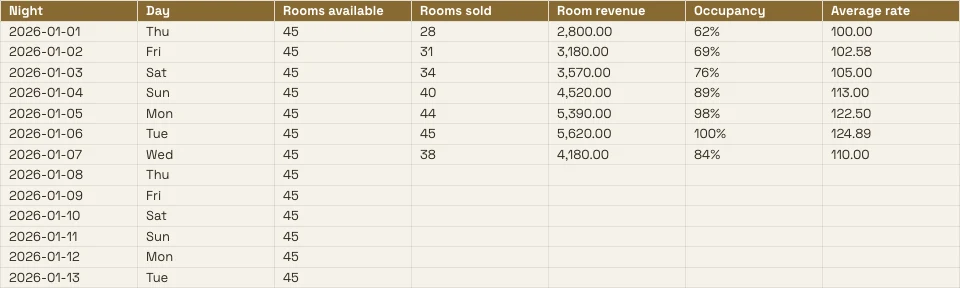
Ogni foglio di calcolo che l'azienda tiene e i record dietro di esso
Un budget, una lista prezzi o un turno sono qui un foglio di calcolo e qualsiasi scheda può essere letta dalle app che contengono i record.
La Griglia
Formule, formati e regole.
Inizia
Vuoto, un modello o un file.
Dati da Calisto
Una scheda letta dai tuoi registri.
Analizza
Grafici, pivot e domande.
Insieme
Cellula per cellula, con commenti.
Condividi
Persone, un link, una TV, un file.
Azione
Righe che diventano attività.
Su un telefono
Leggi, modifica e commenta.
Scrivi Formule, Formatta Celle e Imposta le Regole
Digita una formula tra 245 funzioni, oppure descrivi cosa ti serve accanto alla formula e ottienine una. Formatta dal chip sulle celle selezionate o dal pannello Formatta. Il menu di ogni colonna e riga permette di ordinare, filtrare, bloccare, raggruppare e pulire i dati.
Descrivi una Formula
Dì ciò di cui hai bisogno, come la media della colonna D dove lo stato è Attivo, e la formula viene scritta per te.
Regole sulle celle
Formattazione condizionale, colori alternati e validazione con liste come chip e caselle di spunta.
Intervalli nominativi e viste di filtro
Nomina un intervallo una volta sola; salva una vista filtrata senza modificare quella di nessun altro.
- Fees'Projects'!E2:E14Modifica
- Hours'Projects'!D2:D14Modifica
- OpenProjects'Projects'!A2:F9Modifica
- TaxRate'Settings'!B2Modifica
- Retainers'Retainers'!A2:D8Modifica
- Nessuna (Il Filtro Proprio del Foglio)
- Open, by client2
- Over 100 hours
- Owen’s projects
- Invoiced this quarter
Ogni comando per nome
⌘K trova qualsiasi comando e qualsiasi funzione, per nome o per famiglia.
Trova e sostituisci
In ogni scheda, per cella intera, per caso o per modello, e all'interno delle formule.
Chips per Date, Persone e File
Una data, un contatto o un file da Depot come chip in una cella.
Pulisci
Rimuovi duplicati, ritaglia gli spazi, dividi il testo in colonne.
Inizia Vuoto, da un Modello o da un File
Descrivi il foglio di calcolo su Home e si aprirà il modello più vicino, oppure scegli un modello per tipo e settore, oppure inizia vuoto. Non viene salvato nulla finché non lo salvi. Apri un file XLSX, ODS, CSV o TSV, dal dispositivo o da Depot, e le formule vengono ricalcolate.
Crea un nuovo Foglio Di Calcolo
Come desideri iniziare?
Ora apri un file che hai già: XLSX, ODS, CSV o TSV. I tipi di colonna vengono rilevati e formattati automaticamente.
Scegli fileDescrivilo su Home
Specifica a cosa serve il foglio di calcolo e il modello più simile si aprirà nel tuo tema.
Buongiorno, Chloe.
Compila una scheda dai record che le tue app Mantengono
Seleziona prenotazioni, offerte, pagamenti, scorte, membri, titolari di biglietti o la rosa, e la scheda viene compilata dai registri stessi, senza esportazione. Scegli Live per rileggerli ad ogni apertura, Manuale per un pulsante di Aggiornamento, oppure Snapshot.
Graficaci, Pivotaci e Chiedici Domande
I grafici appartengono al foglio di lavoro: sette tipi, posizionati sulle celle, disegnati dalle celle come sono ora, e mostrati su un telefono e sul link pubblicato. Una tabella pivot riassume una scheda su una scheda propria.
Grafici
Colonna, barra, linea, area, scatter, torta e ciambella, posizionate sulle celle.
Tabelle pivot
Righe, colonne e valori riassunti in una scheda a sé stante.
Chiedi informazioni su questi dati
Una domanda in parole semplici, risolta dalla scheda.
Unlimited members paid $18,960, PT Bundle $11,880 and 10-Pack $6,420.
Each Unlimited member paid $1,264 on average, across 15 members.
=AVERAGEIF(B2:B41,"Unlimited",E2:E41)Inserisci nella cella selezionataCopia FormulaSmart Fill e Classificazione automatica delle colonne
Una colonna completata dal suo modello; ogni colonna riceve il suo tipo e formato numerico.
Migliora, Riassumi o Traduci
Le celle selezionate sono state migliorate, abbreviate, adattate al tono del tuo brand, riassunte o tradotte.
Pastel de nata, saído do forno de hora a hora.Tosta mista no pão da Gleba, com queijo da Ilha.Galão cremoso, em copo alto, com leite dos Açores.Bolo de laranja da avó Lurdes, com calda a escorrer.
SostituisciRiprovaStatistiche Colonna
Conteggio, somma, media, minimo, massimo e mediana di qualsiasi colonna.
- Compilato
- 18
- Vuoto
- 2
- Distinct
- 11
- Errori
- 1
- Somma
- 14,20,000
- Media
- 83,529.41
- Mediana
- 75,000
- Min
- 25,000
- Massimo
- 2,50,000
Modifica Insieme e Decidi Chi Vede Quali Celle
Più persone modificano lo stesso foglio di calcolo contemporaneamente, cella per cella. Fissa un commento a una cella, menziona qualcuno o passagli il thread e trova su Home cosa devi rispondere. Ogni salvataggio è una versione che puoi confrontare e ripristinare.
Commenti sulle Celle
Fissato a una cella, con risposte e menzioni, e consegnato a qualcuno per rispondere.
Cronologia delle versioni
Vendite!B2modificatoVendite!B4modificatoVendite!D6modificatoVendite!A9addedGraphic novel workshopVendite!B9added24Vendite!A10removedVendite!C8modificatoConfronta due versione cella per cella e ripristina una delle due.
Intervalli protetti e schede
Una scheda o un intervallo modificabile solo dal suo proprietario, o un intervallo che avvisa prima di una modifica.
Celle Le vostre regole per i dati Nascondi
Le Regole dei dati di Purview impediscono a una cella di raggiungere lo schermo di una persona e la mantengono intatta quando viene salvata.
Avvisi come Regole
Automazione
Passaggi che si eseguono autonomamente quando accade qualcosa nel tuo business.
| Automazione | Quando | Quindi | Ultimi 7 giorni | Ultimo esecuzione | Stato | |
|---|---|---|---|---|---|---|
| Tell the people on a spreadsheet about a new commentComment added | Comment added | Tell the people | 86 | 21/11/2026 11:42 | Attivo | Pausa |
| Tell a person when they are mentioned in a commentPerson mentioned in a comment | Person mentioned in a comment | Tell the person | 41 | 21/11/2026 10:15 | Attivo | Pausa |
| Tell a person when a comment thread is assigned to themComment thread assigned | Comment thread assigned | Tell the person | 23 | 20/11/2026 17:08 | Attivo | Pausa |
| Tell the people in a comment thread about a replyReply in a comment thread | Reply in a comment thread | Tell the people | 52 | 21/11/2026 09:31 | Attivo | Pausa |
| Tell people when a spreadsheet is shared with themSpreadsheet shared | Spreadsheet shared | Tell the people | 9 | 19/11/2026 14:50 | In pausa | Riprendi |
| Tell the person who pulls invoices into a sheet that some are overdueOverdue invoices pulled into a sheet | Overdue invoices pulled into a sheet | Tell the person | 3 | 17/11/2026 08:57 | Attivo | Pausa |
Una condivisione, un commento, una risposta o un menzione comunica alle persone tramite regole che puoi mettere in pausa nelle Automazioni.
Trasforma le righe in Fatture, Attività, Schede e Record
Genera una fattura in Contabilità dalle righe di una scheda, crea un compito in Dispatch o presenta un grafico in Slides, dove rimane collegato a questo foglio di calcolo. Un modulo collegato a un foglio di calcolo aggiunge una riga per ogni risposta, con una nuova colonna per ogni nuova domanda.
Fattura in Libro mastro
Le righe della scheda diventano una fattura che controlli e crei in Ledger.
Fattura Parzialmente pagato
Dettaglio fattura
| Descrizione | Quantità | Prezzo unitario | Totale |
|---|---|---|---|
| Group stay, 6 rooms, 3 nights | 18 | R 1 650,00 | R 29 700,00 |
| Cape Malay breakfast, guests | 36 | R 145,00 | R 5 220,00 |
| Airport transfers, minibus | 2 | R 950,00 | R 1 900,00 |
| Bo-Kaap walking tour | 12 | R 280,00 | R 3 360,00 |
| Cooking class, Cape Malay | 12 | R 620,00 | R 7 440,00 |
| Late checkout, 6 rooms | 6 | R 250,00 | R 1 500,00 |
Attività in Dispatch
Un compito con il suo assegnatario, la data di scadenza e la priorità, collegato al foglio di calcolo.
Grafico in Diapositive
Un deck il cui grafico rimane collegato a questo foglio di calcolo.
Righe da un modulo
Un modulo collegato aggiunge una riga per ogni risposta.
Righe nelle Automazioni
Una nuova riga avvia una regola e una regola aggiunge una riga, una volta qualsiasi siano i tentativi.
Fatture scadute trovate
Un estratto contabile che trova fatture scadute informa la persona che lo ha estratto, come regola puoi metterlo in pausa.
Fattura Parzialmente pagato
Dettaglio fattura
| Descrizione | Quantità | Prezzo unitario | Totale |
|---|---|---|---|
| Group stay, 6 rooms, 3 nights | 18 | R 1 650,00 | R 29 700,00 |
| Cape Malay breakfast, guests | 36 | R 145,00 | R 5 220,00 |
| Airport transfers, minibus | 2 | R 950,00 | R 1 900,00 |
| Bo-Kaap walking tour | 12 | R 280,00 | R 3 360,00 |
| Cooking class, Cape Malay | 12 | R 620,00 | R 7 440,00 |
| Late checkout, 6 rooms | 6 | R 250,00 | R 1 500,00 |
Leggi, Modifica e Commenta da un Telefono
La stessa tabella in forma di telefono: modifica una cella, filtra una colonna, compila una scheda dai tuoi record, rispondi ai commenti e presenta un grafico. Una tabella condivisa da un'altra app si apre in Fogli.
Dove Sheets Tocca Tutto Altro
3 of these 8 connections are in your plan today; the others are their own apps.
Forms
A linked form adds one row per response, with a new column for each new question.
Depot
Every spreadsheet is in Depot and its Hubs, and a spreadsheet file in Depot opens in Sheets.
Slides
Present in Slides makes a deck whose chart stays linked to the spreadsheet.
Ledger
Ledger’s statements, invoices and transactions fill a tab, and Generate Invoice makes the invoice in Ledger.
Workforce
The team and the schedule fill a tab, read again whenever it is opened.
Dispatch
Create Task makes a task in Dispatch from the spreadsheet.
Deals
Deals’ pipeline fills a tab, and Attach to Deal files the spreadsheet on a deal as a PDF.
Display
A published spreadsheet is shown on a TV as a data table.
Nessun costo di configurazione. Paga quando inizi a utilizzare.
Spreadsheets your team works in together.
Calisto Work is one subscription per person for Docs, Sheets, Slides, Forms, Equipo, and Depot, with a branded mailbox for each person.
Consigliato per te
Funziona bene insieme.
Calisto Forms
Calisto Depot
Calisto Slides
Calisto Ledger
Calisto Workforce
Calisto Dispatch
Calisto Deals
Calisto Commerce
The CRM: leads routed and claimed, a pipeline on your own stages, quotes as versions and the contracts they become, people and companies, the day’s follow-ups, the handoff after the sale, commissions and the forecast.
Learn more →Calisto Display
Calisto Display
Runs the TVs in a business: kitchen displays, pickup and now-serving boards, guest TVs, menu boards, signage and designed screens, with schedules, alerts and performance.
Learn more →Calisto Automations
Consigliato per
I settori che gestiscono Sheets e per cosa ciascuno lo utilizza.
Agenti ImmobiliariReportistica
Commission splits and pipeline reporting.
Agenti Immobiliari su Calisto →Sviluppo immobiliareReportistica
Payment plans, cost tracking, unit reporting.
Sviluppo immobiliare su Calisto →Tutto incluso in Calisto Sheets.
- Calisto’s own spreadsheet engine, with as many tabs as the work needs
- 245 functions by family, found by name in ⌘K
- Describe what you need beside the formula, and get the formula back
- Iterative calculation, set per spreadsheet, so every reader gets the same answers
- Show Formulas, gridlines, Add 1000 Rows, keyboard shortcuts
- Find, and Find and Replace
- The format chip on the selected cells, and one Format panel for everything else
- Number formats in the business’s own currency, percentages, dates and plain numbers; never a currency nobody recorded
- Conditional formatting, alternating colors and color scales
- Data validation: lists shown as chips, tick boxes, numbers, dates, text and custom rules
- Merge, wrap, borders, freeze, hide and group rows and columns
- Each column’s and row’s menu: insert, delete, size, sort, filter, group, stats and clean-up
- Date chips and contact chips that name a customer from your contacts
- Describe it on Home and the closest template opens; or start blank, in a theme, or from a template by type, industry, style and color
- A template is a design worn in a theme; its blanks are asked for before it opens
- Nothing is saved until you save it; leaving with changes asks first
- Open XLSX, ODS, CSV and TSV files, and shared text arrives as a grid
- Open a spreadsheet file from Depot in Sheets
- Make a Copy, Save as Template, Edit Template
- Bookings: every booking, and revenue by channel per currency
- Deals: the open pipeline and what was won
- Payments: transactions
- Inventory: stock on hand, and what is below its reorder point
- Registry: members; Tickets: attendees; Workforce: the team and the schedule
- Ledger Data: the balance sheet, profit and loss, the invoices register and the transaction register
- Catalog Data, and Subscription Metrics (what the business pays Calisto)
- A web address: a public CSV or JSON file
- Live, Manual or Snapshot for each tab, with when it was read
- Money only for people the owner’s settings allow; anyone else reads “Not shared with you”
- Charts kept in the spreadsheet: column, bar, line, area, scatter, pie and donut
- A chart placed over the cells, drawn from the cells as they are now, on every device and the published link
- Pivot tables onto a tab of their own
- Column stats: count, sum, average, lowest, highest and median
- Smart Fill, Auto-Classify Columns and Ask About This Data
- Improve, shorten, summarize or translate the selected cells, or change their tone to your brand’s voice
- Named ranges and filter views
- Editing together, merged cell by cell; everyone in the spreadsheet shown in Share
- Comments pinned to a cell, with replies, mentions and threads handed to someone
- Comments for You on Home: the threads that are yours to answer
- Version history: compare two versions cell by cell, restore, and name a version
- Notices for a share, a comment, a reply, a mention and a handed thread, each a rule you can pause in Automations
- Share with people to view, comment or edit, and change or remove access in place
- Protected tabs and ranges: owner only, or for a range a warning before a change
- Purview’s Data Rules keep a cell from reaching a person’s screen, and keep it intact when they save
- Collections and locks set in Purview apply here too
- Publish a link anyone can open, and take it back
- A published spreadsheet shown on a TV, with Display
- Export XLSX, ODS, CSV, TSV, HTML and PDF, with the page setup, and print
- Send: Email, an Inbox message, Live, or Attach to Deal (a PDF on the deal)
- Save to a Hub and Folder; every spreadsheet is in Depot
- Copy Link, Star, Details with a description, Trash with 30 days to restore
- Generate Invoice in Ledger from a tab’s lines
- Create Task in Dispatch
- Present in Slides: a deck whose chart stays linked to the spreadsheet
- A linked form adds one row per response, with a new column for each new question
- Automations: a new spreadsheet, a new row, a share and a pulled overdue invoice start rules; a rule adds a row or makes a spreadsheet, each row once whatever the retries
- Refine Design: the theme of a spreadsheet (its colors, the header band, type and row height)
- Brand Check: the words read against your brand guidelines
- The same look on the desk, the phone, the published link, the charts, XLSX and PDF
- The number format new spreadsheets start with, for the business
- Your own preferences, the same in every business: recalculate as you type or on F9, and where Share starts
- Each person chooses which comment notices reach them
- Home, Spreadsheets, Templates and Library in the tab bar; an open spreadsheet fills the screen
- Undo and Redo, Find, the cell’s sheet with its format and filter, Data, Comments and the tabs
- Spreadsheets kept on the device open read-only with no signal; a comment written then is sent later
- Spreadsheets shared from another app open in Sheets
- Notifications that open the comment, with Reply and Mark as Done
- Shortcuts: New Spreadsheet, Recent, Shared with Me and Templates
Questions about Calisto Sheets
XLSX, ODS, CSV e TSV, dal dispositivo, da Depot o condivisi da un'altra app su un telefono. Le formule vengono ricalcolate dal motore interno di Calisto. I file XLS legacy non si aprono.
Dai registri che le app conservano: prenotazioni, offerte, pagamenti, scorte, membri, titolari di biglietti, la rosa e gli stati e i registri di Ledger. Li rilegge in tempo reale ogni volta che si apre il foglio di calcolo, Manual aspetta il Refresh, Snapshot non cambia mai. I numeri che una persona potrebbe non vedere leggono "Non condiviso con te".
Sì. Le modifiche uniscono cella per cella, tutti nel foglio di calcolo sono visibili in Condividi e un commento può essere fissato a una cella, menzionare qualcuno o essere passato a loro.
I fogli di calcolo conservati sul dispositivo in sola lettura, in modo che una copia precedente non sovrascriva mai il lavoro più recente. Un commento scritto senza segnale viene inviato quando la connessione ritorna. L'editing richiede una connessione.
I file XLSX, ODS, CSV, TSV, HTML e PDF trasportano la griglia. XLSX, PDF e HTML trasportano anche il loro aspetto. Grafici e immagini rimangono in Calisto, su ogni dispositivo e sul link pubblicato.
Sheets fa parte di Calisto Work, un abbonamento a persona. La sezione prezzi su questa pagina legge il catalogo in tempo reale. Le app in cui si apre un foglio di calcolo, come Ledger o Dispatch, sono prezzate nelle loro app.
@Lucía Hernández Molinos raised the 25 kg sack again. Do we keep 18 or drop to 15 for the week?
Keep 18. Día de Muertos orders start on Thursday.
Masa madre is back in stock at Granos Ruiz. Two packs should cover the sourdough this week.
RispondiRisolviMantequilla price confirmed with San Ángel for November.
Segnato come completatoRispondiRiapri