Mga spreadsheet na ginagawa at ginagamit ng iyong team kasama-sama.
Sumulat ng formulas, gumawa ng graph at i-pivot ang mga numero, at i-edit ang parehong spreadsheet sa parehong oras na lahat, sa mesa o sa telepono. Maaari ring punan ang anumang tabula mula sa mga rekords na pinapanatili ng iyong negosyo.
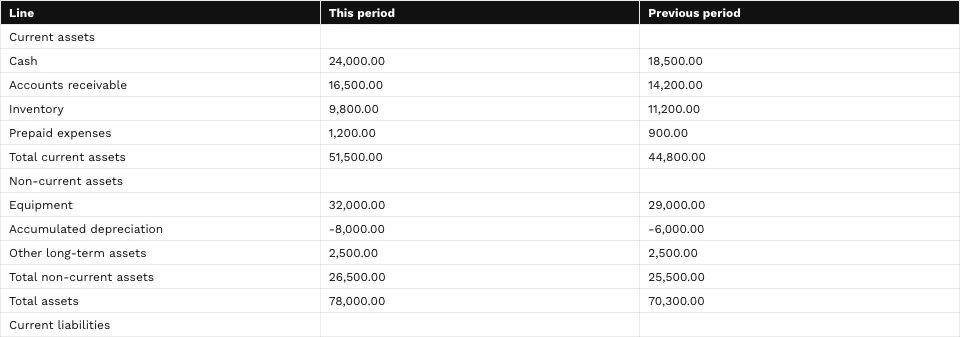
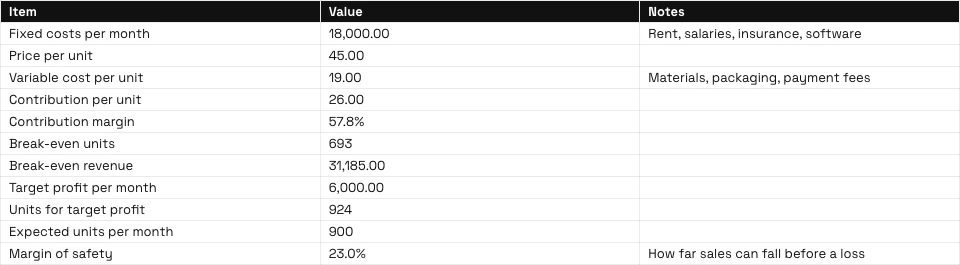
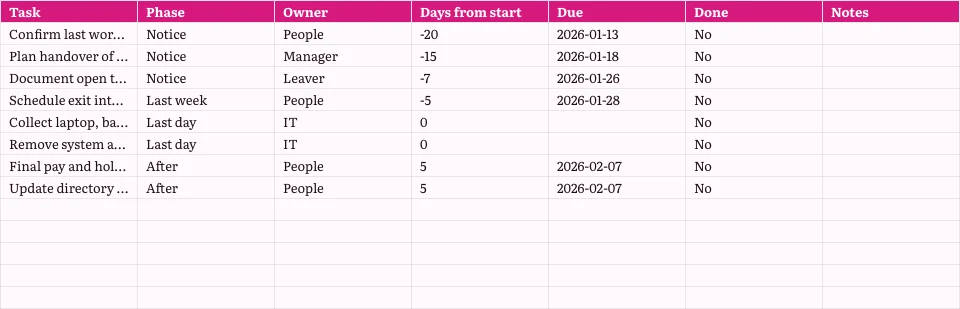
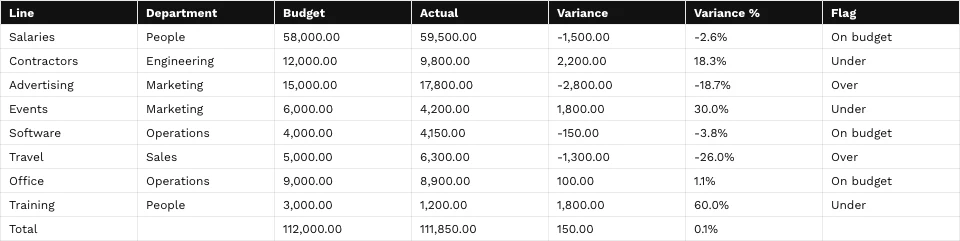
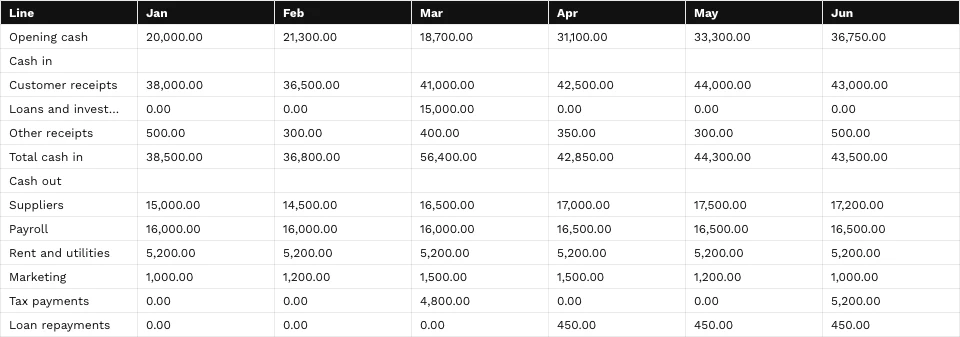
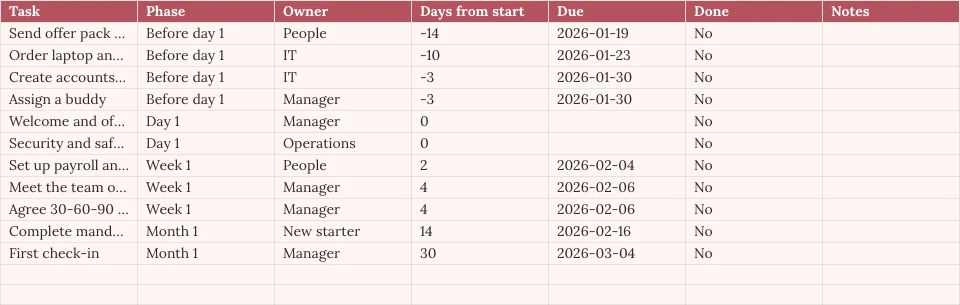
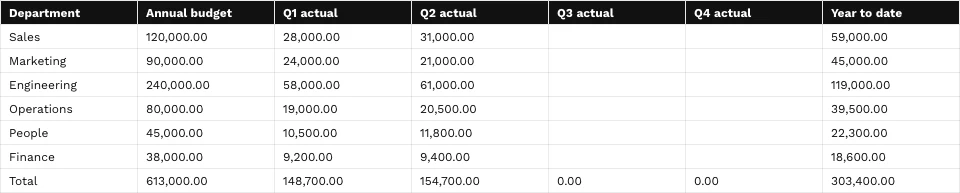
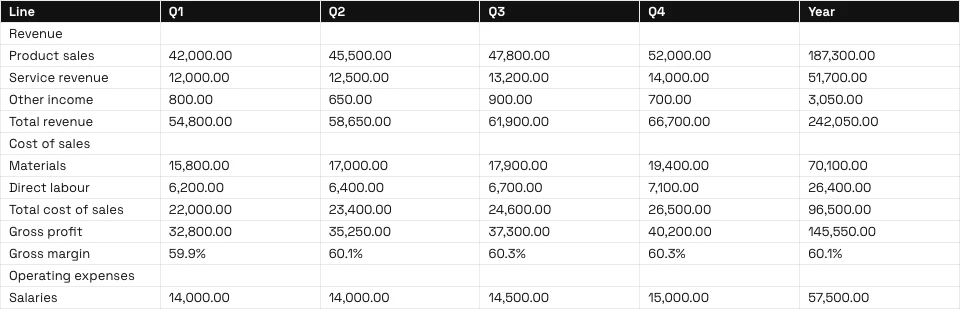
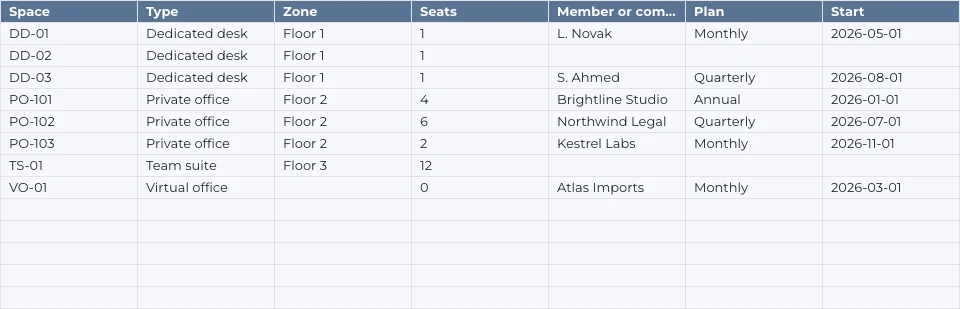
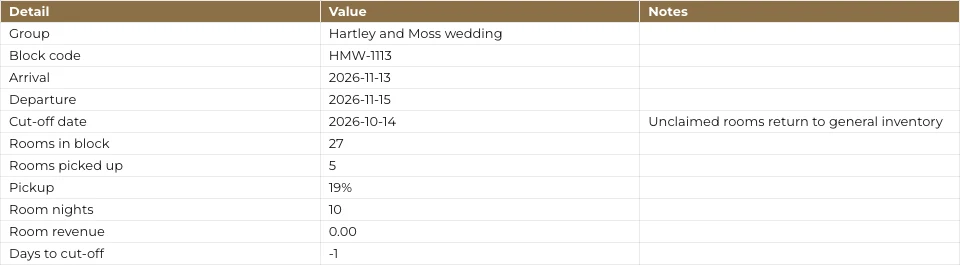
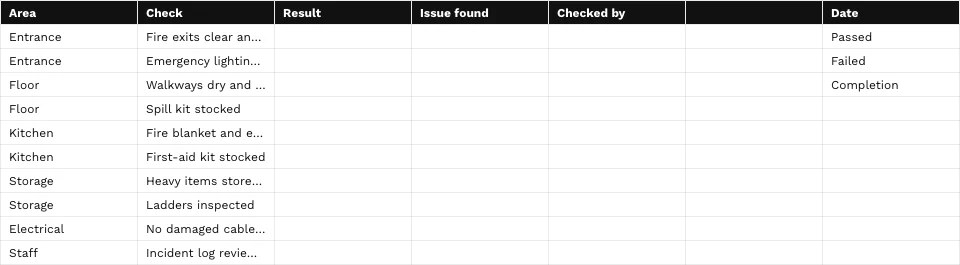
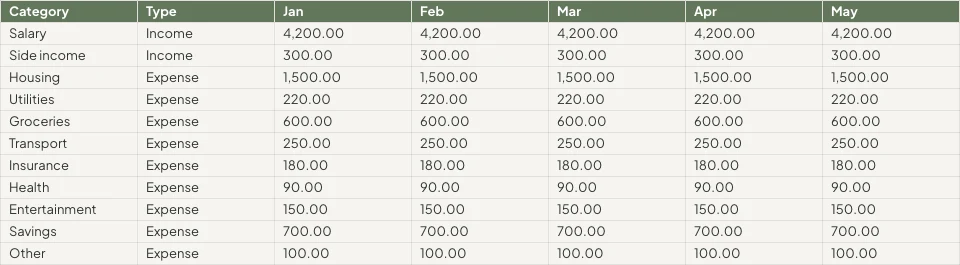




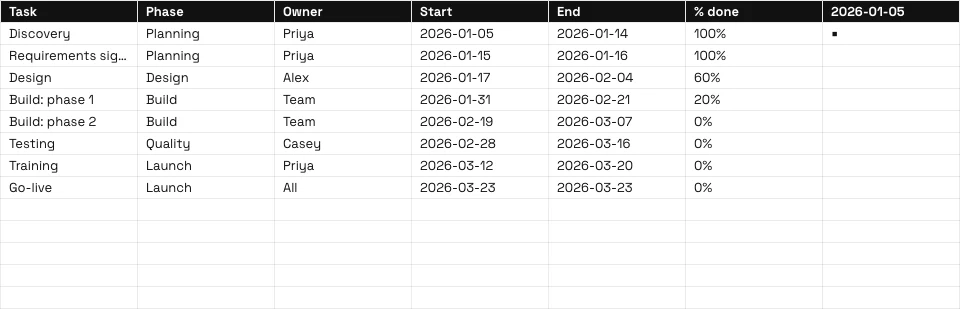
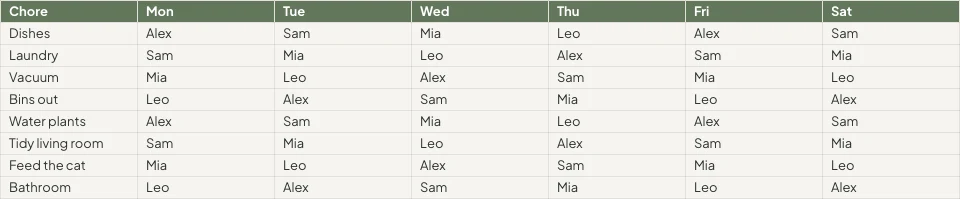

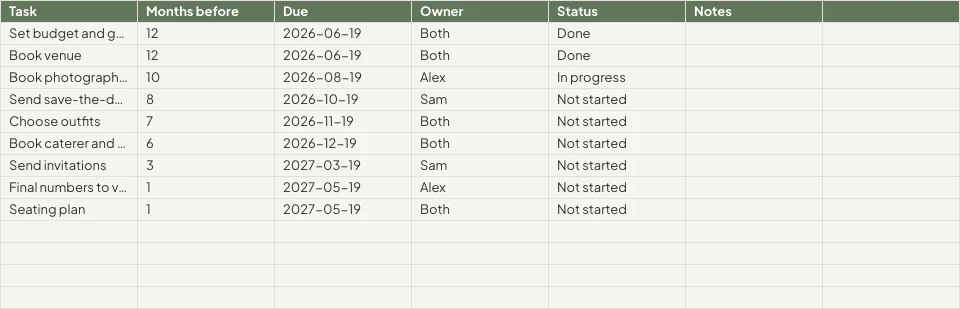
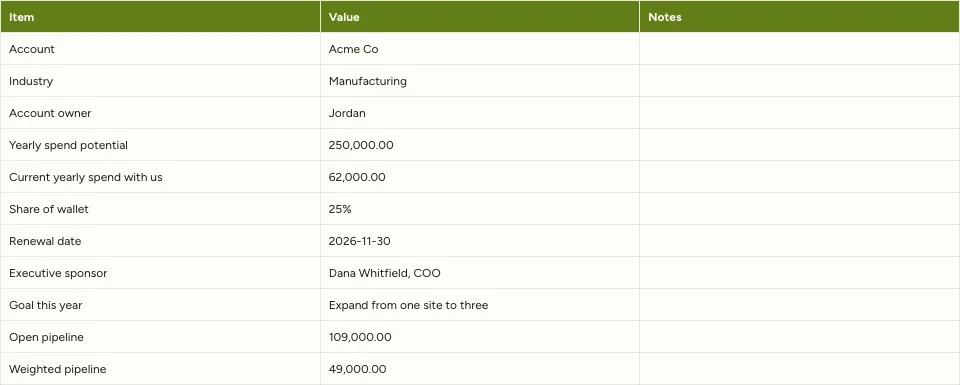

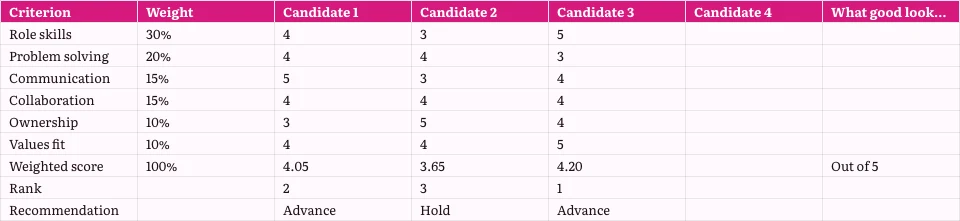
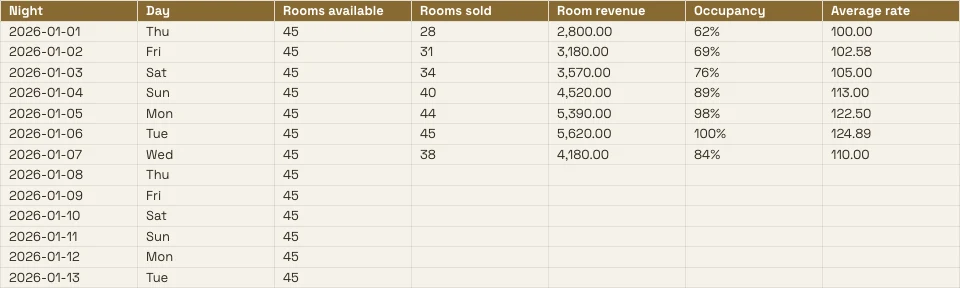
Bawat spreadsheet na pinapanatili ng negosyo, at ang mga rekords sa likod nito
Isang budget, isang price list o isang rota ay isang spreadsheet dito, at maaaring basahin ang anumang tab sa mga app na naglalagay ng mga rekords.
Ang Grid
Mga formula, format at rules.
Simulan
Blanko, isang template o isang file.
Mga Datos mula sa Calisto
Isang tab na binasa mula sa iyong rekords.
Pangangailangan
Mga Grapiko, pivots at mga tanong.
Kasama-sama
Cell by cell, kasama ang mga komento.
Ibahagi
Mga tao, isang link, isang TV, isang file.
Aktibo
Mga linya na naging trabaho.
Sa isang Telepono
Basahin, i-edit, at mag-comment.
I-Write ang Formulas, I-Format ang mga Selula at I-set ang mga Rules
I-type ang isang formula mula sa 245 functions, o ilarawan kung ano ang kailangan mo sa tabi ng formula at kumuha ng isa. I-format mula sa chip sa napiling cells o sa Format panel. Ang menu ng bawat column at row ay nag-sort, nag-filter, nag-freeze, nag-group at nag-linis.
Descrbe ang Formula
Sabihin kung ano ang kailangan mo, tulad ng average ng column D kung ang status ay Active, at ang formula ay isinusulat para sa iyo.
Rules on Cells
Kondisyonal na pag-format, pagbabago ng kulay, at pagtatala gamit ang mga chips at tick boxes.
Mga Nangalan na Ranggo at Filter Views
Magbigay ng pangalan sa isang serye; i-save ang nakasara na tanawin nang hindi nagbabago sa ibang tao.
- Fees'Projects'!E2:E14I-edit
- Hours'Projects'!D2:D14I-edit
- OpenProjects'Projects'!A2:F9I-edit
- TaxRate'Settings'!B2I-edit
- Retainers'Retainers'!A2:D8I-edit
- Walang (Ang Sariling Filter ng Sheet)
- Open, by client2
- Over 100 hours
- Owen’s projects
- Invoiced this quarter
Bawat Command ayon sa Pangalan
Ang ⌘K ay nakakahanap ng anumang command at anumang function, gamit ang pangalan nito o ang pamilya nito.
Hanapin at Palitan
Sa bawat tab, buong cell, kaso, o pattern, at sa loob ng formulas.
Chips para sa Dates, People at Files
Isang petsa, isang kontak, o isang file mula sa Depot bilang isang chip sa loob ng isang selula.
Linisin
Alisin ang duplicates, i-trim ang mga puwang, i-split ang teksto sa mga kolum.
Simulan ang Blank, mula sa Template o mula sa File
Descrabe ang spreadsheet sa Home at ang pinakamalapit na template ay bukas, o pumili ng template ayon sa type at industry, o simulan nang blanko. Walang ginagawa hanggang sa i-save mo. Buksan ang XLSX, ODS, CSV o TSV file, mula sa device o mula sa Depot, at ang formulas nito ay recalculated.
Gumawa ng Bagong Spreadsheet
Paano mo gusto itong simulan?
O buksan ang file na iyong mayroon na: XLSX, ODS, CSV o TSV. Na-detekta at na-format ang mga uri ng kolum nang awtomatikong.
Piliin ang FileDescrbahan ito sa Home
Sabihin kung para saan ang spreadsheet, at buksan ang pinakamalapit na template sa iyong tema.
Magandang umaga, Chloe.
Fill a Tab From the Records Your Apps Keep
Pumili ng bookings, deals, payments, stock, members, ticket holders, o roster, at puno ang tab mula sa mga record mismo, walang export. Piliin ang Live upang mabasa ulit sa bawat bukas, Manual para sa Refresh button, o Snapshot.
Chart It, Pivot It at Ask It Mga Tanong
Ang mga graph ay kinakatawan ng workbook: pito ang uri, nakalagay sa mga selula, inihahatid mula sa mga selula tulad ng kasalukuyan, at ipinapakita sa isang telepono at sa inilabas na link. Ang pivot table ay nagbubuo ng isang tab sa sariling tab.
Charts
Kolona, bar, linya, area, scatter, pie at donut, na nakalagay sa mga selula.
Pivot Tables
Ang mga hilera, kolum at halaga ay inihahambing sa sariling tab.
Tanungin tungkol sa Data na ito
Isang tanong sa simpleng salita, nasagot mula sa tab.
Unlimited members paid $18,960, PT Bundle $11,880 and 10-Pack $6,420.
Each Unlimited member paid $1,264 on average, across 15 members.
=AVERAGEIF(B2:B41,"Unlimited",E2:E41)Ilagay sa Piniling CellCopy FormulaSmart Fill at Auto-Classify Columns
Isang kolum na tapos na ayon sa kanyang pattern; ang bawat kolum ay binigyan ng kanyang uri at format ng numero.
Improve, Summarize o Translate
Ang napiling selang ito ay napabuti, maikli, ginawang may boses ng iyong brand, binuo o binigyang-diin.
Pastel de nata, saído do forno de hora a hora.Tosta mista no pão da Gleba, com queijo da Ilha.Galão cremoso, em copo alto, com leite dos Açores.Bolo de laranja da avó Lurdes, com calda a escorrer.
PalitanSubukan MuliColumn Stats
Count, sum, average, lowest, highest at median ng anumang column.
- Punong-puno
- 18
- Walang laman
- 2
- Distinct
- 11
- Maling Gamit
- 1
- Kabuuang halaga
- 14,20,000
- Average
- 83,529.41
- Median
- 75,000
- Min
- 25,000
- Pinakamataas
- 2,50,000
I-edit nang Kasama, at Magdesisino Kung Sino ang Makikita sa Bawat Cell
Maraming tao ang nag-eedit ng isang spreadsheet nang sabay-sabay, cell by cell na pinagsama. I-pin ang isang komento sa isang cell, banggitin ang isang tao o ibigay sa kanila ang thread, at hanapin ang ano ang iyong dapat sagutin sa Home. Bawat save ay isang bersyon na maaari mong i-compare at i-restore.
Mga komento sa mga Sel
Pinag-attach sa isang cell, kasama ang mga sagot at mentions, at ibinibigay sa isang tao na sagutin.
Kasaysayan ng Bersyon
Benta!B2binagoBenta!B4binagoBenta!D6binagoBenta!A9addedGraphic novel workshopBenta!B9added24Benta!A10removedBenta!C8binagoI-compare ang dalawang bersyon cell by cell at ayawin ang isa o ang isa.
Protektadong Mga Range at Tabs
Isang tab o range lamang na i-edit ang sarili nitong may-ari, o isang range na magbabantay bago magbago.
Mga Cell na Tinatago ng Iyong Data Rules
Ang Data Rules ng Purview ay nag-iingat na hindi makarating ang isang cell sa screen ng isang tao, at pinapanatili ang integridade nito kapag nilagay nila ito.
Notices as Rules
Automation
Mga hakbang na nagpapatakbo sa sarili nitong nangyayari ang isang bagay sa iyong negosyo.
| Automation | Kapag | Kaya | Huling 7 araw | Huling paglalakbay | Kalagayan | |
|---|---|---|---|---|---|---|
| Tell the people on a spreadsheet about a new commentComment added | Comment added | Tell the people | 86 | 21/11/2026 11:42 | Aktibo | I-pause |
| Tell a person when they are mentioned in a commentPerson mentioned in a comment | Person mentioned in a comment | Tell the person | 41 | 21/11/2026 10:15 | Aktibo | I-pause |
| Tell a person when a comment thread is assigned to themComment thread assigned | Comment thread assigned | Tell the person | 23 | 20/11/2026 17:08 | Aktibo | I-pause |
| Tell the people in a comment thread about a replyReply in a comment thread | Reply in a comment thread | Tell the people | 52 | 21/11/2026 09:31 | Aktibo | I-pause |
| Tell people when a spreadsheet is shared with themSpreadsheet shared | Spreadsheet shared | Tell the people | 9 | 19/11/2026 14:50 | Naka-pahinga | I-Resume |
| Tell the person who pulls invoices into a sheet that some are overdueOverdue invoices pulled into a sheet | Overdue invoices pulled into a sheet | Tell the person | 3 | 17/11/2026 08:57 | Aktibo | I-pause |
Isang share, isang komento, isang sagot o isang mention ay nagpapahaba sa mga tao sa pamamagitan ng mga rule na maaari mong i-pause sa Automations.
I-turn ang mga Rows sa Invoices, Tasks, Decks at Records
Gumawa ng invoice sa Ledger mula sa mga linya ng isang tab, gumawa ng gawain sa Dispatch, o ipakita ang isang chart sa Slides, kung saan ito mananatiling nakakonekta sa spreadsheet na ito. Isang form na nakakonekta sa isang spreadsheet ay nagdadagdag ng isang hilera bawat sagot, na may bagong kolum para sa bawat bagong tanong.
Invoice sa Ledger
Maging invoice ang mga linya ng tab na ito na iyong susuriin at gagawa sa Ledger.
Billing Bahagyang Bayad
Detalye ng Invoice
| Paglalarawan | Qty | Unit Price | Kabuuan |
|---|---|---|---|
| Group stay, 6 rooms, 3 nights | 18 | R 1 650,00 | R 29 700,00 |
| Cape Malay breakfast, guests | 36 | R 145,00 | R 5 220,00 |
| Airport transfers, minibus | 2 | R 950,00 | R 1 900,00 |
| Bo-Kaap walking tour | 12 | R 280,00 | R 3 360,00 |
| Cooking class, Cape Malay | 12 | R 620,00 | R 7 440,00 |
| Late checkout, 6 rooms | 6 | R 250,00 | R 1 500,00 |
Gawa sa Dispatch
Isang gawain na may tagapagpatupad, petsa ng pagtatapos at prioridad, na nakakonekta sa spreadsheet.
Chart sa Slides
Isang deck na ang chart nito ay nananatiling nakakonekta sa spreadsheet na ito.
Mga linya mula sa isang Form
Isang nakakabit na form ay nagdadagdag ng isang hilera bawat sagot.
Mga row sa Automations
Isang bagong hilera ay nagsisimula sa isang rule, at ang isang rule ay nagdadagdag ng hilera, isang beses lamang kung ano ang mga retries.
Natagpuan ang mga nakaligtas na Invoice
Ang pagkuha ng Ledger na nakakahanap ng mga nakalagpas na bilyo ay nagbibigay alam sa taong nagkuha nito; bilang isang alituntunin, maaari kang huminto.
Billing Bahagyang Bayad
Detalye ng Invoice
| Paglalarawan | Qty | Unit Price | Kabuuan |
|---|---|---|---|
| Group stay, 6 rooms, 3 nights | 18 | R 1 650,00 | R 29 700,00 |
| Cape Malay breakfast, guests | 36 | R 145,00 | R 5 220,00 |
| Airport transfers, minibus | 2 | R 950,00 | R 1 900,00 |
| Bo-Kaap walking tour | 12 | R 280,00 | R 3 360,00 |
| Cooking class, Cape Malay | 12 | R 620,00 | R 7 440,00 |
| Late checkout, 6 rooms | 6 | R 250,00 | R 1 500,00 |
Basahin, I-edit at Kumomento mula sa Phone
Ang parehong spreadsheet sa anyo ng isang phone: i-edit ang isang cell, i-filter ang isang column, punan ang tab mula sa iyong mga rekords, sagutin ang mga komento at ipakita ang isang chart. Ang isang spreadsheet na binahagi mula sa ibang app ay bukas sa Sheets.
Saan Lumalabas ang Lahat ng Sheets Else
3 of these 8 connections are in your plan today; the others are their own apps.
Forms
A linked form adds one row per response, with a new column for each new question.
Depot
Every spreadsheet is in Depot and its Hubs, and a spreadsheet file in Depot opens in Sheets.
Slides
Present in Slides makes a deck whose chart stays linked to the spreadsheet.
Ledger
Ledger’s statements, invoices and transactions fill a tab, and Generate Invoice makes the invoice in Ledger.
Workforce
The team and the schedule fill a tab, read again whenever it is opened.
Dispatch
Create Task makes a task in Dispatch from the spreadsheet.
Deals
Deals’ pipeline fills a tab, and Attach to Deal files the spreadsheet on a deal as a PDF.
Display
A published spreadsheet is shown on a TV as a data table.
Walang gastusin sa pag-setup. Bayaran kapag nagsimula nang gamitin.
Spreadsheets your team works in together.
Calisto Work is one subscription per person for Docs, Sheets, Slides, Forms, Agenda, Equipo, and Depot, with a branded mailbox for each person.
Inirerekomenda para sa iyo
Magaganda ang pagkakasama-sama.
Calisto Forms
Calisto Depot
Calisto Slides
Calisto Ledger
Calisto Workforce
Calisto Dispatch
Calisto Deals
Calisto Commerce
The CRM: leads routed and claimed, a pipeline on your own stages, quotes as versions and the contracts they become, people and companies, the day’s follow-ups, the handoff after the sale, commissions and the forecast.
Learn more →Calisto Display
Calisto Display
Runs the TVs in a business: kitchen displays, pickup and now-serving boards, guest TVs, menu boards, signage and designed screens, with schedules, alerts and performance.
Learn more →Calisto Automations
Inirerekomenda para sa
Ang mga industriya na nagpapatakbo ng Sheets, at ano ang ginagawa ng bawat isa.
Real Estate BrokersPaglalathala
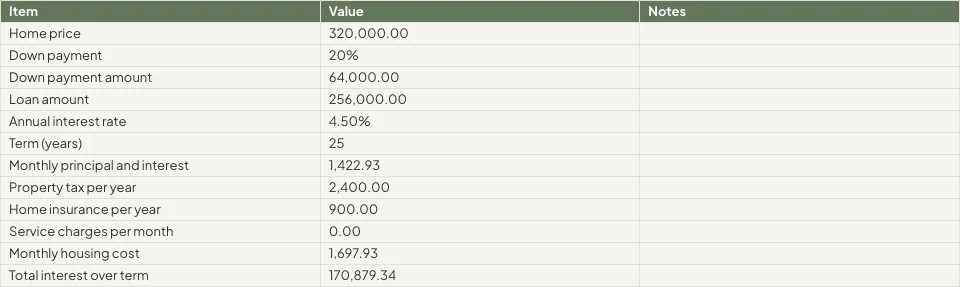
Commission splits and pipeline reporting.
Real Estate Brokers sa Calisto →Pag-unlad ng PropyetaPaglalathala
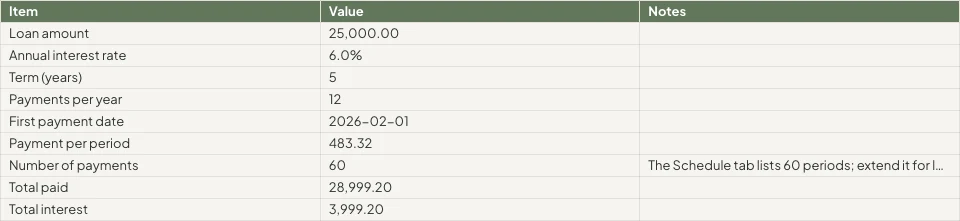
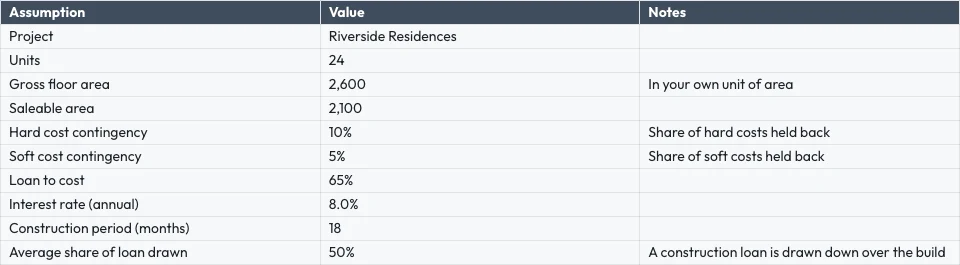
Payment plans, cost tracking, unit reporting.
Pag-unlad ng Propyeta sa Calisto →mga Graphic Designer at ArtistJob costing sheets
Job costing and retainer tracking.
mga Graphic Designer at Artist sa Calisto →Mga Online RetailersPaglalathala
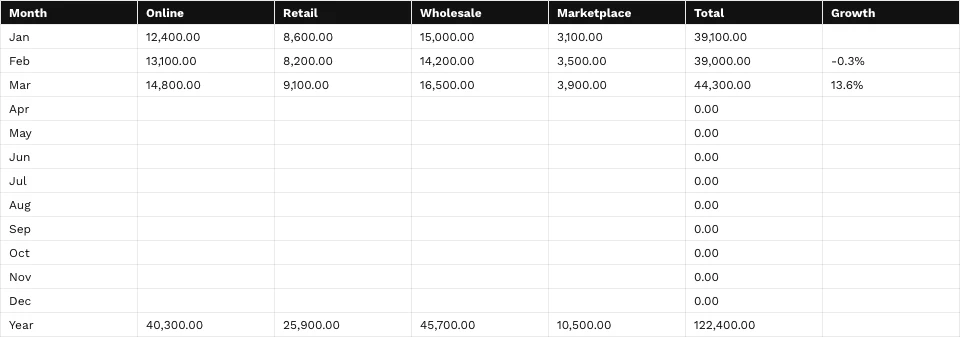
Margin, cost and channel reporting.
Mga Online Retailers sa Calisto →Lahat ng kasama sa Calisto Sheets.
- Calisto’s own spreadsheet engine, with as many tabs as the work needs
- 245 functions by family, found by name in ⌘K
- Describe what you need beside the formula, and get the formula back
- Iterative calculation, set per spreadsheet, so every reader gets the same answers
- Show Formulas, gridlines, Add 1000 Rows, keyboard shortcuts
- Find, and Find and Replace
- The format chip on the selected cells, and one Format panel for everything else
- Number formats in the business’s own currency, percentages, dates and plain numbers; never a currency nobody recorded
- Conditional formatting, alternating colors and color scales
- Data validation: lists shown as chips, tick boxes, numbers, dates, text and custom rules
- Merge, wrap, borders, freeze, hide and group rows and columns
- Each column’s and row’s menu: insert, delete, size, sort, filter, group, stats and clean-up
- Date chips and contact chips that name a customer from your contacts
- Describe it on Home and the closest template opens; or start blank, in a theme, or from a template by type, industry, style and color
- A template is a design worn in a theme; its blanks are asked for before it opens
- Nothing is saved until you save it; leaving with changes asks first
- Open XLSX, ODS, CSV and TSV files, and shared text arrives as a grid
- Open a spreadsheet file from Depot in Sheets
- Make a Copy, Save as Template, Edit Template
- Bookings: every booking, and revenue by channel per currency
- Deals: the open pipeline and what was won
- Payments: transactions
- Inventory: stock on hand, and what is below its reorder point
- Registry: members; Tickets: attendees; Workforce: the team and the schedule
- Ledger Data: the balance sheet, profit and loss, the invoices register and the transaction register
- Catalog Data, and Subscription Metrics (what the business pays Calisto)
- A web address: a public CSV or JSON file
- Live, Manual or Snapshot for each tab, with when it was read
- Money only for people the owner’s settings allow; anyone else reads “Not shared with you”
- Charts kept in the spreadsheet: column, bar, line, area, scatter, pie and donut
- A chart placed over the cells, drawn from the cells as they are now, on every device and the published link
- Pivot tables onto a tab of their own
- Column stats: count, sum, average, lowest, highest and median
- Smart Fill, Auto-Classify Columns and Ask About This Data
- Improve, shorten, summarize or translate the selected cells, or change their tone to your brand’s voice
- Named ranges and filter views
- Editing together, merged cell by cell; everyone in the spreadsheet shown in Share
- Comments pinned to a cell, with replies, mentions and threads handed to someone
- Comments for You on Home: the threads that are yours to answer
- Version history: compare two versions cell by cell, restore, and name a version
- Notices for a share, a comment, a reply, a mention and a handed thread, each a rule you can pause in Automations
- Share with people to view, comment or edit, and change or remove access in place
- Protected tabs and ranges: owner only, or for a range a warning before a change
- Purview’s Data Rules keep a cell from reaching a person’s screen, and keep it intact when they save
- Collections and locks set in Purview apply here too
- Publish a link anyone can open, and take it back
- A published spreadsheet shown on a TV, with Display
- Export XLSX, ODS, CSV, TSV, HTML and PDF, with the page setup, and print
- Send: Email, an Inbox message, Live, a Connect channel, or Attach to Deal (a PDF on the deal)
- Save to a Hub and Folder; every spreadsheet is in Depot
- Copy Link, Star, Details with a description, Trash with 30 days to restore
- Generate Invoice in Ledger from a tab’s lines
- Create Task in Dispatch
- Present in Slides: a deck whose chart stays linked to the spreadsheet
- A linked form adds one row per response, with a new column for each new question
- Automations: a new spreadsheet, a new row, a share and a pulled overdue invoice start rules; a rule adds a row or makes a spreadsheet, each row once whatever the retries
- Refine Design: the theme of a spreadsheet (its colors, the header band, type and row height)
- Brand Check: the words read against your brand guidelines
- The same look on the desk, the phone, the published link, the charts, XLSX and PDF
- The number format new spreadsheets start with, for the business
- Your own preferences, the same in every business: recalculate as you type or on F9, and where Share starts
- Each person chooses which comment notices reach them
- Home, Spreadsheets, Templates and Library in the tab bar; an open spreadsheet fills the screen
- Undo and Redo, Find, the cell’s sheet with its format and filter, Data, Comments and the tabs
- Spreadsheets kept on the device open read-only with no signal; a comment written then is sent later
- Spreadsheets shared from another app open in Sheets
- Notifications that open the comment, with Reply and Mark as Done
- Shortcuts: New Spreadsheet, Recent, Shared with Me and Templates
Questions about Calisto Sheets
XLSX, ODS, CSV at TSV, mula sa device, mula sa Depot o ibahagi mula sa ibang app sa phone. Binubuksan ng sariling engine ng Calisto ang mga formulas. Hindi bukas ang mga legacy XLS files.
Mula sa mga rekords na pinapanatili ng mga apps: bookings, deals, payments, stock, members, ticket holders, ang roster at ang statements at registers ng Ledger. Binabasa ulit ng Live ang mga ito bawat pagbukas ng spreadsheet, Manual ay naghihintay ng Refresh, Snapshot naman ay hindi nagbabago. Ang mga numero na hindi makita ng isang tao ay nagbabasa ng "Not shared with you".
Oo. Ang mga edit ay nag-uugnay cell by cell, ipinapakita sa lahat sa spreadsheet sa Share, at maaaring i-pin ang comment sa isang cell, banggitin ang isang tao, o ibigay sa kanila.
Ang mga spreadsheets na nakatago sa device ay bukas lang sa read-only, kaya hindi na masasave ang lumang kopya sa bagong trabaho. Ang komento na nakasulat nang walang signal ay ipapadala kapag bumalik ang koneksyon. Ang pag-edit ay nangangailangan ng koneksyon.
Ang XLSX, ODS, CSV, TSV, HTML, at PDF ang nagdadala ng grid. Ang XLSX, PDF, at HTML ay nagdadala rin ng anyo nito. Ang mga graph at larawan ay nananatili sa Calisto, sa bawat device, at sa inilabas na link.
Ang Sheets ay bahagi ng Calisto Work, isang subscription bawat tao. Ang seksyon ng presyo sa pahinang ito ay binabasa ang buhay na katalog. Ang mga app na nagbubukas ng spreadsheet, tulad ng Ledger o Dispatch, ay binabayaran sa kanilang sariling apps.
@Lucía Hernández Molinos raised the 25 kg sack again. Do we keep 18 or drop to 15 for the week?
Keep 18. Día de Muertos orders start on Thursday.
Masa madre is back in stock at Granos Ruiz. Two packs should cover the sourdough this week.
SagutinResolusyonMantequilla price confirmed with San Ángel for November.
Na-marka bilang taposSagutinBuksan ulit