การประชุมวิดีโอที่ทุกคนเข้าร่วมผ่านลิงก์ และสรุปเมื่อการประชุม สิ้นสุดลง
พบปะทีมและลูกค้าของคุณแบบตัวต่อตัว นำเสนอผลงานของคุณ หรือจัดสัมมนาออนไลน์สำหรับกลุ่มผู้ชม ผู้เข้าร่วมสามารถเข้าใช้งานผ่านเบราว์เซอร์โดยไม่ต้องติดตั้งอะไร เมื่อเสร็จสิ้นคุณจะมีสรุปผล การตัดสินใจ รายการงานที่ต้องทำ และการบันทึกวิดีโอ



 แบบสด38Gastown Loft, 2 Bed318 Water St, Vancouver$1,149,000Condoความเป็นไปได้ 9
 Luca BianchiERElena RicciGRGiulia RomanoCFChiara Ferrari
 ถ่ายรูปAnna Kowalczykการตรวจสอบด้วยวิดีโอFilter conditionCoil and finsDrain lineRefrigerant pressure
 แบบสด38Gastown Loft, 2 Bed318 Water St, Vancouver$1,149,000Condoความเป็นไปได้ 9Luca BianchiERElena RicciGRGiulia RomanoCFChiara Ferrariถ่ายรูปAnna Kowalczykการตรวจสอบด้วยวิดีโอFilter conditionCoil and finsDrain lineRefrigerant pressureแบบสด38Gastown Loft, 2 Bed318 Water St, Vancouver$1,149,000Condoความเป็นไปได้ 9Luca BianchiERElena RicciGRGiulia RomanoCFChiara Ferrariถ่ายรูปAnna Kowalczykการตรวจสอบด้วยวิดีโอFilter conditionCoil and finsDrain lineRefrigerant pressureแบบสด38Gastown Loft, 2 Bed318 Water St, Vancouver$1,149,000Condoความเป็นไปได้ 9Luca BianchiERElena RicciGRGiulia RomanoCFChiara Ferrariถ่ายรูปAnna Kowalczykการตรวจสอบด้วยวิดีโอFilter conditionCoil and finsDrain lineRefrigerant pressure
 47:0500:00Why Karaköy09:42Fit-out and timing21:15Menu for the second site33:50Hiring the opening team
 36:20ลิงก์ถูกคัดลอกแล้ว ใครก็ตามที่มีลิงก์นี้สามารถดูการบันทึกได้47:0500:00Why Karaköy09:42Fit-out and timing21:15Menu for the second site33:50Hiring the opening team36:20ลิงก์ถูกคัดลอกแล้ว ใครก็ตามที่มีลิงก์นี้สามารถดูการบันทึกได้47:0500:00Why Karaköy09:42Fit-out and timing21:15Menu for the second site33:50Hiring the opening team36:20ลิงก์ถูกคัดลอกแล้ว ใครก็ตามที่มีลิงก์นี้สามารถดูการบันทึกได้47:0500:00Why Karaköy09:42Fit-out and timing21:15Menu for the second site33:50Hiring the opening team36:20ลิงก์ถูกคัดลอกแล้ว ใครก็ตามที่มีลิงก์นี้สามารถดูการบันทึกได้แบบสด38Gastown Loft, 2 Bed318 Water St, Vancouver$1,149,000Condoความเป็นไปได้ 9Luca BianchiERElena RicciGRGiulia RomanoCFChiara Ferrariถ่ายรูปAnna Kowalczykการตรวจสอบด้วยวิดีโอFilter conditionCoil and finsDrain lineRefrigerant pressure47:0500:00Why Karaköy09:42Fit-out and timing21:15Menu for the second site33:50Hiring the opening team36:20ลิงก์ถูกคัดลอกแล้ว ใครก็ตามที่มีลิงก์นี้สามารถดูการบันทึกได้
ทุกประเภทของเซสชัน และสรุปผล หลังจาก
การประชุม การโทร เว็บเซมินาร์ การกระจายสัญญาณ และการส่งข้อความวิดีโอ ใช้รายการเดียวกัน ห้องเดียวกัน และสรุปเดียวกัน
การประชุมและการโทร
ตอนนี้ วางแผนไว้แล้ว หรือทีมงานโทรมา
ห้อง
การควบคุมโฮสต์ การนำเสนอ และคำบรรยาย
เว็บินาร์
การลงทะเบียน หลังเวที และการถามตอบ
การแพร่กระจายและการจัดแสดง
จากหนึ่งไปยังหลาย และถูกถ่ายทอดออก
สรุป
สรุปงาน และบันทึก
ข้อความวิดีโอ
บันทึกไว้แล้ว ดูทีหลัง
การตรวจสอบด้วยวิดีโอ
งานที่ตรวจสอบในการโทร
บนโทรศัพท์
สессันเดียวกันในกระเป๋าของคุณ
เริ่มการประชุมตอนนี้ วางตารางการประชุม หรือโทรหา เพื่อนร่วมทีม
Meet Now เปิดห้องและส่งลิงก์ให้คุณ การประชุมที่กำหนดเวลาหรือซีรีส์รายสัปดาห์จะส่งคำเชิญปฏิทินไปยังผู้เชิญแต่ละคนพร้อมลิงก์และรหัสผ่านผู้มาเยือนเฉพาะของพวกเขา และการแก้ไขหรือการยกเลิกจะส่งไปยังปฏิทินของพวกเขาเช่นกัน My Room คือลิงก์ถาวรของคุณ
โทรหาจากบทสนทนา พร้อม Equipo
การโทรหรือวิดีโอคอลในบทสนทนา Equipo จะเรียกผู้คนและเปิดการโทรทันที โดยเคารพโหมดห้ามรบกวน และแจ้งการโทรที่พลาดเพียงครั้งเดียว
ซีรีส์หนึ่ง แต่ละซีรีส์อยู่ในห้องของตัวเอง
รายวัน รายสัปดาห์ ทุกสองสัปดาห์ หรือรายเดือน แก้ไขหรือยกเลิกอันนี้ อันนี้และอันถัดไป หรือทั้งชุด
ห้องของฉัน
ลิงก์ถาวรและ PIN ของคุณเอง ทุกครั้งที่เปิดจะเป็นเซสชันใหม่ และการเคาะจะแจ้งว่ามีการรออยู่
Luca Bianchiห้องประชุมของฉันลิงก์live.calistoco.com/live/r/luca-bianchiรหัสผ่านของแขก305 771คัดลอกลิงก์คัดลอกคำเชิญแชร์แขกเข้าร่วมฟรี
ผู้คนนอกธุรกิจของคุณเข้าร่วมผ่านลิงก์และ PIN ในเบราว์เซอร์ ผู้คนในธุรกิจของคุณที่เป็นเจ้าภาพหรือเข้าร่วมจะใช้ที่นั่ง Live ของพวกเขา
แชทของการประชุม, ก่อนและหลัง
หน้าการประชุมมีแชทติดมาด้วย เปิดใช้งานก่อนเริ่มและหลังจบการประชุม สำหรับผู้เข้าร่วม
จองโดยลูกค้าของคุณ
หน้าการจองของเครื่องจักรตารางเวลาช่วยให้ลูกค้าเลือกเวลาที่จะพบคุณได้ และการจองเสมือนจะเปิดห้องของตัวเอง
จาก Deals และ Connect
รายการเซสชันเดียวกันจะเปิดขึ้นภายในส่วน Deals และนัดหมายของลูกค้าจะแสดงในหัวข้อสนทนาของพวกเขาใน Connect
จัดการห้อง นำเสนอ และทำให้ทุกคน มีส่วนร่วม
แต่ละคนตรวจสอบกล้องและไมโครโฟนในโถงต้อนรับ จากนั้นเจ้าภาพจะรับพวกเขาจากห้องรอ ปิดเสียงคนใดคนหนึ่งหรือทุกคน ลบใครบางคน ล็อกห้อง โฟกัสที่ผู้พูด สร้างเจ้าภาพร่วม หรือส่งมอบบทบาทเจ้าภาพ
Luca BianchiGRGiulia RomanoERElena RicciFMFederico MorettiCFChiara FerrariMCMarco Contiนำเสนอ Deck, Doc หรือ Sheet
นำ Calisto deck เอกสาร ตาราง หรือกระดานไวท์บอร์ดว่างขึ้นบนเวที ทุกคนจะติดตามสไลด์ของคุณ แม้ผู้เข้าร่วมสายก็เช่นกัน คุณยังคงบันทึกคำพูดของนักพูดและสไลด์ถัดไป
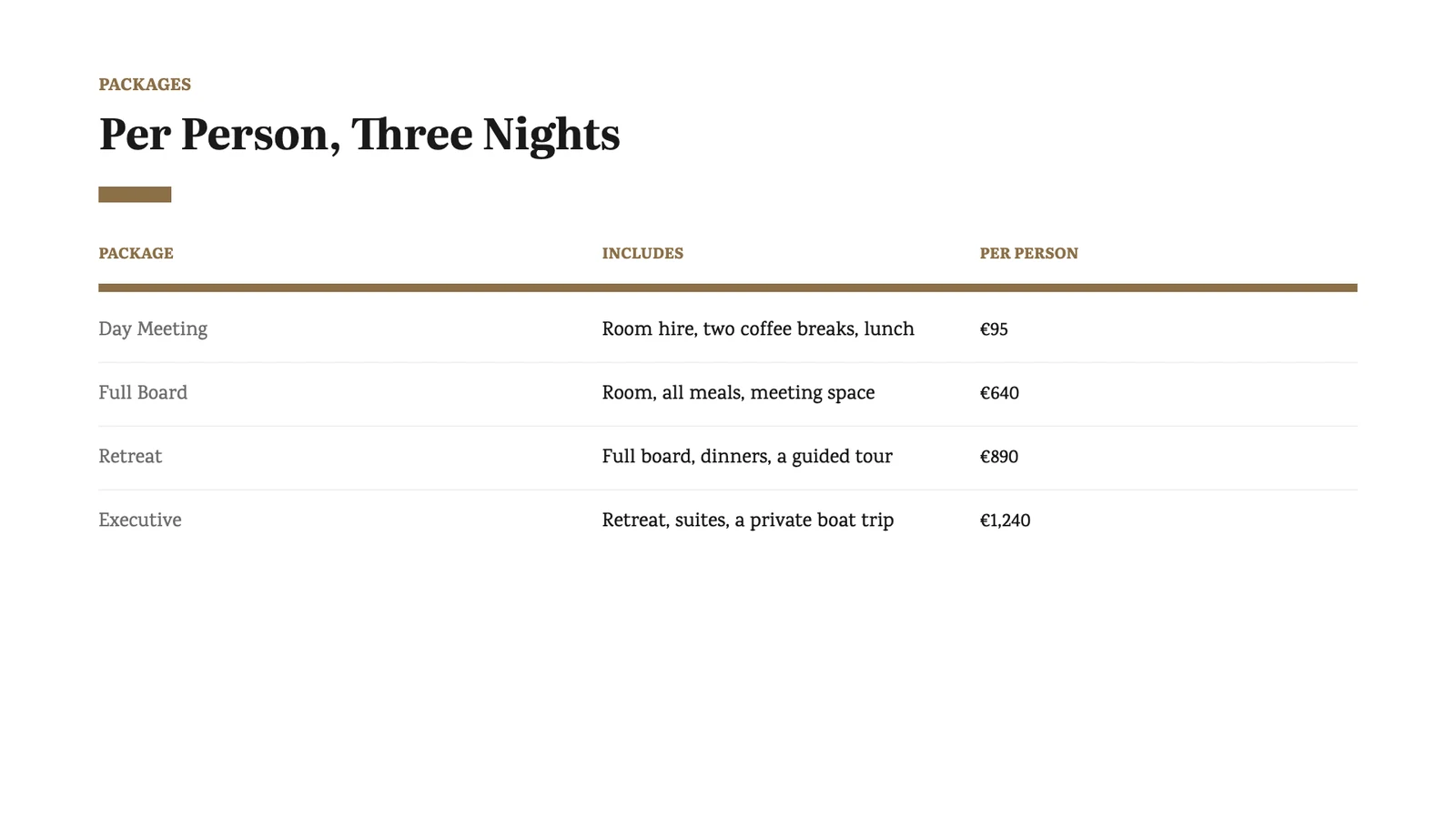 สไลด์ถัดไป
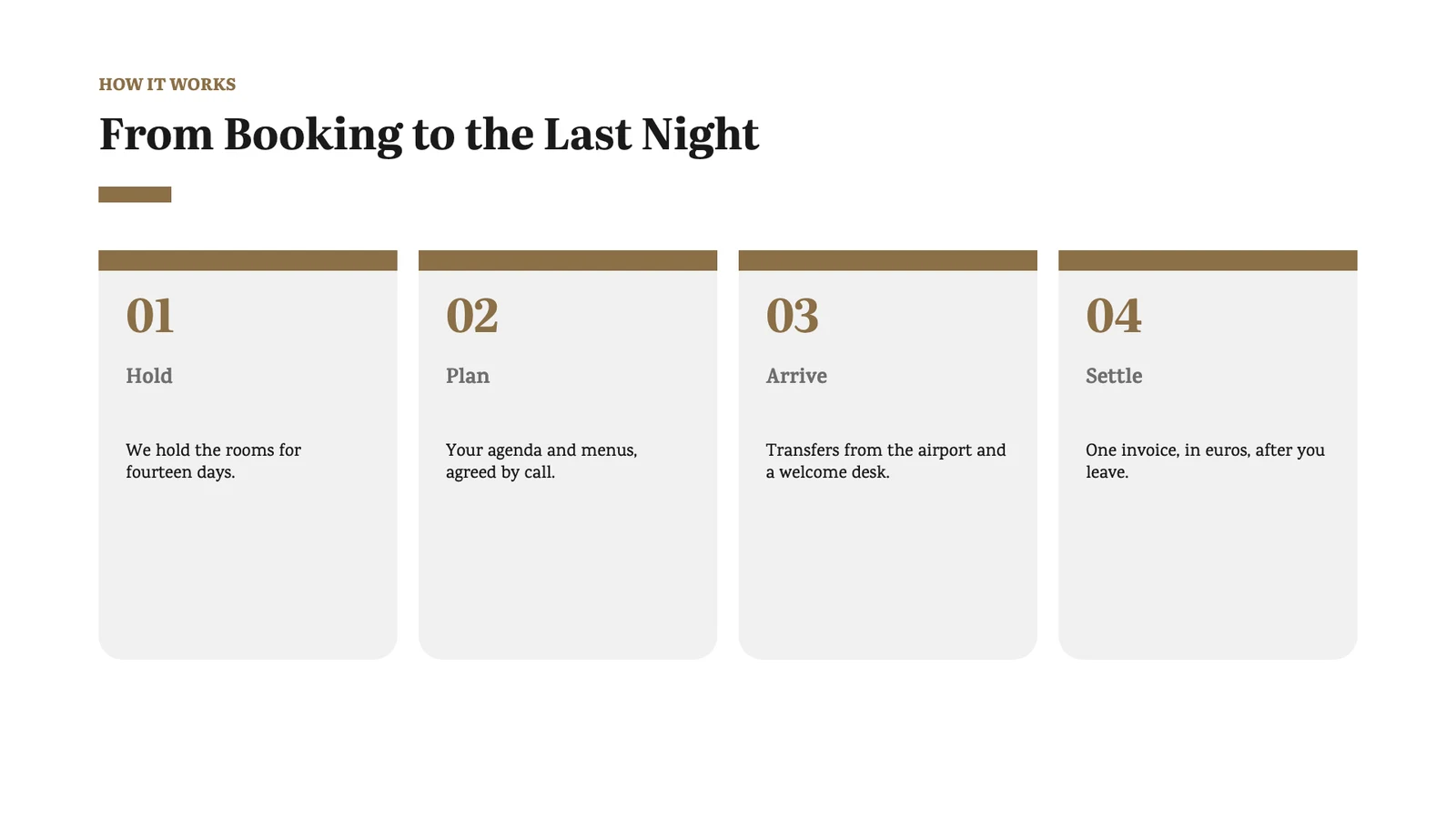 Speaker NotesWalk them through the three packages. Annika asked about the garden dinner on the first call, so start with Two Nights and point out it is included. Mention the April dates are still open.
ลงทะเบียนผู้ชมและจัดการเว็บเซมินาร์จาก หลังเวที
แต่ละคนจะลงทะเบียนบนหน้าเว็บสัมมนาและได้รับลิงก์เฉพาะของตนเพื่อเข้าร่วม เมื่อถึงขีดจำกัดจะเปิดรายชื่อรอคิวที่เรียงลำดับตามเวลา ผู้ลงทะเบียนแต่ละคนจะถูกบันทึกเป็นลูกค้าของคุณ และการยืนยันและการแจ้งเตือนจะถูกกำหนดโดยกฎที่คุณแก้ไขใน Automations

หลังเวที
ผู้ดำเนินรายการและผู้ร่วมรายการพบกันในห้องส่วนตัวข้างเวที ซึ่งผู้ชมไม่สามารถมองเห็นหรือได้ยิน
ถามและตอบแบบมีการควบคุม
คำถามถึงผู้ดูแลและผู้ถาม ให้อนุมัติ ตอบ หรือปิดคำถาม; การยกมือจะส่งไปยังผู้จัด
การลงทะเบียนและรายชื่อรอคิว
- YJYoon Ji-hojiho.yoon@naver.comลงทะเบียนแล้วOpen House: Business Korean2026. 11. 14.
- HSHan So-yeonsoyeon.han@gmail.comลงทะเบียนแล้วOpen House: Business Korean2026. 11. 15.
- LNLim Na-raenarae.lim@daum.netลงทะเบียนแล้วOpen House: Business Korean2026. 11. 15.
- DFDaniel Fischerd.fischer@posteo.deรอรายชื่อ · #1Open House: Business Korean2026. 11. 18.
- MCMariana Costamariana.costa@gmail.comรอรายชื่อ · #2Open House: Business Korean2026. 11. 19.
- TMTran Minh Anhminhanh.tran@gmail.comรอรายชื่อ · #3Open House: Business Korean2026. 11. 19.
ผู้ลงทะเบียนทุกคนในรายการเดียว ไม่ว่าจะถูกลงทะเบียนหรือรอคิวพร้อมตำแหน่งของตน ลบหนึ่งคน และผู้ที่รอจะได้รับตำแหน่งและได้รับการบอกกล่าว
เล่นการบันทึก
เล่นการบันทึกหนึ่งรายการลงในเซสชันราวกับเป็นสด จากนั้นหยุดและเริ่มสด
ขอคำปรึกษา
- ABAdwoa BaduLand purchase, East LegonBuying Land in Ghana: What to Check20/11/2026
- FAFiifi AmoahFamily land lease, AburiBuying Land in Ghana: What to Check20/11/2026
- KOKwesi OforiIndenture review, Temaแบบสด19/11/2026
- ASAma SarpongProbate and title, Kumasiแบบสด18/11/2026
- EQEsi QuayeLease of stool land, Cape Coastแบบสด16/11/2026
ผู้ลงทะเบียนสามารถติ๊กเลือก "ต้องการคำปรึกษา" และผู้ที่ทำเช่นนี้จะกลายเป็นโอกาสใน Deals หรือคำขอใน Legal
ข้อเสนอแนะ
ผู้เข้าร่วมให้คะแนนเซสชันเมื่อสิ้นสุด และผู้จัดอ่านคำตอบทุกข้อในการสรุป
การยินยอมเมื่อคุณขอ
ขอความยินยอมบนหน้าการลงทะเบียน และจะบันทึกไว้กับการลงทะเบียน
ส่งข้อความไปยังกลุ่มเป้าหมาย, ถ่ายทอดสัญญาณออก หรือพาชม ทรัพย์สิน
ในรายการถ่ายทอดสด ผู้ชมจะดู ปฏิกิริยา และตอบโพล ถ่ายทอดสดเซสชันใดก็ได้ที่อนุญาตไปยังแพลตฟอร์มสตรีมมิ่งหรือเซิร์ฟเวอร์ของคุณเอง และหยุดการสตรีมจากลิสต์ใดก็ได้ รายการถ่ายทอดสดจะถูกตรวจสอบหาเนื้อหาผิดกฎหมายขณะกำลังทำงาน
ส่งออกสตรีม
เลือกจุดหมายปลายทาง วางคีย์สตรีม และเริ่ม ทุกสตรีมที่กำลังทำงานจะถูกแสดงในที่เดียว แต่ละรายการมีปุ่มหยุด
บนทีวีของคุณ พร้อมการแสดงผล
โทรทัศน์แสดงการถ่ายทอดสดหรือเว็บเซมินาร์แบบสดในฐานะผู้ชม พร้อมปฏิกิริยาของห้องที่ลอยอยู่เหนือมัน
ประกาศด้วยแคมเปญ
ประกาศเปิดใช้งาน เครื่องเขียนอีเมลของแคมเปญจะปรากฏข้างการกระจายข้อความ
การแสดงผล
แสดงทรัพย์สินแบบสดพร้อมรายละเอียดข้างวิดีโอ ผู้ชมแต่ละคนที่ยังคงรายละเอียดไว้จะเป็นโอกาสในการติดตามต่อ; ตัวแทนจะจัดการการนำเสนอเดียวกันจากรายการ
 แบบสด46Villa CoralCalle Las Palmas 14, Cap Cana, Punta CanaUS$1,250,000Villa
- HWHannah Weisshannah.weiss@gmx.deVery interested
- PLPierre Laurentp.laurent@orange.frVery interested
- SKStefan Krausstefan.kraus@web.deสนใจ
- IMIsabel Morenoisabel.moreno@gmail.comสนใจ
- OPOlga Petrovaolga.petrova@yandex.comBrowsing
- JWJames Whitakerjames@whitaker.co.ukBrowsing
สัมมนา ร่วมกับมหาวิทยาลัย
ห้องประชุมสำหรับเซสชันการฝึกอบรมที่จัดทำโดย University ซึ่งมีการเข้าร่วมและใบรับรองสำหรับผู้เข้าร่วม
- TATomás Aguilar58:10ดาวน์โหลดใบรับรอง
- RCRenata Chan58:02ดาวน์โหลดใบรับรอง
- ICIván Canul57:44ดาวน์โหลดใบรับรอง
- LPLucía Pech55:31ออกใบรับรอง
- ENEmilio Navarro51:18ออกใบรับรอง
เปิดบทสรุปทันทีที่การประชุม สิ้นสุดลง
การบันทึกถูกถอดเสียงและสรุปเป็นภาพรวม จุดสำคัญ การตัดสินใจ ขั้นตอนต่อไป และรายการงาน เลือกว่ารายการงานใดจะกลายเป็นงาน การ์ดงานจะเคลื่อนย้ายข้อตกลง จอง เปิดตั๋ว หรือปรับสต็อกในแอปที่เก็บบันทึก ผ่านการตรวจสอบของแอปนั้นเอง
The team went through the quarter’s patient survey: waiting time is the first complaint, and Saturday slots fill a week ahead. They agreed to open Saturday mornings for physiotherapy and to send a reminder the day before each visit.
การตัดสินใจAdd Saturday morning physiotherapy slots from next month.Text a reminder the day before each visit.จุดสำคัญ- Average wait at the front desk is 14 minutes.
- Saturday slots are booked 8 days ahead.
- Most complaints mention parking.
- Casa Pereyra: Design Review19/11/2026 · 62 นาที · บท 6ในบทสนทนา23:14…if we move the skylight over the stairs, the hall gets morning light…
- Weekly Studio Meeting16/11/2026 · 44 นาที · บท 4ในบทสนทนา08:51…the skylight supplier can deliver in three weeks, not six…
- Site Visit: Palermo Loft11/11/2026 · 27 นาที · บท 3ในบทสนทนา15:02…the old skylight leaks at the north corner, see the photo…
- Client Call: Díaz Kitchen08/11/2026 · 33 นาที · บท 4ในบทสนทนา19:47…a small skylight over the island instead of pendant lights…
- Budget Review: Casa Pereyra04/11/2026 · 38 นาที · บท 5ในบทสนทนา30:22…the skylight is the one line we could still cut…
- Studio Retreat Planning30/10/2026 · 51 นาที · บท 5ในบทสนทนา41:09…the cabin with the skylight in the reading room…
บันทึกข้อความวิดีโอและส่งเป็น ลิงก์
บันทึกกล้องหรือหน้าจอของคุณในเบราว์เซอร์แล้วส่งลิงก์ไปยังลูกค้าหรือเพื่อนร่วมทีม มันจะถูกถอดเสียงและสรุปผลเหมือนการประชุม การบันทึกที่ยังไม่ได้อัปโหลดจะอยู่บนอุปกรณ์ของคุณจนกว่าจะอัปโหลด
Luca BianchiLuca walks Elena through three logo directions for Ricci Gelateria and recommends the second. Elena is asked to choose one before the menus are drawn.
ดูพร้อมคำบรรยาย
ผู้ชมจะเล่นวิดีโอพร้อมคำบรรยายและสรุปผลอยู่ข้างๆ
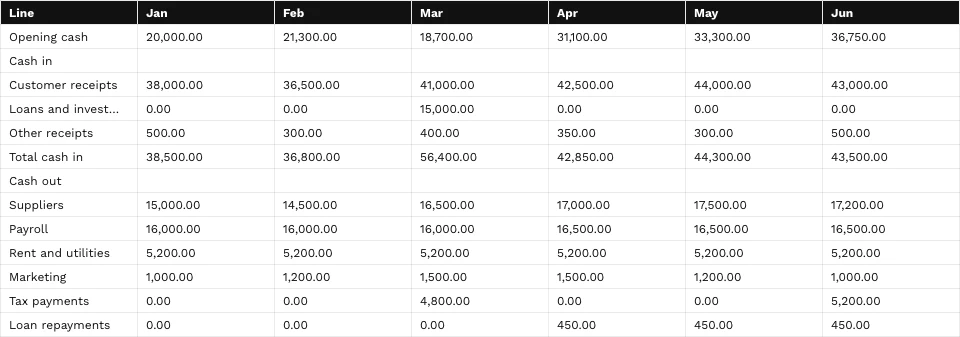
Hannah explains the three figures on Murray Joinery’s VAT return, why the quarter is lower than last year, and that nothing needs paying before the 7th.
ตรวจสอบงานและแนะนำช่างเทคนิคผ่าน วิดีโอ
เริ่มการโทรวิดีโอจากงานใน Trades หรือการเยี่ยมใน Orderflow ลูกค้าเข้าร่วมฟรีจากลิงก์ที่ส่งอีเมล ในขณะที่คุณเดินตรวจสอบข้างเคียงกับการโทร ถ่ายรูปจากกล้องของพวกเขาไปยังรายการของงาน งานจะแสดงการโทรทั้งหมด
Anna KowalczykTNTomasz Nowakเพิ่มราคาสิ่งที่เห็น
หยุดภาพที่กล้องของช่างเทคนิคแสดง, ทำเครื่องหมายและส่งไปยังทุกคนในสายเรียก
 รูปภาพที่เพิ่มคำอธิบายไว้ให้คุณเพิ่มลงในงานปิดMargaret EllisJMJack Mitchell
ลงมือทำทันที พร้อมการสั่งการ
ผู้จัดรายการเพิ่มรูปภาพที่ปรับแต่งแล้วลงในรูปภาพงานของงานนั้น
เพิ่มลงในงาน


เชิญผู้เชี่ยวชาญเข้ามา
เชิญผู้เชี่ยวชาญผ่านอีเมล เหมือนวิธีที่เชิญลูกค้า
- Compressor starts, then stops after 40 seconds
- Outdoor fan turns
- Error E6 on the display
รูปภาพที่เพิ่มคำอธิบายไว้ให้คุณเพิ่มลงในงานปิดMargaret EllisJMJack Mitchellพบ บันทึก และติดตามจาก โทรศัพท์ ของคุณ
เริ่มการประชุม เปิดห้องของคุณ หรือบันทึกวิดีโอจากหน้าจอแรก จากนั้นดูว่าอะไรกำลังถ่ายทอดสดอยู่ อะไรกำลังจะมาถึง และสรุปงานล่าสุดของคุณ เก็บรายการและสรุปงานที่คุณเปิดบนโทรศัพท์ไว้และอ่านได้แม้ไม่มีสัญญาณ
ที่ซึ่ง Live สัมผัสทุกอย่าง อื่นๆ.
4 of these 8 connections are in your plan today; the others are their own apps.
Equipo
Call and Video Call in a conversation ring its people on Live, and the call opens in place.
Depot
Each recording and its recap are filed in a Hub, and a meeting’s chat and summary are messages in the store Depot holds.
Connect
A client’s meetings sit in their thread beside their emails, calls and chats.
Agenda
A recap’s action item you turn into a task is assigned to you, so it is in your Agenda.
Deals
Live’s sessions list opens inside Deals, and a webinar registrant who asks for a consultation becomes a lead.
Automations
A webinar’s confirmation and reminders, the recap email and the team’s notices are rules you pause or edit.
Video
Make Clips opens a recording in Calisto Video with its transcript, and each moment picked becomes a clip.
Display
A TV shows a live broadcast or webinar, with the room’s reactions over it.
ไม่มีต้นทุนการติดตั้ง จ่ายเมื่อเริ่มใช้งาน
Every call and meeting, per person.
แนะนำสำหรับคุณ
ทำงานร่วมกันได้ดี
Calisto Equipo
รวมอยู่ในบัญชีของคุณ
Public and Private Hubs, group chats and direct messages, threads, voice and video, polls, approvals and the files each Hub keeps, with every member of the business in it.
Learn more →Calisto Depot
Calisto Connect
Included with any Interact app
Everyone you talk to, every way you talk, in one conversation, made of your seats in the apps underneath it.
Learn more →Calisto Agenda
รวมอยู่ในบัญชีของคุณ
The tasks every business gives you and your own, one calendar that syncs both ways, booking pages people can book and pay through, and your own contact book.
Learn more →Calisto Deals
Calisto Commerce
The CRM: leads routed and claimed, a pipeline on your own stages, quotes as versions and the contracts they become, people and companies, the day’s follow-ups, the handoff after the sale, commissions and the forecast.
Learn more →Calisto Automations
Calisto Video
Calisto Display
Calisto Display
Runs the TVs in a business: kitchen displays, pickup and now-serving boards, guest TVs, menu boards, signage and designed screens, with schedules, alerts and performance.
Learn more →แนะนำสำหรับ
อุตสาหกรรมที่ดำเนินการ Live และสิ่งที่แต่ละอุตสาหกรรมดำเนินการเพื่อวัตถุประสงค์นั้น
การฝึกสอนและการฝึกอบรมRemote sessions
Remote sessions and group coaching calls.
การฝึกสอนและการฝึกอบรม บน Calisto →Live Music & FestivalsStreaming
Streamed sets and virtual attendance.
Live Music & Festivals บน Calisto →Marathons & EnduranceRace-day streaming
Race-day stream and briefings.
Marathons & Endurance บน Calisto →ตัวแทนกีฬาและนักกีฬาLivestreaming
Livestream showcases and press conferences.
ตัวแทนกีฬาและนักกีฬา บน Calisto →ทัวร์และประสบการณ์Virtual tours & briefings
Virtual tours and pre-trip briefings.
ทัวร์และประสบการณ์ บน Calisto →สิ่งทั้งหมดที่รวมอยู่ใน Calisto Live.
- A person starts or joins a call or meeting with their own Live seat, given when they are added to the team or in their services. Guests from outside join free.
- Call, Video Call and Join in Equipo, and a call to a teammate from Voice, run on Live in Live’s own panel.
- Meetings, webinars, broadcasts, showcases, seminars and video messages, each with its own room and tools.
- Every kind at once, by when it runs or ran.
- Meetings, Webinars, Broadcasts and Showcases, each a list, a calendar and its own lens: Registrations, Streams or Leads.
- Scheduled, Live, Ended or Cancelled, with counts on each chip.
- Join or Start, the guest link and PIN, the time in your own zone, attendees and registrants, the recording, Edit and Cancel Session.
- Open before the meeting starts and after it ends, the same thread as in the room.
- A room opened now, its link ready to share.
- A time, a length, invitees and an optional note.
- Each invitee gets a calendar event with their own link and guest PIN; an edit updates it and a cancellation removes it.
- Daily, weekly, every two weeks or monthly; edit or cancel one, this and the following, or all.
- A permanent link and PIN of your own, with Copy and Share; each use is its own session.
- Someone waiting at your room tells you, on your phone too.
- An instant meeting that rings the teammates named, audio or video, tied to the conversation it came from.
- A person on Do Not Disturb is never rung; a call is refused when everyone it would ring is.
- A person rung who did not join in 45 seconds, or before it ended, is told once.
- Six digits, needed with the link; wrong guesses are limited per address.
- A booking page where clients pick a time with you; a virtual booking opens its own room.
- The same sessions list, fully editable, under Interact ▸ Live.
- A meeting can name the client it is about, and it is listed in their thread in Connect.
- Camera, microphone and background checked before anyone sees you.
- The host or a co-host admits each person; the waiting room comes after the lobby.
- A locked room admits nobody new, on every way in.
- Let people into a meeting before the host arrives, or not.
- A room at its limit says so.
- Mute one or all, remove, lock, spotlight, co-host and host transfer.
- Speakers beside the host in webinars, broadcasts and showcases.
- Any window or screen, with marks anyone can draw on it.
- A deck, document, sheet or blank whiteboard on the stage; everyone follows the presenter, guests included.
- Arrow keys, speaker notes, the next slide and annotation; the host can hand presenting over or stop it.
- Opens a room already presenting the file.
- Assigned or chosen by people, a timer that brings everyone back, and Ask for Help to the host.
- Kept, so a late joiner sees it; private messages, files, GIFs and Calisto’s own stickers.
- Two to ten choices, one answer or several, launched and closed by a host or co-host, kept after a reload.
- Questions with one upvote per person; in a moderated webinar a question reaches only the moderators and its asker.
- In every kind of session, and everyone sees who is waiting to speak.
- In the room, and floating over a broadcast on a TV.
- For everyone, guests included, translated into each viewer’s language and kept as the transcript.
- Questions about what was said so far, answered to the asker alone and never stored.
- A summary of the captions while the meeting runs, replaced by the recording’s when it is ready.
- On or off for yourself.
- Blur, your business’s backgrounds, or your own image unless the business keeps to its approved ones.
- Gallery, speaker and sidebar, with a default for every room.
- The host’s alone, in every kind; Record by Default records each new session when it goes live.
- A session live for 90 minutes with nobody left in it is ended for you, never with people in it.
- A page per webinar; each registrant gets their own join link, and a calendar file to add.
- A place limit, a waitlist in arrival order, and places moving up when one frees or the limit rises.
- Each registrant filed on a client record, by email; registering is never marketing consent.
- Asked on the registration page when you want it, recorded with the registration.
- A registrant who ticks I would like a consultation becomes a lead, and in a law firm Legal’s inquiry.
- The confirmation, the place freed, and reminders 24 hours and 1 hour before are rules you pause, edit or delete.
- A private room beside the stage for hosts and panelists; joining it never starts the session.
- One of your recordings played into the session as though live, then stopped to go live.
- A rating, a comment and whether they would come again, read by the host on the recap.
- A webinar recording is a video of the business, so it can be a lesson of a Direct course.
- One to many: the audience watches, reacts and answers polls.
- To a streaming platform preset or any RTMP address, started and stopped by the host or a co-host.
- Every stream running now, in Broadcasts ▸ Streams.
- A broadcast scanned for illegal content as it runs, never held for approval before it starts.
- Campaigns’ email composer beside the broadcast.
- A TV shows a live broadcast or webinar as a viewer, with its reactions; a meeting room’s TV is the meeting’s screen.
- A property’s name, address, price, type and photo beside the video.
- One per viewer who leaves their details, followed up from the Leads lens; also run from Listings.
- Authored and managed in University, run in this room; certificates for each real attendee of a completed seminar.
- Summary, key points, decisions, next steps, action items, the recording and who was there, from the room when it ends or from its session.
- Review and edit the list, then pick which become tasks of the business, assigned to you.
- Create a task, move a deal, book, open a ticket or adjust stock, through the app that holds the record.
- Notes anyone who was there adds to, and notes of your own.
- Who joined, counted once per person, downloadable as CSV.
- The recording split into chapters, its transcript timed line by line.
- A summary that could not be prepared says so, and the host runs it again.
- The recording-ready notice and the recap to the host and signed-in attendees are rules you control.
- Every recorded session of any kind, searched by what was said.
- A recording shared with its own key, never the PIN; Stop This Link ends it.
- A recording downloaded through Live, never a storage link.
- A recording opened in Calisto Video with its transcript, a clip cut from each moment picked.
- The host, those who were there and whoever the owner setting admits: admins, only attendees or the whole team. Owners always.
- Recordings kept as many days as you set, then removed.
- Each recording and its recap filed in a Depot Hub.
- A meeting’s chat, recording and summary are messages beside each person’s emails, calls and chats, read in Connect.
- Your camera or screen recorded in the browser, listed under your own video messages.
- Shared to a client or teammate as a link, in their messages from then on.
- Every video message transcribed and summarized like a meeting.
- A long video sent in resumable parts; a recording not yet saved stays on the device.
- A video shared to Calisto from a phone or opened with it on a desk becomes a video message.
- It moves to Trash, where it can be restored, and its link stops.
- A call from a task or a visit, the client invited by email with the link and PIN, joining free.
- The visit’s inspection beside the call, for the host alone.
- The client’s video frame onto the inspection item open, with a line in the chat.
- Freeze the technician’s camera, mark it up with the one photo editor, and send it to everyone in the call.
- A marked-up picture added to the task’s work photos.
- Overview: sessions, people, minutes and the mix of kinds. Reports: each kind and the monthly trend, downloadable as CSV.
- Sessions by name, the coming ones first, and recordings by what was said.
- Your business’s details and working hours, written to the same records Calendar and Tasks read.
- Who may open recordings, and the business’s other people settings.
- Waiting room, mute on join, layout, join before host, blur, backgrounds, approved backgrounds only, and the participant limit.
- Your business’s approved background library.
- Record by default, the consent notice, and how long recordings are kept.
- A setting locked by Purview or Blueprint shows as locked here.
- The language captions are shown in, your own preference on every device.
- Meet Now, Schedule, My Room and Video Message, then what is live, what is coming and recent recaps.
- Home, Meetings, Video Messages and Recordings; Insights, Schedule Engine and Settings in More.
- Meet Now, Schedule a Meeting, My Room, Record a Video Message and Recordings.
- A Windows widget with what is live and your next sessions.
- Join, Admit and Open My Room from the notice.
- Home, every list, video messages, recordings and recaps once opened, read with no signal; a change waits for a connection.
- A session’s, a video message’s and My Room’s next step at the bottom of the screen.
- A retry never makes a second session or second invitations.
- A join, watch or registration link previews when shared and is never listed by search engines.
- Every room runs on Calisto’s self-hosted video servers, never a vendor’s meetings service.
- People join from a browser; there is no phone number to dial into a meeting.
Questions about Calisto Live
ไม่ ผู้มาเยือนเปิดลิงก์ในเบราว์เซอร์ ตรวจสอบกล้องและไมโครโฟนในล็อบบี้ และป้อนรหัสผ่าน บนโทรศัพท์ ลิงก์เดียวกันจะเปิดห้องเดียวกัน
แต่ละคนในธุรกิจของคุณที่เริ่มหรือเข้าร่วมสายโทรศัพท์หรือการประชุมใน Live จากบทสนทนาใน Equipo หรือที่ใดก็ได้ใน Calisto ลูกค้าและแขกจากภายนอกธุรกิจของคุณเข้าร่วมฟรี
การประชุมที่บันทึกไว้จะถูกถอดเสียงและสรุป: ภาพรวม จุดสำคัญ การตัดสินใจ ขั้นตอนถัดไป และรายการงาน โดยมีการแบ่งบทในบันทึก คุณสามารถเลือกว่ารายการงานใดจะกลายเป็นงานได้ การประชุมที่ไม่ได้บันทึกไว้ยังคงสามารถสรุปได้จากรายการคำบรรยาย
ผู้จัด ผู้เข้าร่วมประชุม และผู้ใดก็ตามที่เจ้าของธุรกิจของคุณกำหนดให้: ผู้ดูแลระบบ, เฉพาะผู้เข้าร่วม หรือทั้งทีม การบันทึกที่แชร์เป็นลิงก์ดูจะเล่นจากคีย์ของตัวเอง และปุ่มหยุดลิงก์นี้จะยุติการบันทึก การสลับเปลี่ยนจะไม่เชื่อมต่อสิ่งใดซ้ำสองครั้ง
ไม่ใช่ ผู้เข้าร่วมทุกคนเข้าร่วมจากเบราว์เซอร์ หมายเลขโทรศัพท์จะถูกคิดค่าธรรมเนียมตามนาทีโดยผู้ให้บริการ ในขณะที่ผู้เข้าร่วมจากเบราว์เซอร์มีค่าใช้จ่ายเพียงการเชื่อมต่อที่ชำระไปแล้วเท่านั้น
ผู้ลงทะเบียนแต่ละคนในเว็บ研讨会จะถูกบันทึกเป็นลูกค้าของธุรกิจของคุณ และการเข้าร่วมจะนับหนึ่งครั้งต่อคน การลงทะเบียนไม่ใช่การยินยอมต่อการตลาด; เรื่องนั้นอยู่ในส่วนของแคมเปญ
บนเซิร์ฟเวอร์วิดีโอที่ Calisto จัดการเองโดยไม่มีบริการประชุมจากภายนอก การบันทึกจะเป็นไฟล์ในคลังเก็บข้อมูลของธุรกิจของคุณ จัดเก็บใน Depot
ต่อคน ในกล่องราคาบนหน้านี้ ซึ่งอ่านจากแคตตาล็อกแบบเรียลไทม์ ความสามารถแบบ Live ที่เปิดไปยังแอปอื่น เช่น Deals, Automations หรือ Video จะถูกกำหนดราคาในแอปนั้น
