Spreadsheets your team builds and works in together.
Schrijf formules, maak grafieken en draai de getallen om, en bewerk hetzelfde spreadsheetgelijktijdig met iedereen, op de bureau of een telefoon. Elke tab kan ook worden ingevuld vanuit de gegevens die uw bedrijf bijhoudt.
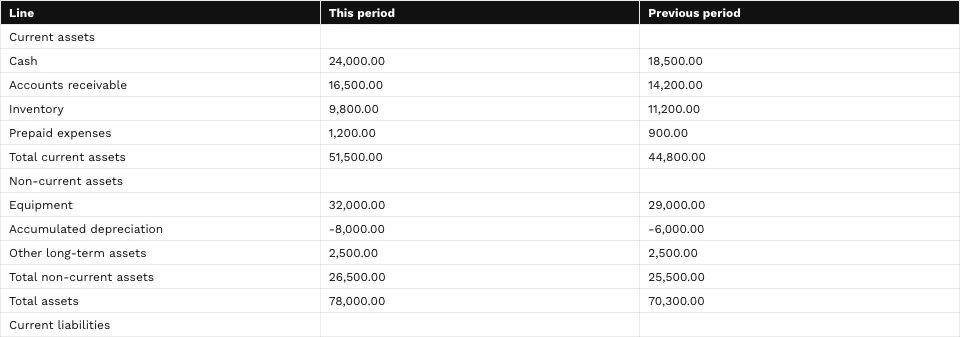
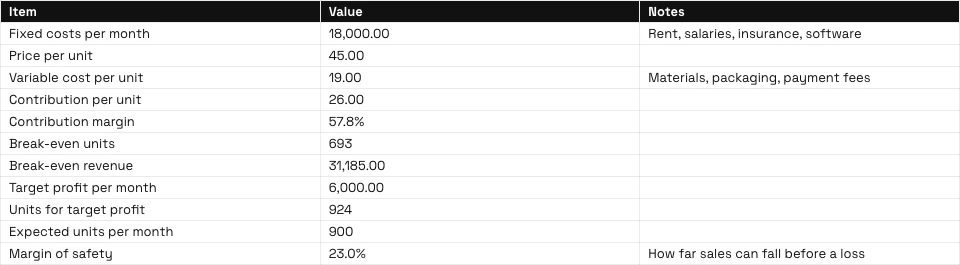
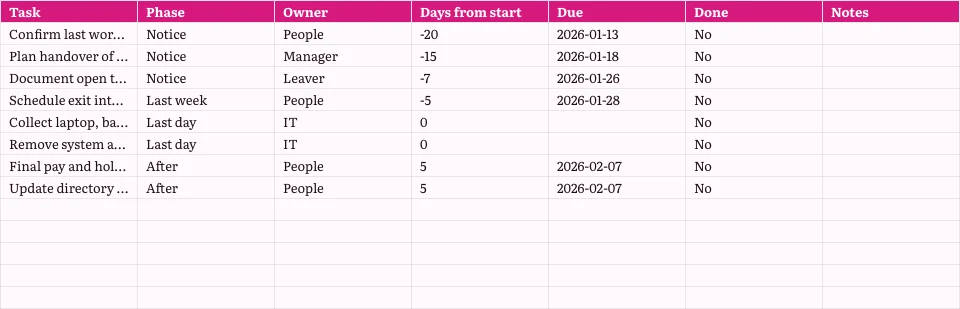
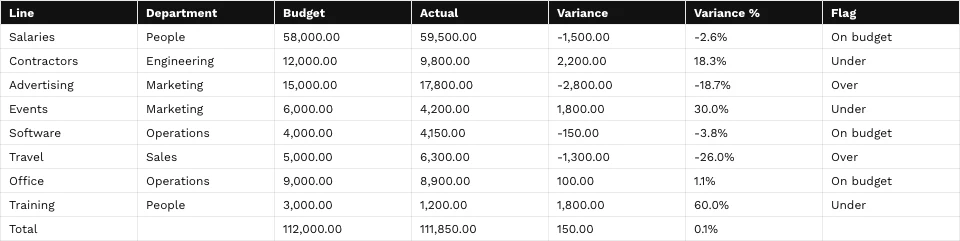
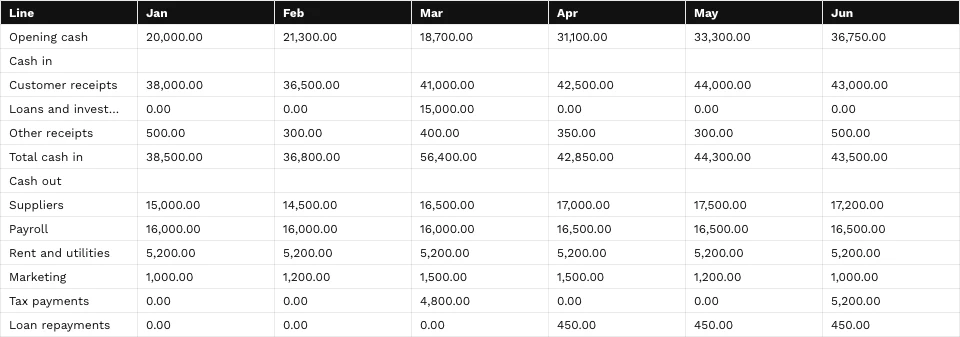
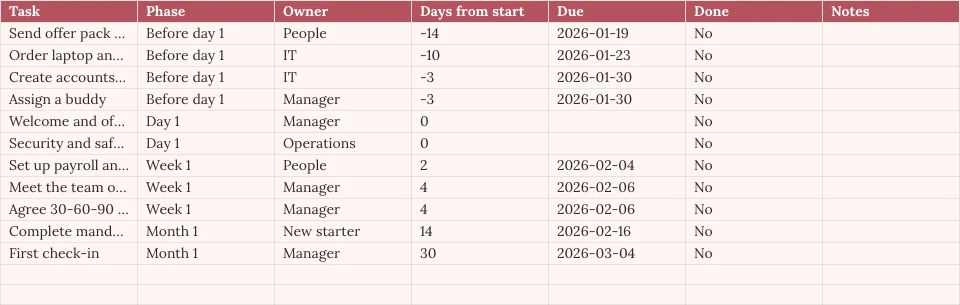
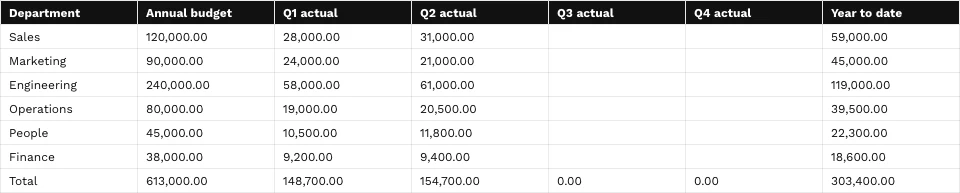
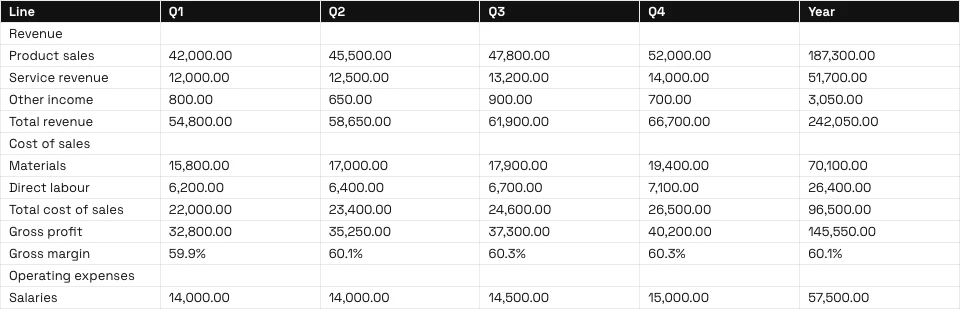
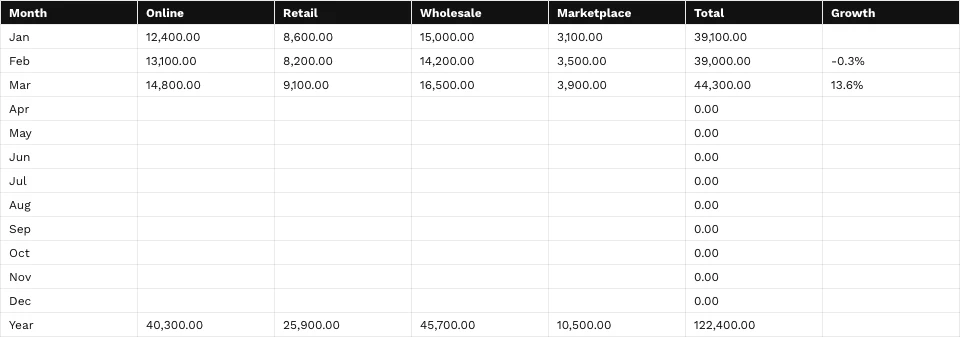

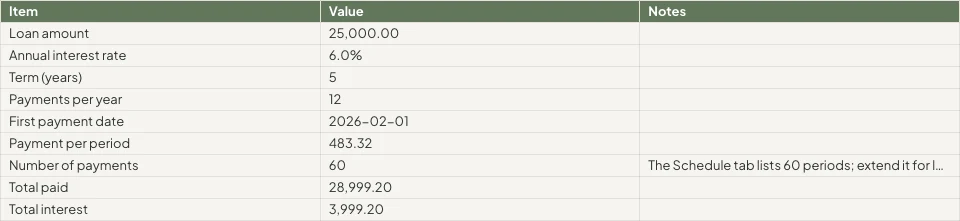
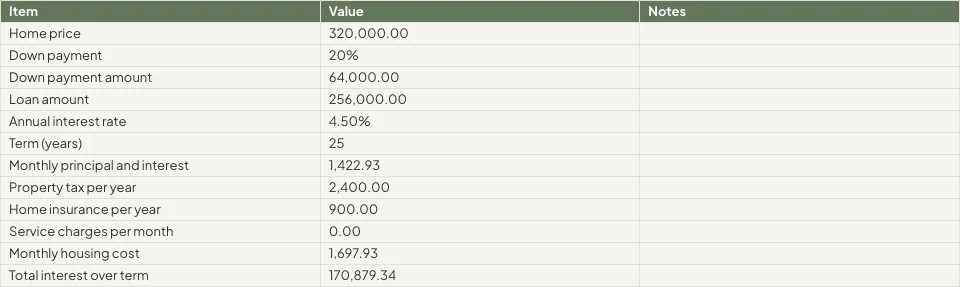
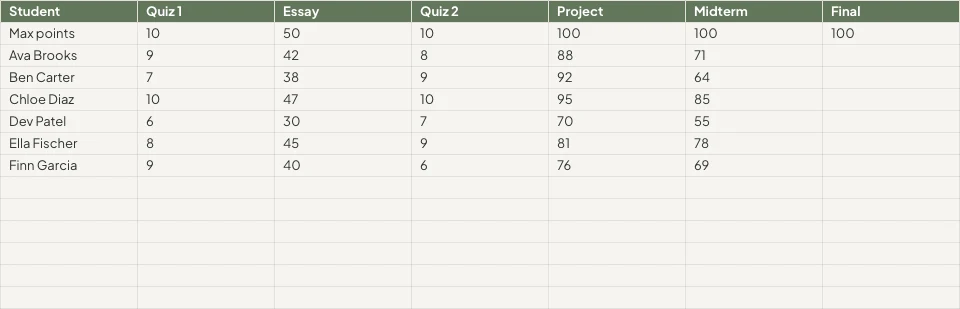



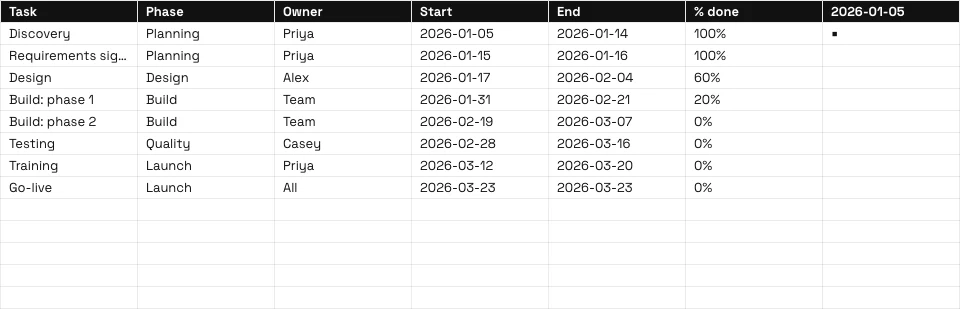
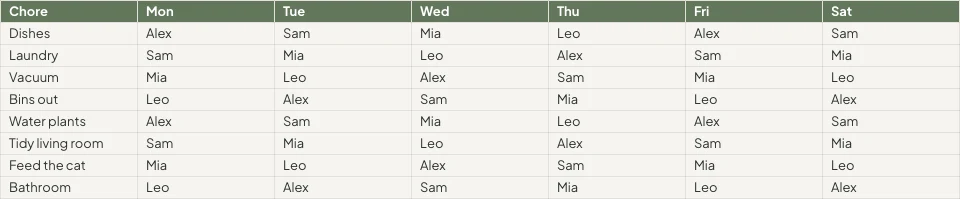

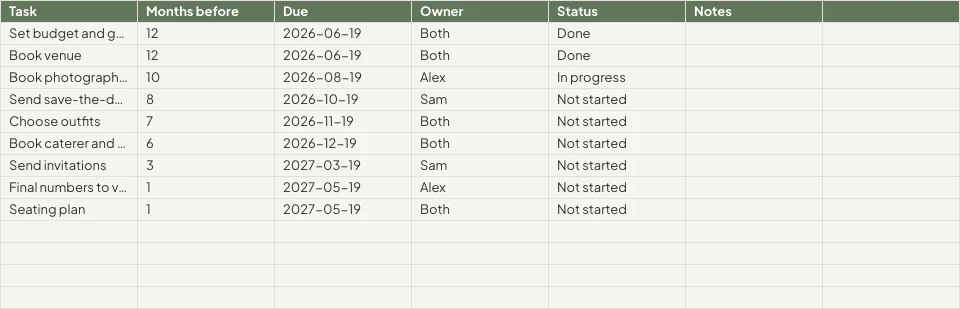
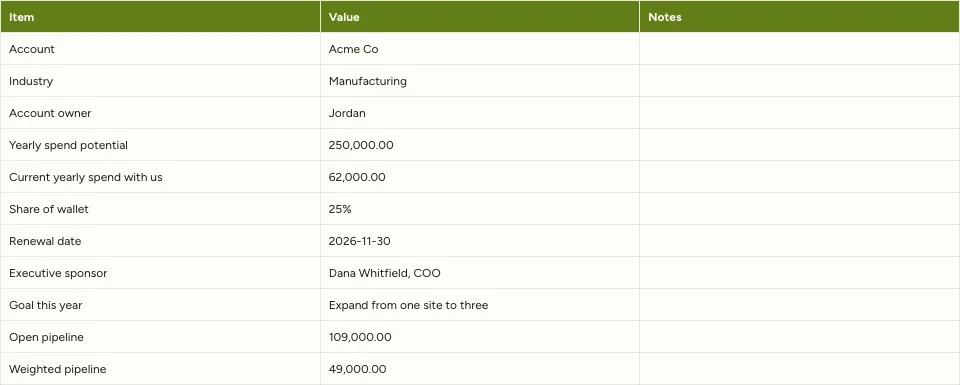

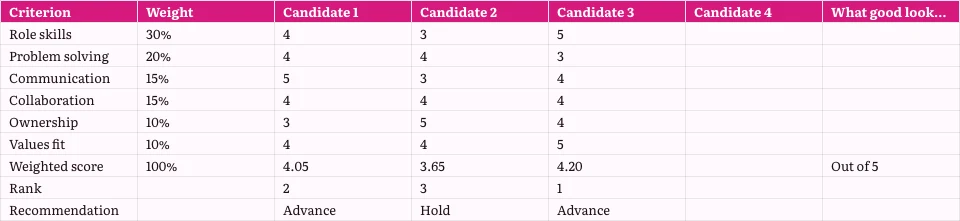
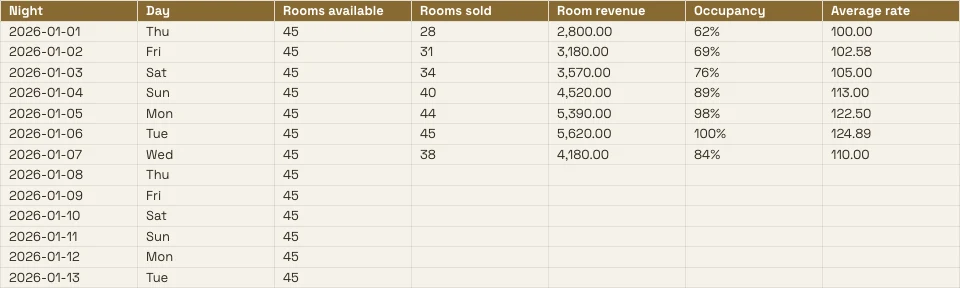
Elke spreadsheet die het bedrijf bijhoudt, en de records achter het
Een begroting, een prijslijst of een rooster is hier een spreadsheet, en elke tabblad kan worden gelezen vanuit de apps die de gegevens bevatten.
The Grid
Formules, formaten en regels.
Starten
Leeg, een sjabloon of een bestand.
Data From Calisto
Een tabblad gelezen uit uw registraties.
Analyseren
Diagrammen, draaipunten en vragen.
Samen
Cel voor cel, met opmerkingen.
Delen
Mensen, een link, een tv, een bestand.
Act
Regels die worden tot werk.
Op een telefoon
Lezen, bewerken en reageren.
Formules invoeren, cellen formatteren en regels instellen
Type a formula from 245 functions, or describe what you need beside the formula and get one back. Format from the chip on the selected cells or the Format panel. Each column’s and row’s menu sorts, filters, freezes, groups and cleans up.
Een formule beschrijven
Zeg wat u nodig heeft, zoals het gemiddelde van kolom D waar de status Actief is, en de formule wordt voor u geschreven.
Regels voor cellen
Conditionele opmaak, afwisselende kleuren en validatie met lijsten als chips en vinkjes.
Benamingen en filterweergaven
Noem een reeks één keer; sla een gefilterd weergave op zonder de weergave van anderen te wijzigen.
- Fees'Projects'!E2:E14Edit
- Hours'Projects'!D2:D14Edit
- OpenProjects'Projects'!A2:F9Edit
- TaxRate'Settings'!B2Edit
- Retainers'Retainers'!A2:D8Edit
- Geen (Eigen filter van het blad)
- Open, by client2
- Over 100 hours
- Owen’s projects
- Invoiced this quarter
Elke opdracht per naam
⌘K vindt elke opdracht en elke functie, via de naam of de familie.
Zoeken en vervangen
Over elke tab, per hele cel, per geval of per patroon, en binnen formules.
Chips voor Data, Personen en Bestanden
Een datum, een contactpersoon of een bestand uit Depot als chip in een cel.
Opruimen
Dubbelingen verwijderen, spaties trimmen, tekst splitsen in kolommen.
Leeg beginnen, van een sjabloon of van een bestand
Beschrijf het spreadsheet op Home en het dichtstbijzijnde sjabloon opent, of kies een sjabloon op type en sector, of begin leeg. Niets wordt opgeslagen tot u het opslaat. Open een XLSX, ODS, CSV of TSV-bestand, vanaf het apparaat of vanaf Depot, en de formules worden opnieuw berekend.
Maak een nieuw Spreadsheet
Hoe wilt u beginnen?
Of open een bestand dat u al heeft: XLSX, ODS, CSV of TSV. Kolomtypen worden automatisch gedetecteerd en geformatteerd.
Kies BestandBeschrijf het op Home
Say what the spreadsheet is for, and the closest template opens in your theme.
Goede morgen, Chloe.
Een tabblad invullen vanuit de gegevens die uw apps behouden
Kies boekingen, deals, betalingen, voorraad, leden, tickethouders of het rooster, en de tab wordt gevuld vanuit de records zelf, zonder export. Kies Live om ze opnieuw te lezen bij elke opening, Manual voor een knop Verversen, of Snapshot.
Chart It, Pivot It en Ask It Vragen
Charts belong to the workbook: seven types, placed over the cells, drawn from the cells as they are now, and shown on a phone and on the published link. A pivot table summarizes a tab onto a tab of its own.
Diagrammen
Kolom, balk, lijn, gebied, scatter, cirkeldiagram en ringdiagram, geplaatst over de cellen.
Pivottabellen
Rows, columns and values summarized onto a tab of their own.
Vraag naar deze gegevens
Een vraag in simpele woorden, beantwoord vanuit het tabblad.
Unlimited members paid $18,960, PT Bundle $11,880 and 10-Pack $6,420.
Each Unlimited member paid $1,264 on average, across 15 members.
=AVERAGEIF(B2:B41,"Unlimited",E2:E41)Invoegen in de geselecteerde celFormule kopiërenSlim invullen en automatisch classificeren van kolommen
A column completed from its pattern; each column given its type and number format.
Improve, Summarize or Translate
De geselecteerde cellen zijn verbeterd, verkort, in de stem van uw merk gezet, samengevat of vertaald.
Pastel de nata, saído do forno de hora a hora.Tosta mista no pão da Gleba, com queijo da Ilha.Galão cremoso, em copo alto, com leite dos Açores.Bolo de laranja da avó Lurdes, com calda a escorrer.
VervangenOpnieuw proberenColumn Stats
Tellen, optellen, gemiddeld, laagste, hoogste en mediaan van elke kolom.
- Vol
- 18
- Leeg
- 2
- Distinct
- 11
- Fouten
- 1
- Som
- 14,20,000
- Gemiddeld
- 83,529.41
- Mediaan
- 75,000
- Min
- 25,000
- Max
- 2,50,000
Bewerken Samen, en Beslissen Wie Welke Cellen Ziet
Several people edit one spreadsheet at once, merged cell by cell. Pin a comment to a cell, mention someone or hand them the thread, and find what is yours to answer on Home. Every save is a version you can compare and restore.
Opmerkingen op cellen
Vastgezet op een cel, met antwoorden en vermeldingen, en overhandigd aan iemand om te beantwoorden.
Versiegeschiedenis
Sales!B2gewijzigdSales!B4gewijzigdSales!D6gewijzigdSales!A9addedGraphic novel workshopSales!B9added24Sales!A10removedSales!C8gewijzigdCompare two versions cell by cell and restore either.
Beschermde bereiken en tabbladen
Een tabblad of een bereik dat alleen de eigenaar bewerkt, of een bereik dat waarschuwt voordat er een wijziging plaatsvindt.
Cells Your Data Rules Hide
De Data Rules van Purview voorkomen dat een cel op het scherm van een persoon verschijnt, en houden deze intact wanneer deze wordt opgeslagen.
Mededelingen als regels
Automatisering
Stappen die automatisch worden uitgevoerd wanneer er iets gebeurt in uw bedrijf.
| Automatisering | Wanneer | Vervolgens | Afgelopen 7 dagen | Last run | Status | |
|---|---|---|---|---|---|---|
| Tell the people on a spreadsheet about a new commentComment added | Comment added | Tell the people | 86 | 21/11/2026 11:42 | Actief | Pauze |
| Tell a person when they are mentioned in a commentPerson mentioned in a comment | Person mentioned in a comment | Tell the person | 41 | 21/11/2026 10:15 | Actief | Pauze |
| Tell a person when a comment thread is assigned to themComment thread assigned | Comment thread assigned | Tell the person | 23 | 20/11/2026 17:08 | Actief | Pauze |
| Tell the people in a comment thread about a replyReply in a comment thread | Reply in a comment thread | Tell the people | 52 | 21/11/2026 09:31 | Actief | Pauze |
| Tell people when a spreadsheet is shared with themSpreadsheet shared | Spreadsheet shared | Tell the people | 9 | 19/11/2026 14:50 | Opgepauzeerd | Doorgaan |
| Tell the person who pulls invoices into a sheet that some are overdueOverdue invoices pulled into a sheet | Overdue invoices pulled into a sheet | Tell the person | 3 | 17/11/2026 08:57 | Actief | Pauze |
A share, a comment, a reply or a mention tells people through rules you can pause in Automations.
Turn Rows Into Invoices, Tasks, Decks and Records
Genereer een factuur in Ledger vanuit de regels van een tabblad, maak een taak aan in Dispatch, of presenteer een grafiek in Slides, waarbij deze gekoppeld blijft aan deze spreadsheet. Een formulier dat gekoppeld is aan een spreadsheet, voegt per reactie een nieuwe rij toe, met een nieuwe kolom voor elke nieuwe vraag.
Factuur in de boekhouding
De lijnen van het tabblad worden een factuur die u controleert en aanmaakt in Ledger.
Invoice Deels betaald
Invoice detail
| Description | Aantal | Eenheidsprijs | Totaal |
|---|---|---|---|
| Group stay, 6 rooms, 3 nights | 18 | R 1 650,00 | R 29 700,00 |
| Cape Malay breakfast, guests | 36 | R 145,00 | R 5 220,00 |
| Airport transfers, minibus | 2 | R 950,00 | R 1 900,00 |
| Bo-Kaap walking tour | 12 | R 280,00 | R 3 360,00 |
| Cooking class, Cape Malay | 12 | R 620,00 | R 7 440,00 |
| Late checkout, 6 rooms | 6 | R 250,00 | R 1 500,00 |
Taak in Dispatch
Een taak met zijn toegewezen persoon, vervaldatum en prioriteit, gekoppeld aan het spreadsheet.
Grafiek in Presentaties
A deck whose chart stays linked to this spreadsheet.
Rijgegevens uit een formulier
Een gekoppelde formulier voegt per antwoord één rij toe.
Regels in Automatiseringen
Een nieuwe rij start een regel, en een regel voegt een rij toe, zodra het wat de herpogingen zijn.
Overdue Invoices Found
Een Boekhouding-trekkingsactie die achterstallige facturen vindt, informeert de persoon die deze heeft getrokken; als regel kunt u dit opschorten.
Invoice Deels betaald
Invoice detail
| Description | Aantal | Eenheidsprijs | Totaal |
|---|---|---|---|
| Group stay, 6 rooms, 3 nights | 18 | R 1 650,00 | R 29 700,00 |
| Cape Malay breakfast, guests | 36 | R 145,00 | R 5 220,00 |
| Airport transfers, minibus | 2 | R 950,00 | R 1 900,00 |
| Bo-Kaap walking tour | 12 | R 280,00 | R 3 360,00 |
| Cooking class, Cape Malay | 12 | R 620,00 | R 7 440,00 |
| Late checkout, 6 rooms | 6 | R 250,00 | R 1 500,00 |
Lezen, Bewerken en Commentaren vanaf een Telefoon
Hetzelfde spreadsheet in de vorm van een telefoon: een cel bewerken, een kolom filteren, een tabblad invullen vanuit uw gegevens, opmerkingen beantwoorden en een grafiek presenteren. Een spreadsheet die vanuit een andere app wordt gedeeld, opent in Sheets.
Waar Sheets Alles Anders Raakt
3 of these 8 connections are in your plan today; the others are their own apps.
Forms
A linked form adds one row per response, with a new column for each new question.
Depot
Every spreadsheet is in Depot and its Hubs, and a spreadsheet file in Depot opens in Sheets.
Slides
Present in Slides makes a deck whose chart stays linked to the spreadsheet.
Ledger
Ledger’s statements, invoices and transactions fill a tab, and Generate Invoice makes the invoice in Ledger.
Workforce
The team and the schedule fill a tab, read again whenever it is opened.
Dispatch
Create Task makes a task in Dispatch from the spreadsheet.
Deals
Deals’ pipeline fills a tab, and Attach to Deal files the spreadsheet on a deal as a PDF.
Display
A published spreadsheet is shown on a TV as a data table.
Geen opstartkosten. Betaal wanneer u begint met gebruiken.
Spreadsheets your team works in together.
Calisto Work is one subscription per person for Docs, Sheets, Slides, Forms, Agenda, Equipo, and Depot, with a branded mailbox for each person.
Aanbevolen voor u
Werkt goed samen.
Calisto Forms
Calisto Depot
Calisto Slides
Calisto Ledger
Calisto Workforce
Calisto Dispatch
Calisto Deals
Calisto Commerce
The CRM: leads routed and claimed, a pipeline on your own stages, quotes as versions and the contracts they become, people and companies, the day’s follow-ups, the handoff after the sale, commissions and the forecast.
Learn more →Calisto Display
Calisto Display
Runs the TVs in a business: kitchen displays, pickup and now-serving boards, guest TVs, menu boards, signage and designed screens, with schedules, alerts and performance.
Learn more →Calisto Automations
Aanbevolen voor
De industrieën die Sheets runnen, en waarvoor elk van hen het runnen.
Makelaars vastgoedRapportage
Commission splits and pipeline reporting.
Makelaars vastgoed op Calisto →Onroerend goedontwikkelingRapportage
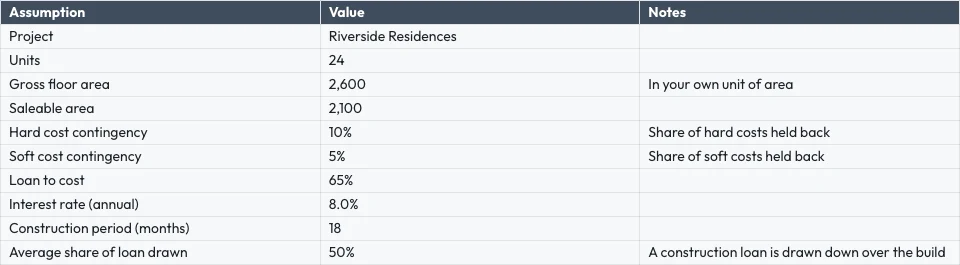
Payment plans, cost tracking, unit reporting.
Onroerend goedontwikkeling op Calisto →Grafische ontwerpers & kunstenaarsJob costing sheets
Job costing and retainer tracking.
Grafische ontwerpers & kunstenaars op Calisto →Alles inbegrepen in Calisto Sheets.
- Calisto’s own spreadsheet engine, with as many tabs as the work needs
- 245 functions by family, found by name in ⌘K
- Describe what you need beside the formula, and get the formula back
- Iterative calculation, set per spreadsheet, so every reader gets the same answers
- Show Formulas, gridlines, Add 1000 Rows, keyboard shortcuts
- Find, and Find and Replace
- The format chip on the selected cells, and one Format panel for everything else
- Number formats in the business’s own currency, percentages, dates and plain numbers; never a currency nobody recorded
- Conditional formatting, alternating colors and color scales
- Data validation: lists shown as chips, tick boxes, numbers, dates, text and custom rules
- Merge, wrap, borders, freeze, hide and group rows and columns
- Each column’s and row’s menu: insert, delete, size, sort, filter, group, stats and clean-up
- Date chips and contact chips that name a customer from your contacts
- Describe it on Home and the closest template opens; or start blank, in a theme, or from a template by type, industry, style and color
- A template is a design worn in a theme; its blanks are asked for before it opens
- Nothing is saved until you save it; leaving with changes asks first
- Open XLSX, ODS, CSV and TSV files, and shared text arrives as a grid
- Open a spreadsheet file from Depot in Sheets
- Make a Copy, Save as Template, Edit Template
- Bookings: every booking, and revenue by channel per currency
- Deals: the open pipeline and what was won
- Payments: transactions
- Inventory: stock on hand, and what is below its reorder point
- Registry: members; Tickets: attendees; Workforce: the team and the schedule
- Ledger Data: the balance sheet, profit and loss, the invoices register and the transaction register
- Catalog Data, and Subscription Metrics (what the business pays Calisto)
- A web address: a public CSV or JSON file
- Live, Manual or Snapshot for each tab, with when it was read
- Money only for people the owner’s settings allow; anyone else reads “Not shared with you”
- Charts kept in the spreadsheet: column, bar, line, area, scatter, pie and donut
- A chart placed over the cells, drawn from the cells as they are now, on every device and the published link
- Pivot tables onto a tab of their own
- Column stats: count, sum, average, lowest, highest and median
- Smart Fill, Auto-Classify Columns and Ask About This Data
- Improve, shorten, summarize or translate the selected cells, or change their tone to your brand’s voice
- Named ranges and filter views
- Editing together, merged cell by cell; everyone in the spreadsheet shown in Share
- Comments pinned to a cell, with replies, mentions and threads handed to someone
- Comments for You on Home: the threads that are yours to answer
- Version history: compare two versions cell by cell, restore, and name a version
- Notices for a share, a comment, a reply, a mention and a handed thread, each a rule you can pause in Automations
- Share with people to view, comment or edit, and change or remove access in place
- Protected tabs and ranges: owner only, or for a range a warning before a change
- Purview’s Data Rules keep a cell from reaching a person’s screen, and keep it intact when they save
- Collections and locks set in Purview apply here too
- Publish a link anyone can open, and take it back
- A published spreadsheet shown on a TV, with Display
- Export XLSX, ODS, CSV, TSV, HTML and PDF, with the page setup, and print
- Send: Email, an Inbox message, Live, a Connect channel, or Attach to Deal (a PDF on the deal)
- Save to a Hub and Folder; every spreadsheet is in Depot
- Copy Link, Star, Details with a description, Trash with 30 days to restore
- Generate Invoice in Ledger from a tab’s lines
- Create Task in Dispatch
- Present in Slides: a deck whose chart stays linked to the spreadsheet
- A linked form adds one row per response, with a new column for each new question
- Automations: a new spreadsheet, a new row, a share and a pulled overdue invoice start rules; a rule adds a row or makes a spreadsheet, each row once whatever the retries
- Refine Design: the theme of a spreadsheet (its colors, the header band, type and row height)
- Brand Check: the words read against your brand guidelines
- The same look on the desk, the phone, the published link, the charts, XLSX and PDF
- The number format new spreadsheets start with, for the business
- Your own preferences, the same in every business: recalculate as you type or on F9, and where Share starts
- Each person chooses which comment notices reach them
- Home, Spreadsheets, Templates and Library in the tab bar; an open spreadsheet fills the screen
- Undo and Redo, Find, the cell’s sheet with its format and filter, Data, Comments and the tabs
- Spreadsheets kept on the device open read-only with no signal; a comment written then is sent later
- Spreadsheets shared from another app open in Sheets
- Notifications that open the comment, with Reply and Mark as Done
- Shortcuts: New Spreadsheet, Recent, Shared with Me and Templates
Questions about Calisto Sheets
XLSX, ODS, CSV en TSV, vanaf het apparaat, vanaf Depot of gedeeld vanuit een andere app op een telefoon. Formules worden opnieuw berekend door Calisto's eigen motor. Oude XLS-bestanden openen niet.
Uit de gegevens die apps bewaren: boekingen, deals, betalingen, voorraad, leden, tickethouders, het rooster en de uitslagen en registers van Ledger. Live leest deze opnieuw elke keer dat het spreadsheet geopend wordt, Manual wacht op Verversen, Snapshot verandert nooit. Getallen die een persoon niet kan zien worden weergegeven als "Niet gedeeld met u".
Yes. Edits merge cell by cell, everyone in the spreadsheet is shown in Share, and a comment can be pinned to a cell, mention someone or be handed to them.
Spreadsheets die op het apparaat open staan in alleen-lezen modus, zodat een oudere kop nooit overschrijft nieuw werk. Een commentaar geschreven zonder signaal wordt verzonden wanneer de verbinding terugkeert. Bewerken vereist een verbinding.
XLSX, ODS, CSV, TSV, HTML en PDF dragen het raster. XLSX, PDF en HTML dragen ook de uitstraling. Grafieken en afbeeldingen blijven in Calisto, op elk apparaat en op de gepubliceerde link.
Sheets maakt deel uit van Calisto Work, één abonnement per persoon. De prijssectie op deze pagina leest de live catalogus. Apps die een spreadsheet openen, zoals Ledger of Dispatch, worden geprijsd in hun eigen apps.
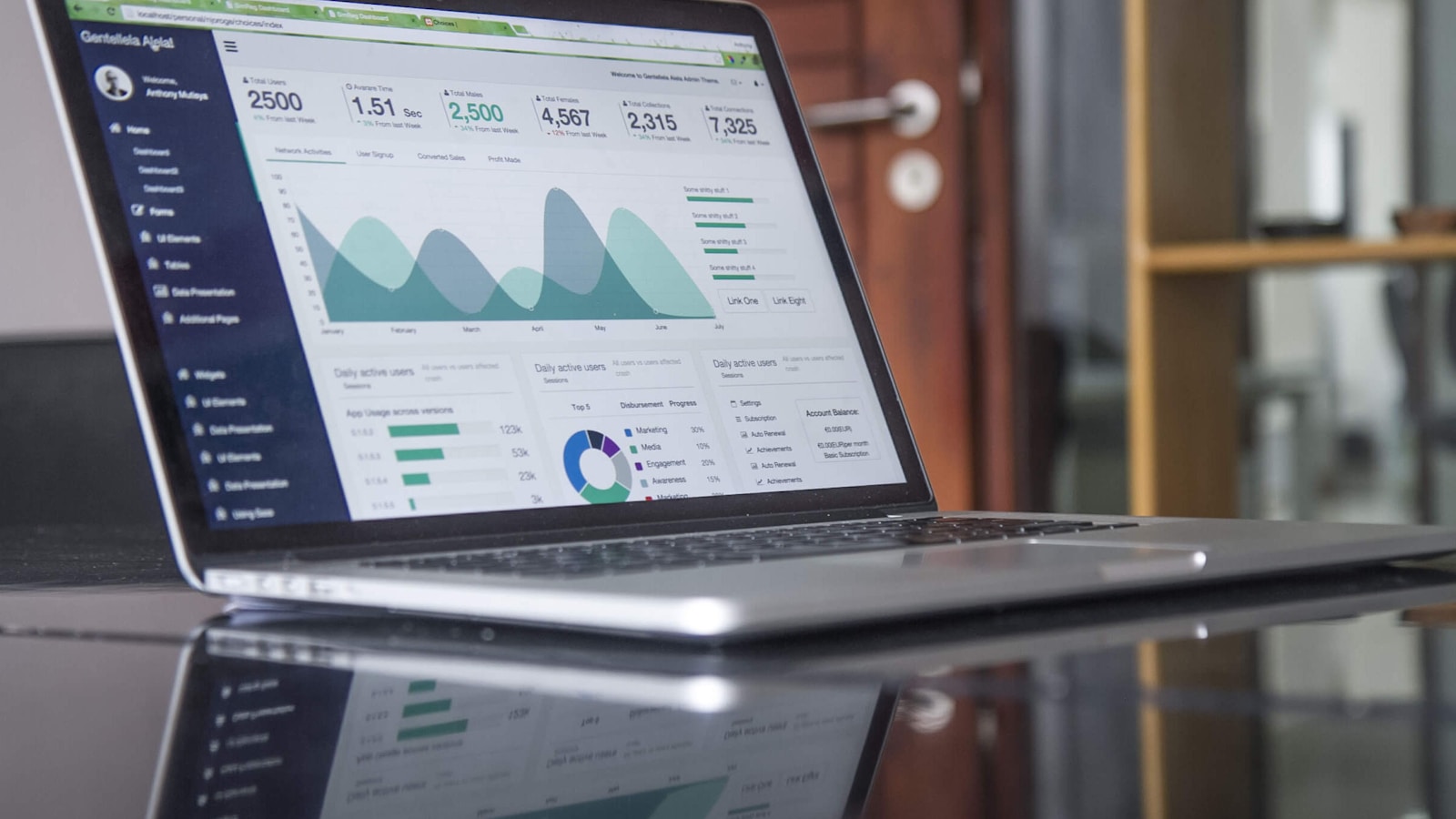
@Lucía Hernández Molinos raised the 25 kg sack again. Do we keep 18 or drop to 15 for the week?
Keep 18. Día de Muertos orders start on Thursday.
Masa madre is back in stock at Granos Ruiz. Two packs should cover the sourdough this week.
AntwoordenOplossenMantequilla price confirmed with San Ángel for November.
Gemarkeerd als voltooidAntwoordenReopen