ตารางสเปรดชีตที่ทีมของคุณสร้างและทำงานร่วมกัน ด้วยกัน
เขียนสูตร สร้างกราฟ และหมุนเวียนตัวเลข รวมถึงแก้ไขไฟล์สเปรดชีตเดียวกันพร้อมกันกับผู้อื่น บนเดสก์ท็อปหรือโทรศัพท์ แท็บใด ๆ ยังสามารถเติมข้อมูลจากบันทึกที่ธุรกิจของคุณเก็บไว้ได้
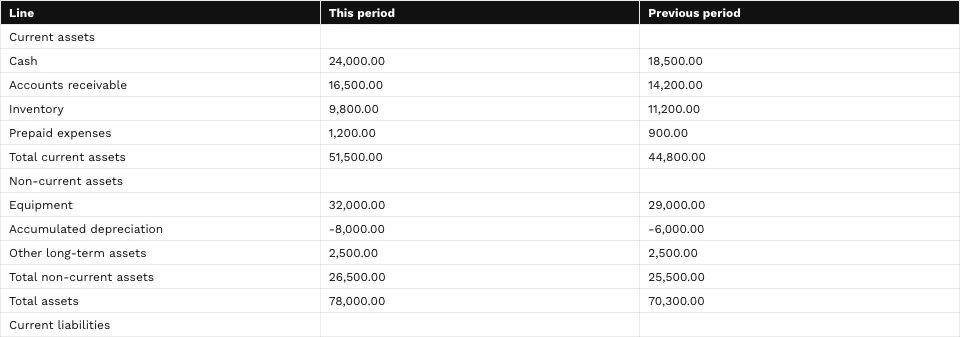
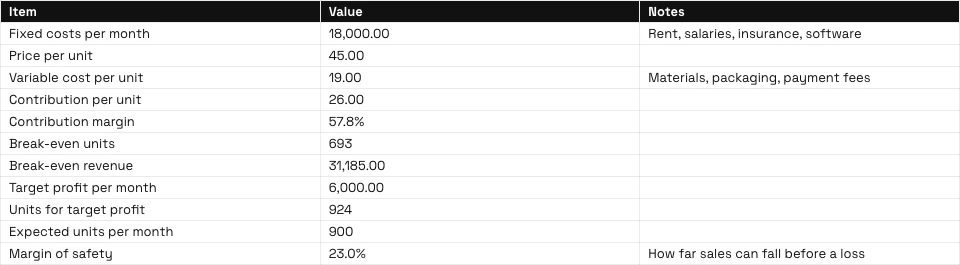
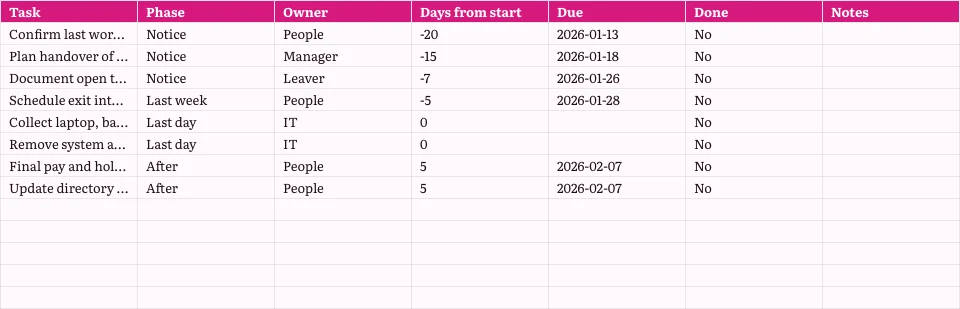
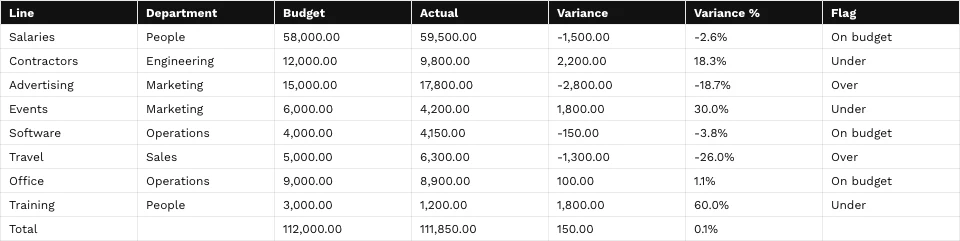
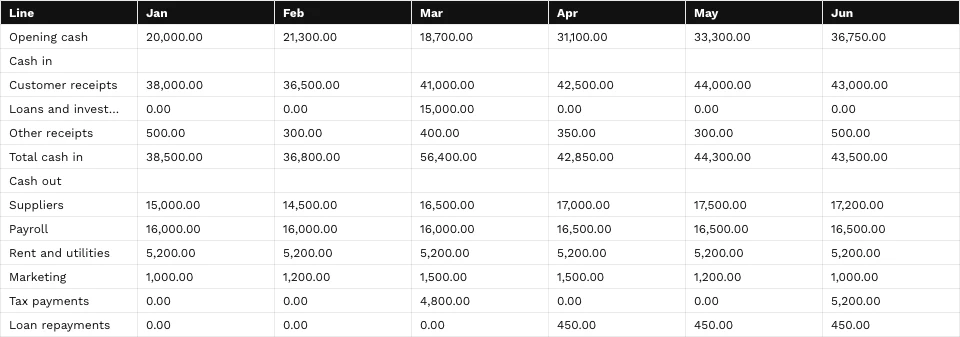
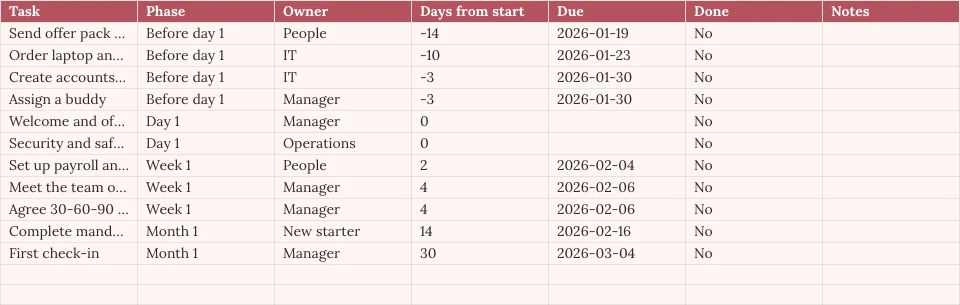
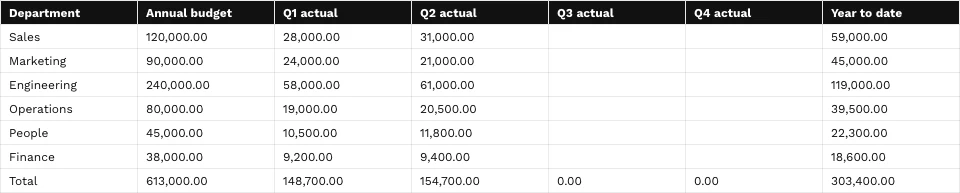
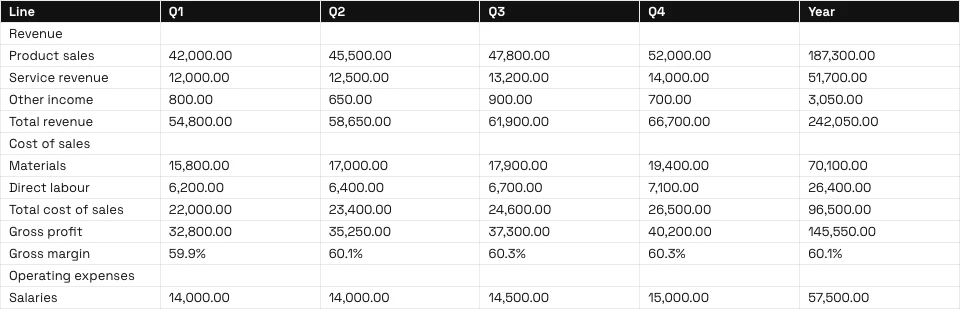
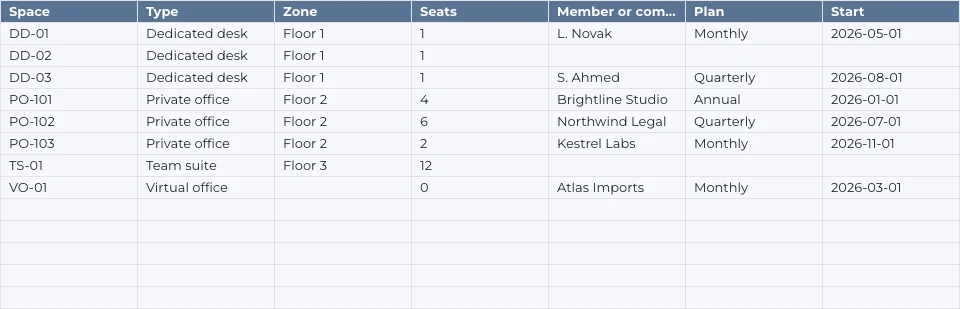
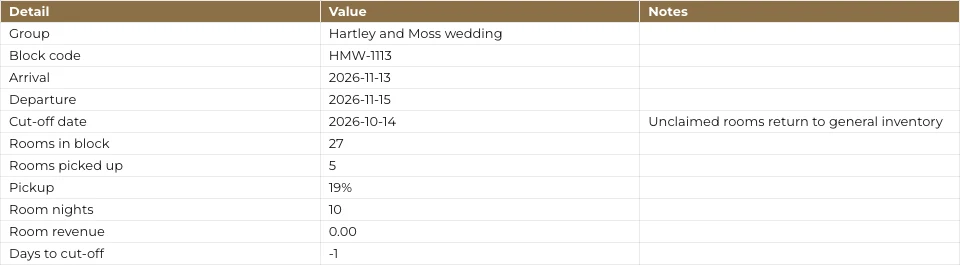
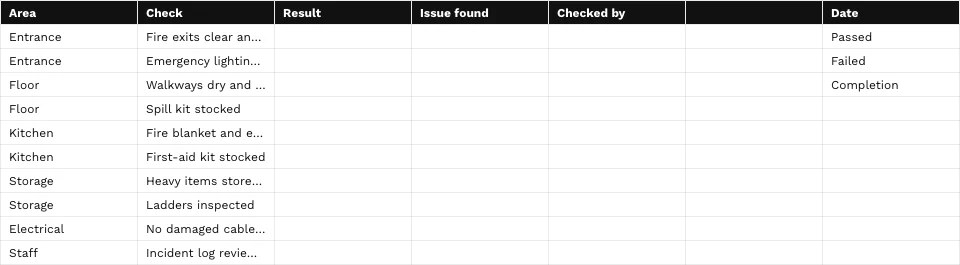
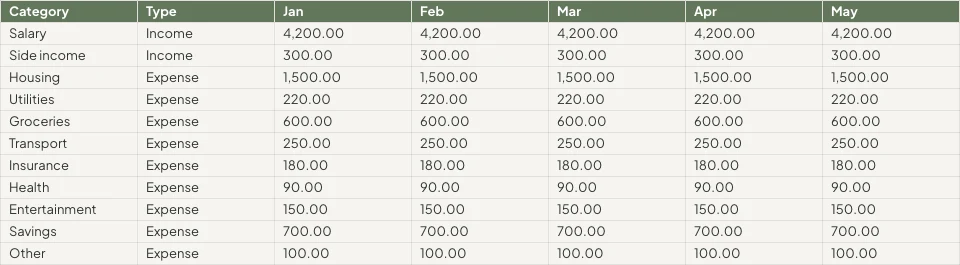
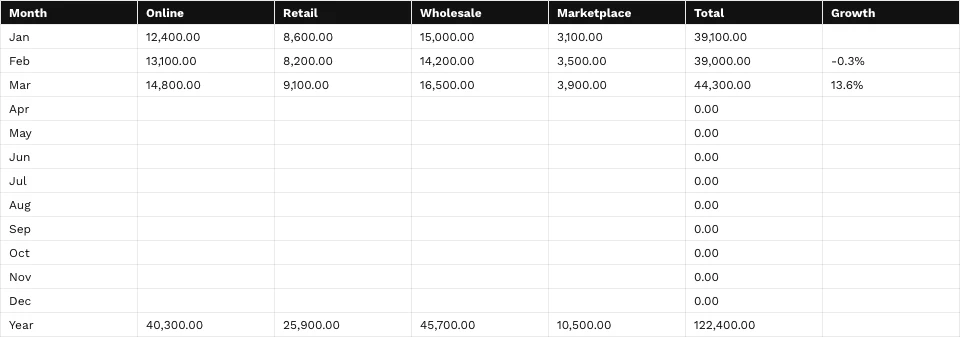

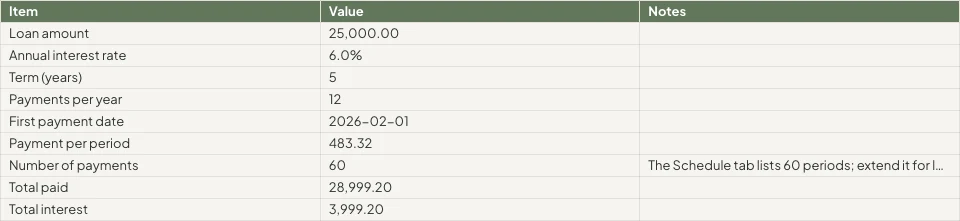
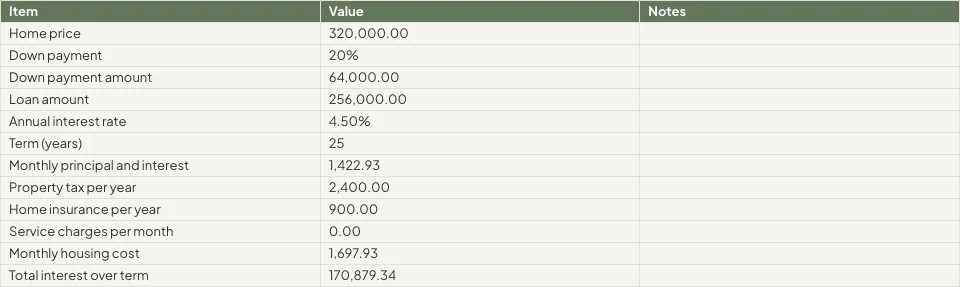
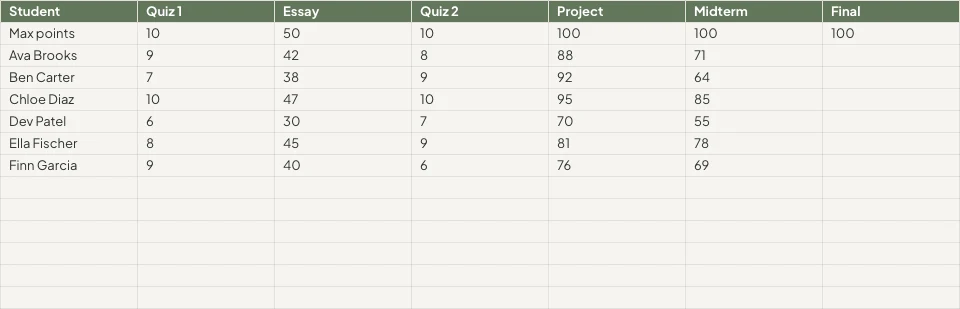



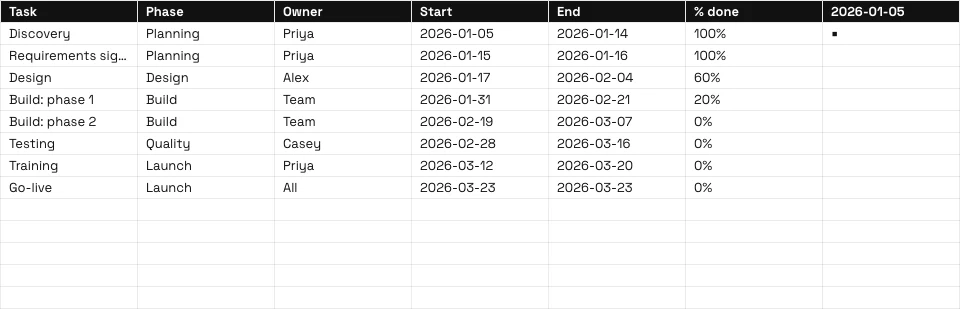
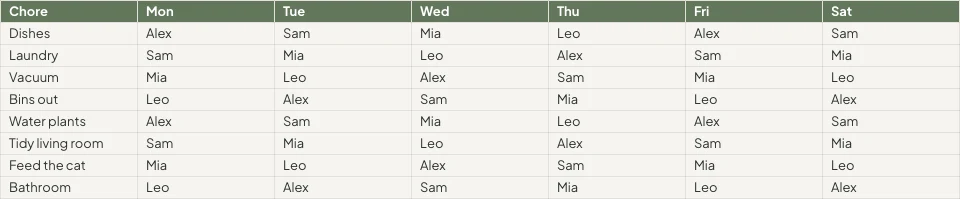

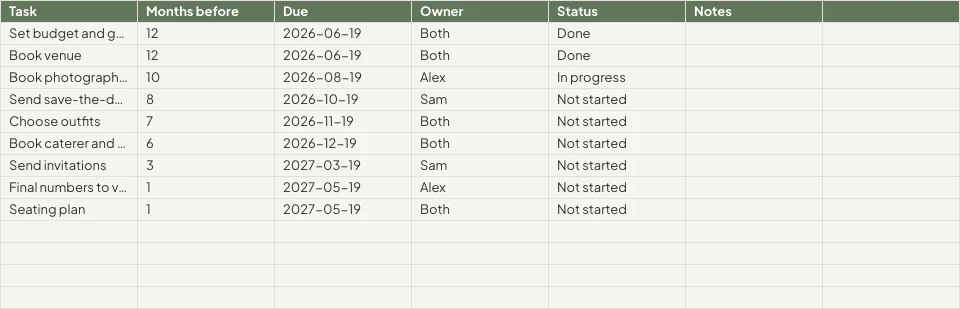
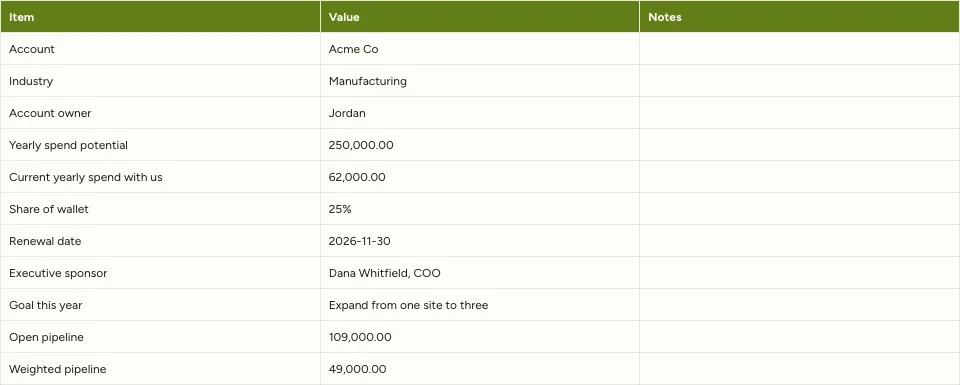
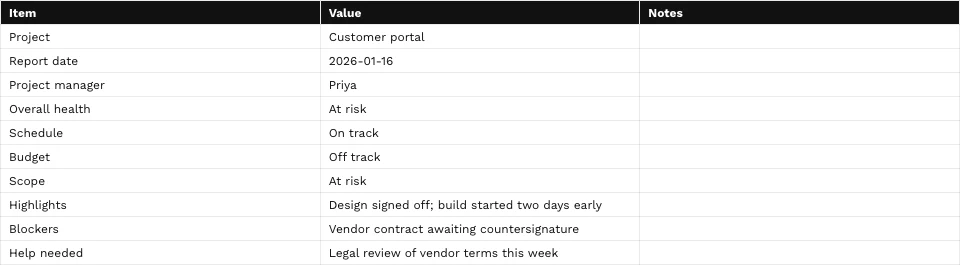
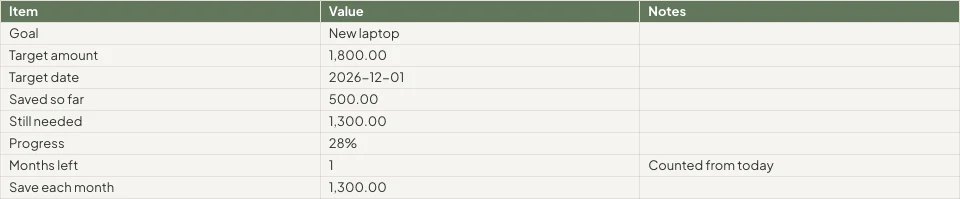

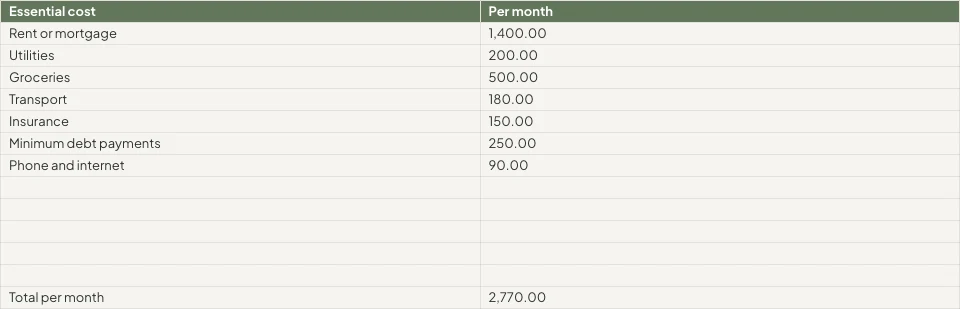
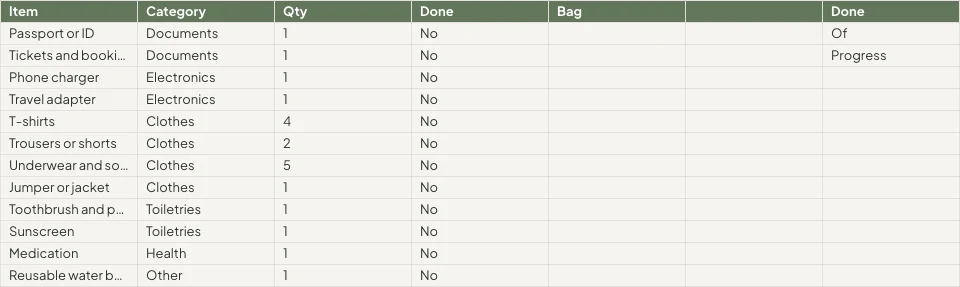
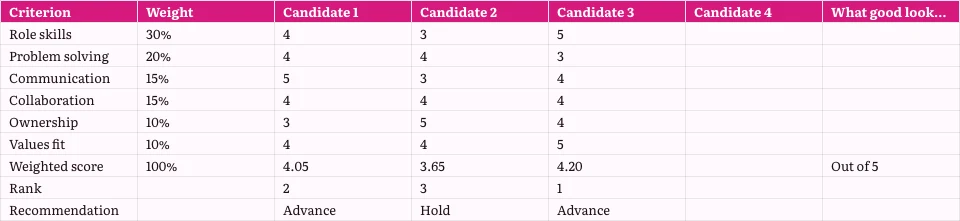
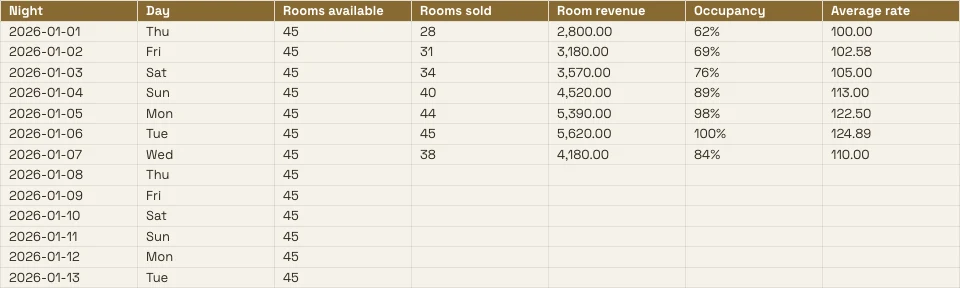
ตารางสเปรดชีตทั้งหมดที่ธุรกิจเก็บไว้ และบันทึก เบื้องหลัง
งบประมาณ, รายการราคา หรือตารางกะคือตารางสเปรดชีตที่นี่ และแท็บใดๆ สามารถอ่านได้จากแอปพลิเคชันที่เก็บข้อมูล
ตาราง
สูตร รูปแบบ และกฎ
เริ่ม
ว่างเปล่า เทมเพลต หรือไฟล์
ข้อมูลจาก Calisto
แท็บที่อ่านจากบันทึกของคุณ
วิเคราะห์
แผนภูมิ, การหมุนเวียน และคำถาม
ร่วมกัน
เซลล์ต่อเซลล์ พร้อมความคิดเห็น
แชร์
คน ลิงก์ โทรทัศน์ ไฟล์
ดำเนินการ
แถวที่กลายเป็นงาน
บนโทรศัพท์
อ่าน แก้ไข และแสดงความคิดเห็น
เขียนสูตร, จัดรูปแบบเซลล์ และตั้งค่ากฎ
พิมพ์สูตรจากฟังก์ชัน 245 รายการ หรืออธิบายสิ่งที่คุณต้องการข้างสูตรและรับมันกลับมา จัดรูปแบบจากชิปบนเซลล์ที่เลือกหรือจากแผงจัดรูปแบบ เมนูของแต่ละคอลัมน์และแถวจะเรียงลำดับ กรอง แช่แข็ง จัดกลุ่ม และทำความสะอาด
อธิบายสูตร
บอกสิ่งที่ต้องการ เช่น ค่าเฉลี่ยของคอลัมน์ D เมื่อสถานะคือ Active และสูตรจะถูกเขียนให้คุณ
กฎเกณฑ์เกี่ยวกับเซลล์
การจัดรูปแบบตามเงื่อนไข, สลับสี, และการตรวจสอบความถูกต้องด้วยรายการในรูปแบบชิปและช่องทำเครื่องหมาย
ชื่อช่วงและการดูแบบกรอง
ตั้งชื่อช่วงครั้งเดียว; บันทึกมุมมองที่กรองแล้วโดยไม่เปลี่ยนของใครอื่น
- Fees'Projects'!E2:E14แก้ไข
- Hours'Projects'!D2:D14แก้ไข
- OpenProjects'Projects'!A2:F9แก้ไข
- TaxRate'Settings'!B2แก้ไข
- Retainers'Retainers'!A2:D8แก้ไข
- ไม่มี (ตัวกรองของตารางเอง)
- Open, by client2
- Over 100 hours
- Owen’s projects
- Invoiced this quarter
คำสั่งทั้งหมดตามชื่อ
⌘K ค้นหาคำสั่งและฟังก์ชันใดๆ ตามชื่อหรือตระกูลของมัน
ค้นหาและแทนที่
ทุกแท็บ ทุกเซลล์ทั้งใบ กรณีต่อ หรือตามรูปแบบ และภายในสูตร
ชิปสำหรับวันที่ ผู้คน และไฟล์
วันที่, ติดต่อ หรือไฟล์จาก Depot เป็นชิปในเซลล์
ทำความสะอาด
ลบรายการซ้ำ ตัดช่องว่าง และแบ่งข้อความออกเป็นคอลัมน์
เริ่มว่างเปล่า จากแม่แบบ หรือจากไฟล์
อธิบายสเปรดชีตบนหน้าหลัก และเทมเพลตที่ใกล้เคียงที่สุดจะเปิดขึ้น หรือเลือกเทมเพลตตามประเภทและอุตสาหกรรม หรือเริ่มแบบว่างเปล่า ไม่มีอะไรถูกบันทึกจนกว่าคุณจะบันทึกเอง เปิดไฟล์ XLSX, ODS, CSV หรือ TSV จากอุปกรณ์หรือจาก Depot และสูตรคำนวณจะคำนวณใหม่
สร้าง ตารางสเปรดชีต ใหม่
คุณต้องการเริ่มต้นอย่างไร?
หรือเปิดไฟล์ที่คุณมีอยู่แล้ว: XLSX, ODS, CSV หรือ TSV ประเภทคอลัมน์จะถูกตรวจจับและจัดรูปแบบอัตโนมัติ
เลือกไฟล์อธิบายบนหน้าหลัก
บอกว่าตารางสเปรดชีตใช้สำหรับอะไร และเทมเพลตที่ใกล้เคียงที่สุดจะเปิดขึ้นในธีมของคุณ
สวัสดี Chloe
กรอกแท็บจากบันทึกในแอปของคุณที่ เก็บรักษา
เลือกการจอง, ดีล, การชำระเงิน, สินค้าคงคลัง, สมาชิก, ผู้ถือตั๋ว หรือรายชื่อบุคลากร แล้วแท็บจะถูกเติมจากรายการเอง โดยไม่ต้องส่งออก เลือกแบบ Live เพื่ออ่านอีกครั้งเมื่อเปิดใหม่ แบบ Manual สำหรับปุ่มรีเฟรช หรือแบบ Snapshot
กราฟมัน หมุนมัน และถามคำถาม คำถาม
แผนภูมิเป็นส่วนหนึ่งของเวิร์กบุ๊ก: มีเจ็ดประเภท วางทับเซลล์ ดึงข้อมูลจากเซลล์ตามที่เป็นอยู่ และแสดงบนโทรศัพท์และบนลิงก์ที่เผยแพร่แล้ว ตารางหมุน (pivot table) จะสรุปแท็บหนึ่งไปยังแท็บของตัวเอง
แผนภูมิ
คอลัมน์, กราฟแท่ง, กราฟเส้น, พื้นที่, จุดกระจาย, พาย และโดนัท วางทับเซลล์
ตารางสรุปข้อมูล
แถว คอลัมน์ และค่าต่างๆ ถูกสรุปไว้ในแท็บของตัวเอง
ถามเกี่ยวกับข้อมูลนี้
คำถามในคำง่ายๆ ตอบจากแท็บ
Unlimited members paid $18,960, PT Bundle $11,880 and 10-Pack $6,420.
Each Unlimited member paid $1,264 on average, across 15 members.
=AVERAGEIF(B2:B41,"Unlimited",E2:E41)แทรกในเซลล์ที่เลือกคัดลอกสูตรSmart Fill และจัดหมวดหมู่คอลัมน์อัตโนมัติ
คอลัมน์ที่สร้างเสร็จตามรูปแบบ; แต่ละคอลัมน์ได้รับประเภทและรูปแบบตัวเลข
ปรับปรุง สรุป หรือแปล
เซลล์ที่เลือกได้รับการปรับปรุง ย่อลง ใช้เสียงของแบรนด์ของคุณ สรุป หรือแปลแล้ว
Pastel de nata, saído do forno de hora a hora.Tosta mista no pão da Gleba, com queijo da Ilha.Galão cremoso, em copo alto, com leite dos Açores.Bolo de laranja da avó Lurdes, com calda a escorrer.
แทนที่ลองใหม่สถิติคอลัมน์
จำนวนรวม เฉลี่ย ต่ำสุด สูงสุด และมัธยฐานของคอลัมน์ใดๆ
- กรอกข้อมูลแล้ว
- 18
- ว่างเปล่า
- 2
- Distinct
- 11
- ข้อผิดพลาด
- 1
- ผลรวม
- 14,20,000
- ค่าเฉลี่ย
- 83,529.41
- ค่าเฉลี่ย
- 75,000
- ขั้นต่ำ
- 25,000
- สูงสุด
- 2,50,000
แก้ไขร่วมกัน และตัดสินใจว่าใครเห็น เซลล์ ใด
หลายคนแก้ไขตารางสเปรดชีตเดียวกันพร้อมกัน เซลล์ละเซลล์ ติดคอมเมนต์ไว้ที่เซลล์ ระบุชื่อใครบางคน หรือส่งต่อเส้นสนทนา และค้นหาสิ่งที่ต้องตอบบนหน้าหลัก ทุกครั้งที่บันทึกคือเวอร์ชันที่คุณสามารถเปรียบเทียบและกู้คืนได้
ความคิดเห็นเกี่ยวกับเซลล์
แปะไว้ที่เซลล์ พร้อมคำตอบและการกล่าวถึง แล้วส่งต่อให้ผู้อื่นตอบกลับ
ประวัติเวอร์ชัน
การขาย!B2เปลี่ยนแปลงการขาย!B4เปลี่ยนแปลงการขาย!D6เปลี่ยนแปลงการขาย!A9addedGraphic novel workshopการขาย!B9added24การขาย!A10removedการขาย!C8เปลี่ยนแปลงเปรียบเทียบสองเวอร์ชันเซลล์ต่อเซลล์และกู้คืน whichever
ช่วงและแท็บที่ป้องกัน
แท็บหรือช่วงที่เฉพาะเจ้าของเท่านั้นที่แก้ไขได้ หรือช่วงที่เตือนก่อนมีการเปลี่ยนแปลง
เซลล์ กฎข้อมูลของคุณ ซ่อน
กฎข้อมูลของ Purview ป้องกันไม่ให้เซลล์ใดเข้าถึงหน้าจอของผู้คน และรักษาความสมบูรณ์ไว้เมื่อพวกเขาบันทึก
การแจ้งเตือนเป็นกฎ
การทำงานอัตโนมัติ
ขั้นตอนที่จะทำงานเองเมื่อเกิดเหตุการณ์บางอย่างในธุรกิจของคุณ
| การทำงานอัตโนมัติ | เมื่อ | จากนั้น | 7 วันที่ผ่านมา | การทำงานครั้งล่าสุด | สถานะ | |
|---|---|---|---|---|---|---|
| Tell the people on a spreadsheet about a new commentComment added | Comment added | Tell the people | 86 | 21/11/2026 11:42 | กำลังใช้งาน | หยุดชั่วคราว |
| Tell a person when they are mentioned in a commentPerson mentioned in a comment | Person mentioned in a comment | Tell the person | 41 | 21/11/2026 10:15 | กำลังใช้งาน | หยุดชั่วคราว |
| Tell a person when a comment thread is assigned to themComment thread assigned | Comment thread assigned | Tell the person | 23 | 20/11/2026 17:08 | กำลังใช้งาน | หยุดชั่วคราว |
| Tell the people in a comment thread about a replyReply in a comment thread | Reply in a comment thread | Tell the people | 52 | 21/11/2026 09:31 | กำลังใช้งาน | หยุดชั่วคราว |
| Tell people when a spreadsheet is shared with themSpreadsheet shared | Spreadsheet shared | Tell the people | 9 | 19/11/2026 14:50 | หยุดชั่วคราว | ต่อเนื่อง |
| Tell the person who pulls invoices into a sheet that some are overdueOverdue invoices pulled into a sheet | Overdue invoices pulled into a sheet | Tell the person | 3 | 17/11/2026 08:57 | กำลังใช้งาน | หยุดชั่วคราว |
การแบ่งปัน, ความคิดเห็น, การตอบกลับ หรือการกล่าวถึงจะแจ้งผู้คนผ่านกฎที่คุณสามารถหยุดชั่วคราวใน Automations ได้
แปลงแถวเป็น ใบแจ้งหนี้ งาน แผนงาน และ บันทึก
สร้างใบแจ้งหนี้ใน Ledger จากบรรทัดของแท็บ สร้างงานใน Dispatch หรือแสดงแผนภูมิใน Slides ซึ่งยังคงเชื่อมโยงกับตารางสเปรดชีตนี้ แบบฟอร์มที่เชื่อมโยงกับตารางสเปรดชีตจะเพิ่มแถวหนึ่งแถวต่อคำตอบ พร้อมคอลัมน์ใหม่สำหรับคำถามใหม่แต่ละข้อ
ใบแจ้งหนี้ในบัญชีแยกประเภท
บรรทัดในแท็บจะกลายเป็นใบแจ้งหนี้ที่คุณตรวจสอบและสร้างในบัญชีแยกประเภท
ใบแจ้งหนี้ จ่ายบางส่วน
รายละเอียดใบแจ้งหนี้
| คำอธิบาย | จำนวน | ราคาต่อหน่วย | รวมทั้งหมด |
|---|---|---|---|
| Group stay, 6 rooms, 3 nights | 18 | R 1 650,00 | R 29 700,00 |
| Cape Malay breakfast, guests | 36 | R 145,00 | R 5 220,00 |
| Airport transfers, minibus | 2 | R 950,00 | R 1 900,00 |
| Bo-Kaap walking tour | 12 | R 280,00 | R 3 360,00 |
| Cooking class, Cape Malay | 12 | R 620,00 | R 7 440,00 |
| Late checkout, 6 rooms | 6 | R 250,00 | R 1 500,00 |
งานในแผนกกระจายงาน
งานที่มีผู้รับผิดชอบ กำหนดส่ง และระดับความสำคัญ เชื่อมโยงกับตารางสเปรดชีต
แผนภูมิในสไลด์
แผนภูมิที่มีกราฟยังคงเชื่อมโยงกับตารางสเปรดชีตนี้
แถวจากแบบฟอร์ม
แบบฟอร์มที่เชื่อมโยงกันจะเพิ่มแถวหนึ่งแถวต่อแต่ละการตอบกลับ
แถวใน Automation
แถวใหม่เริ่มต้นกฎ และกฎเพิ่มแถวหนึ่งครั้งไม่ว่าจะลองกี่ครั้ง
พบใบแจ้งหนี้ที่ค้างชำระ
การดึงข้อมูลบัญชีที่พบใบแจ้งหนี้ที่ค้างชำระจะแจ้งให้ผู้ที่ดึงข้อมูลทราบว่าโดยปกติแล้วคุณสามารถหยุดดำเนินการได้
ใบแจ้งหนี้ จ่ายบางส่วน
รายละเอียดใบแจ้งหนี้
| คำอธิบาย | จำนวน | ราคาต่อหน่วย | รวมทั้งหมด |
|---|---|---|---|
| Group stay, 6 rooms, 3 nights | 18 | R 1 650,00 | R 29 700,00 |
| Cape Malay breakfast, guests | 36 | R 145,00 | R 5 220,00 |
| Airport transfers, minibus | 2 | R 950,00 | R 1 900,00 |
| Bo-Kaap walking tour | 12 | R 280,00 | R 3 360,00 |
| Cooking class, Cape Malay | 12 | R 620,00 | R 7 440,00 |
| Late checkout, 6 rooms | 6 | R 250,00 | R 1 500,00 |
อ่าน แก้ไข และแสดงความคิดเห็น จาก โทรศัพท์
ตารางสเปรดชีตในรูปทรงของโทรศัพท์: แก้ไขเซลล์ กรองคอลัมน์ กรอกแท็บจากบันทึกของคุณ ตอบความคิดเห็น และนำเสนอแผนภูมิ ตารางสเปรดชีตที่แชร์จากแอปอื่นจะเปิดใน Sheets
สถานที่ที่ Sheets สัมผัสกับทุกสิ่ง อื่น ๆ
3 of these 8 connections are in your plan today; the others are their own apps.
Forms
A linked form adds one row per response, with a new column for each new question.
Depot
Every spreadsheet is in Depot and its Hubs, and a spreadsheet file in Depot opens in Sheets.
Slides
Present in Slides makes a deck whose chart stays linked to the spreadsheet.
Ledger
Ledger’s statements, invoices and transactions fill a tab, and Generate Invoice makes the invoice in Ledger.
Workforce
The team and the schedule fill a tab, read again whenever it is opened.
Dispatch
Create Task makes a task in Dispatch from the spreadsheet.
Deals
Deals’ pipeline fills a tab, and Attach to Deal files the spreadsheet on a deal as a PDF.
Display
A published spreadsheet is shown on a TV as a data table.
ไม่มีต้นทุนการติดตั้ง จ่ายเมื่อเริ่มใช้งาน
Spreadsheets your team works in together.
Calisto Work is one subscription per person for Docs, Sheets, Slides, Forms, Agenda, Equipo, and Depot, with a branded mailbox for each person.
แนะนำสำหรับคุณ
ทำงานร่วมกันได้ดี
Calisto Forms
Calisto Depot
Calisto Slides
Calisto Ledger
Calisto Workforce
Calisto Dispatch
Calisto Deals
Calisto Commerce
The CRM: leads routed and claimed, a pipeline on your own stages, quotes as versions and the contracts they become, people and companies, the day’s follow-ups, the handoff after the sale, commissions and the forecast.
Learn more →Calisto Display
Calisto Display
Runs the TVs in a business: kitchen displays, pickup and now-serving boards, guest TVs, menu boards, signage and designed screens, with schedules, alerts and performance.
Learn more →Calisto Automations
แนะนำสำหรับ
อุตสาหกรรมที่ดำเนินการ Sheets และสิ่งที่แต่ละอุตสาหกรรมดำเนินการเพื่อวัตถุประสงค์นั้น
ตัวแทนอสังหาริมทรัพย์รายงาน
Commission splits and pipeline reporting.
ตัวแทนอสังหาริมทรัพย์ บน Calisto →การพัฒนาอสังหาริมทรัพย์รายงาน
Payment plans, cost tracking, unit reporting.
การพัฒนาอสังหาริมทรัพย์ บน Calisto →นักออกแบบกราฟิกและศิลปินJob costing sheets
Job costing and retainer tracking.
นักออกแบบกราฟิกและศิลปิน บน Calisto →สิ่งทั้งหมดที่รวมอยู่ใน Calisto Sheets.
- Calisto’s own spreadsheet engine, with as many tabs as the work needs
- 245 functions by family, found by name in ⌘K
- Describe what you need beside the formula, and get the formula back
- Iterative calculation, set per spreadsheet, so every reader gets the same answers
- Show Formulas, gridlines, Add 1000 Rows, keyboard shortcuts
- Find, and Find and Replace
- The format chip on the selected cells, and one Format panel for everything else
- Number formats in the business’s own currency, percentages, dates and plain numbers; never a currency nobody recorded
- Conditional formatting, alternating colors and color scales
- Data validation: lists shown as chips, tick boxes, numbers, dates, text and custom rules
- Merge, wrap, borders, freeze, hide and group rows and columns
- Each column’s and row’s menu: insert, delete, size, sort, filter, group, stats and clean-up
- Date chips and contact chips that name a customer from your contacts
- Describe it on Home and the closest template opens; or start blank, in a theme, or from a template by type, industry, style and color
- A template is a design worn in a theme; its blanks are asked for before it opens
- Nothing is saved until you save it; leaving with changes asks first
- Open XLSX, ODS, CSV and TSV files, and shared text arrives as a grid
- Open a spreadsheet file from Depot in Sheets
- Make a Copy, Save as Template, Edit Template
- Bookings: every booking, and revenue by channel per currency
- Deals: the open pipeline and what was won
- Payments: transactions
- Inventory: stock on hand, and what is below its reorder point
- Registry: members; Tickets: attendees; Workforce: the team and the schedule
- Ledger Data: the balance sheet, profit and loss, the invoices register and the transaction register
- Catalog Data, and Subscription Metrics (what the business pays Calisto)
- A web address: a public CSV or JSON file
- Live, Manual or Snapshot for each tab, with when it was read
- Money only for people the owner’s settings allow; anyone else reads “Not shared with you”
- Charts kept in the spreadsheet: column, bar, line, area, scatter, pie and donut
- A chart placed over the cells, drawn from the cells as they are now, on every device and the published link
- Pivot tables onto a tab of their own
- Column stats: count, sum, average, lowest, highest and median
- Smart Fill, Auto-Classify Columns and Ask About This Data
- Improve, shorten, summarize or translate the selected cells, or change their tone to your brand’s voice
- Named ranges and filter views
- Editing together, merged cell by cell; everyone in the spreadsheet shown in Share
- Comments pinned to a cell, with replies, mentions and threads handed to someone
- Comments for You on Home: the threads that are yours to answer
- Version history: compare two versions cell by cell, restore, and name a version
- Notices for a share, a comment, a reply, a mention and a handed thread, each a rule you can pause in Automations
- Share with people to view, comment or edit, and change or remove access in place
- Protected tabs and ranges: owner only, or for a range a warning before a change
- Purview’s Data Rules keep a cell from reaching a person’s screen, and keep it intact when they save
- Collections and locks set in Purview apply here too
- Publish a link anyone can open, and take it back
- A published spreadsheet shown on a TV, with Display
- Export XLSX, ODS, CSV, TSV, HTML and PDF, with the page setup, and print
- Send: Email, an Inbox message, Live, a Connect channel, or Attach to Deal (a PDF on the deal)
- Save to a Hub and Folder; every spreadsheet is in Depot
- Copy Link, Star, Details with a description, Trash with 30 days to restore
- Generate Invoice in Ledger from a tab’s lines
- Create Task in Dispatch
- Present in Slides: a deck whose chart stays linked to the spreadsheet
- A linked form adds one row per response, with a new column for each new question
- Automations: a new spreadsheet, a new row, a share and a pulled overdue invoice start rules; a rule adds a row or makes a spreadsheet, each row once whatever the retries
- Refine Design: the theme of a spreadsheet (its colors, the header band, type and row height)
- Brand Check: the words read against your brand guidelines
- The same look on the desk, the phone, the published link, the charts, XLSX and PDF
- The number format new spreadsheets start with, for the business
- Your own preferences, the same in every business: recalculate as you type or on F9, and where Share starts
- Each person chooses which comment notices reach them
- Home, Spreadsheets, Templates and Library in the tab bar; an open spreadsheet fills the screen
- Undo and Redo, Find, the cell’s sheet with its format and filter, Data, Comments and the tabs
- Spreadsheets kept on the device open read-only with no signal; a comment written then is sent later
- Spreadsheets shared from another app open in Sheets
- Notifications that open the comment, with Reply and Mark as Done
- Shortcuts: New Spreadsheet, Recent, Shared with Me and Templates
Questions about Calisto Sheets
ไฟล์ XLSX, ODS, CSV และ TSV จากอุปกรณ์ จาก Depot หรือแชร์จากแอปอื่นในโทรศัพท์ สูตรจะถูกคำนวณใหม่โดยเครื่องยนต์ของ Calisto ไฟล์ XLS รุ่นเก่าไม่สามารถเปิดได้
จากบันทึกที่แอปเก็บไว้: การจอง การทำดีล การชำระเงิน สต็อก สมาชิก ผู้ถือตั๋ว รายชื่อ และงบการเงินและทะเบียนของ Ledger อ่านสดอีกครั้งทุกครั้งที่เปิดสเปรดชีต รอแบบแมนนวลสำหรับ Refresh แบบ Snapshot ไม่เปลี่ยนแปลง ตัวเลขที่บุคคลอาจไม่เห็นจะอ่านว่า "ไม่แชร์กับคุณ"
ใช่ การแก้ไขจะรวมเซลล์ทีละเซลล์ ทุกคนในตารางสเปรดชีตจะปรากฏใน Share และความคิดเห็นสามารถปักหมุดที่เซลล์ ระบุชื่อใครบางคน หรือส่งมอบให้พวกเขาได้
ตารางสเปรดชีตที่เปิดอ่านอย่างเดียวบนอุปกรณ์ ดังนั้นสำเนาเก่าจึงไม่เคยทับงานใหม่ คอมเมนต์ที่เขียนโดยไม่มีสัญญาณจะถูกส่งเมื่อการเชื่อมต่อกลับมา การแก้ไขต้องการการเชื่อมต่อ
ไฟล์ XLSX, ODS, CSV, TSV, HTML และ PDF จะนำตารางไปด้วย ไฟล์ XLSX, PDF และ HTML จะนำรูปแบบไปด้วย แผนภูมิและรูปภาพจะอยู่ใน Calisto บนทุกอุปกรณ์และบนลิงก์ที่เผยแพร่
Sheets เป็นส่วนหนึ่งของ Calisto Work การสมัครสมาชิกหนึ่งรายการต่อคน ส่วนราคาบนหน้านี้จะอ่านแคตตาล็อกแบบเรียลไทม์ แอปที่ตารางสเปรดชีตเปิดเข้าไป เช่น Ledger หรือ Dispatch จะถูกกำหนดราคาในแอปของตนเอง
@Lucía Hernández Molinos raised the 25 kg sack again. Do we keep 18 or drop to 15 for the week?
Keep 18. Día de Muertos orders start on Thursday.
Masa madre is back in stock at Granos Ruiz. Two packs should cover the sourdough this week.
ตอบกลับแก้ไขMantequilla price confirmed with San Ángel for November.
ทำเครื่องหมายว่าเสร็จสิ้นแล้วตอบกลับเปิดใหม่