Jadual spreadsheet yang dibina dan digunakan oleh pasukan anda bersama.
Tulis formula, carta dan putar angka, serta edit fail spreadsheet yang sama pada masa yang sama dengan orang lain, sama ada di atas meja atau di telefon. Sebarang tab juga boleh diisi dari rekod yang dijaga oleh perniagaan anda.
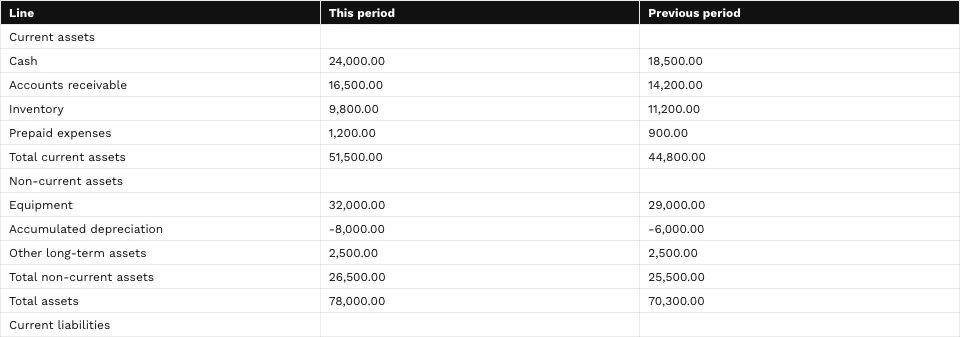
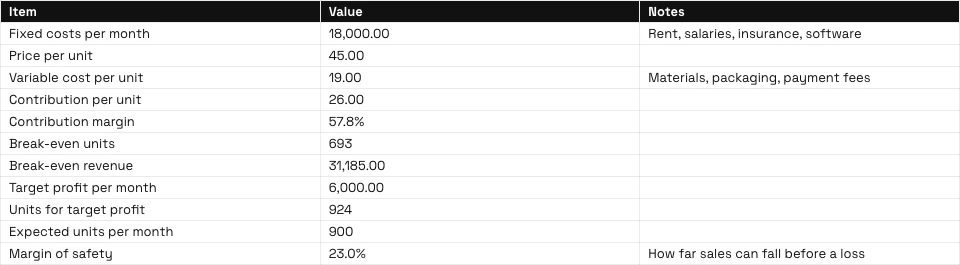
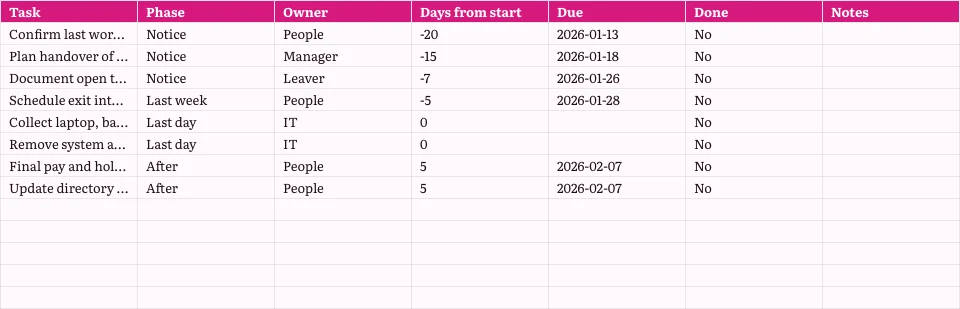
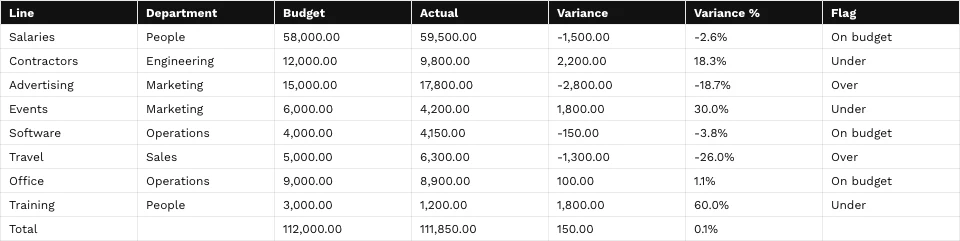
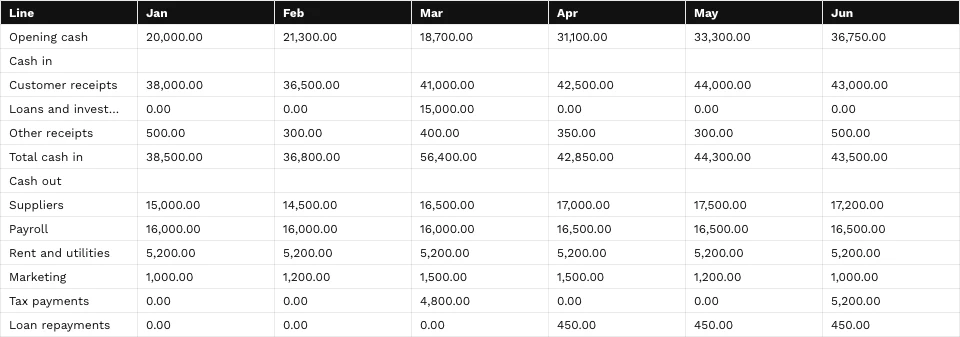
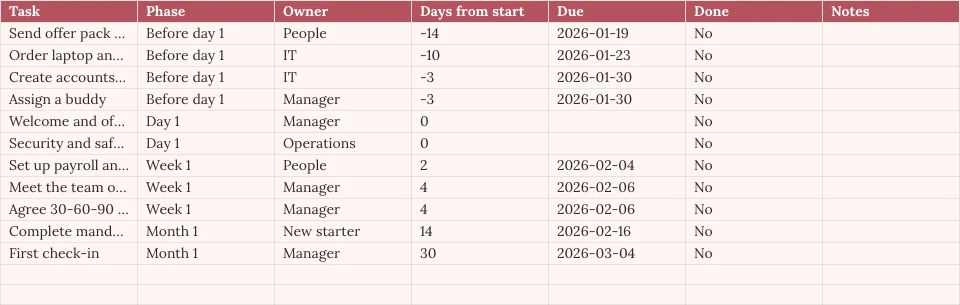
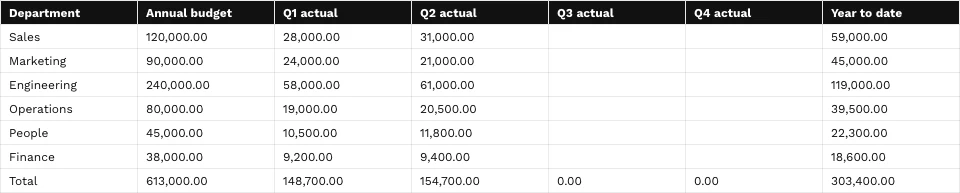
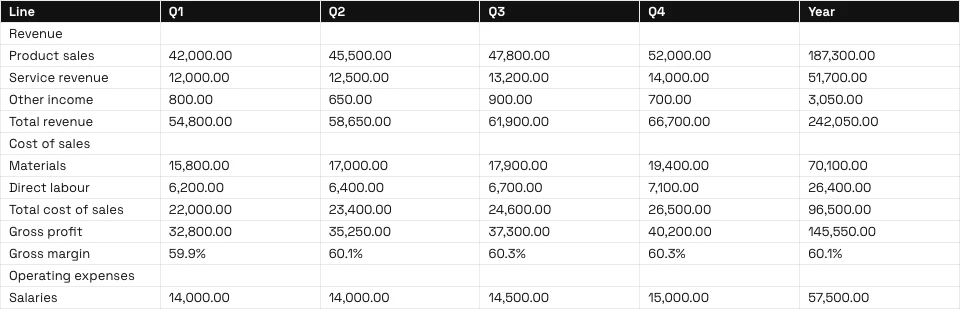
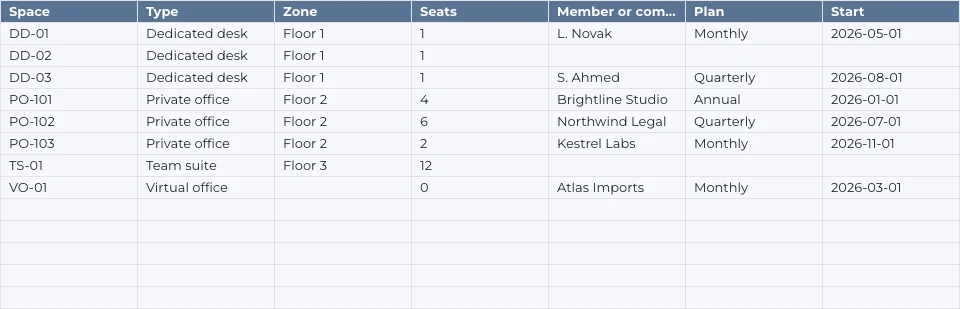
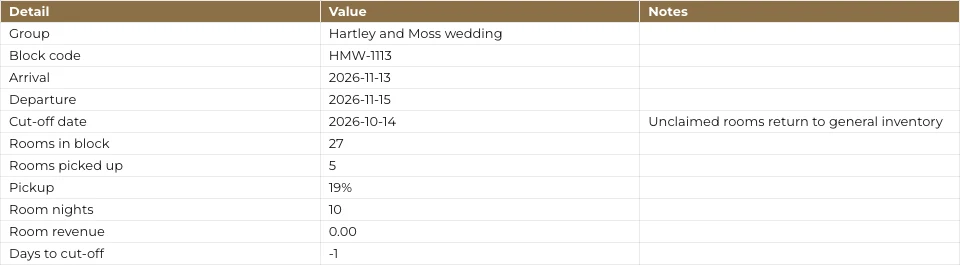
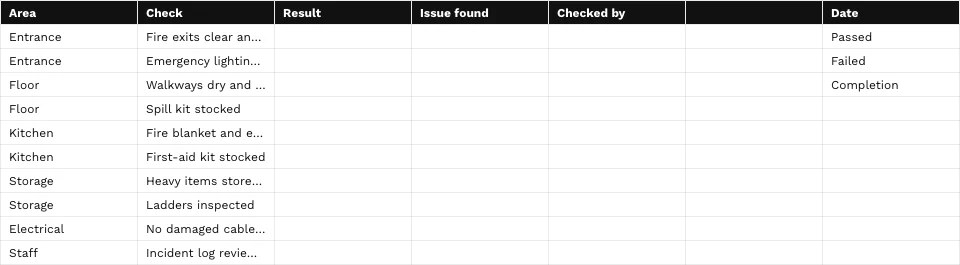
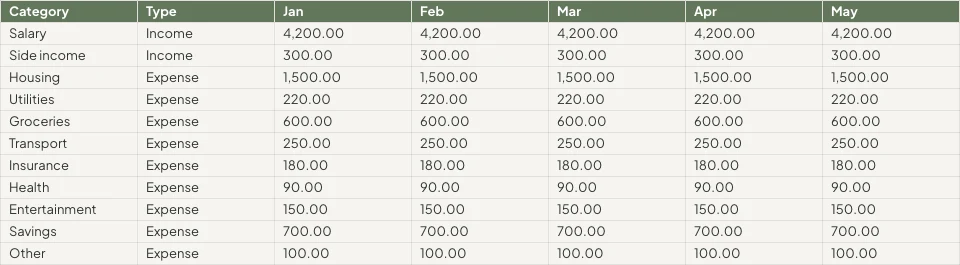
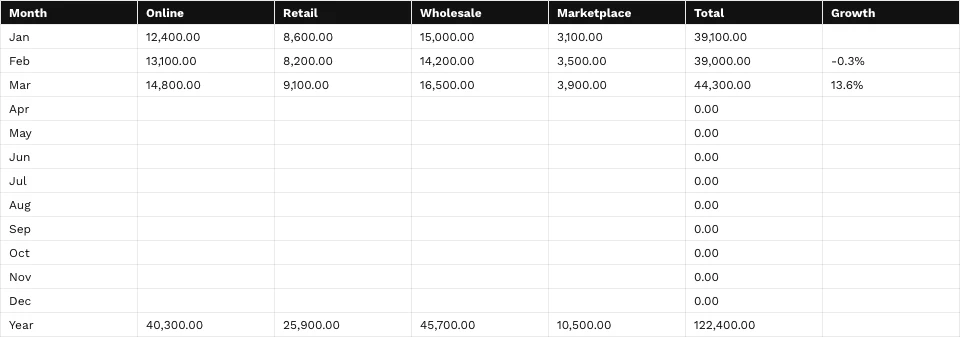

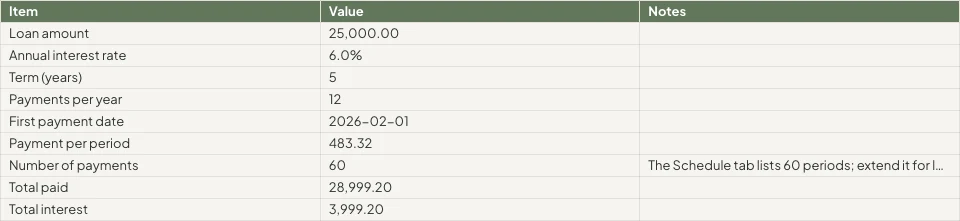
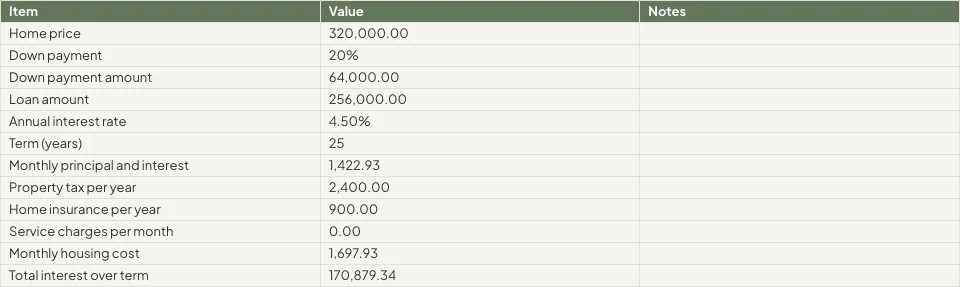
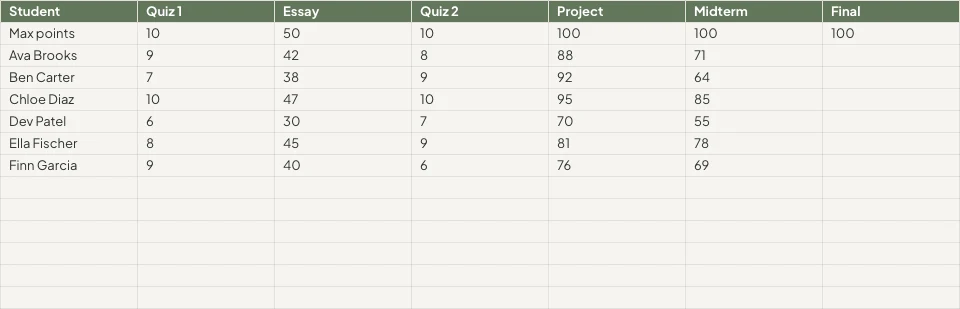



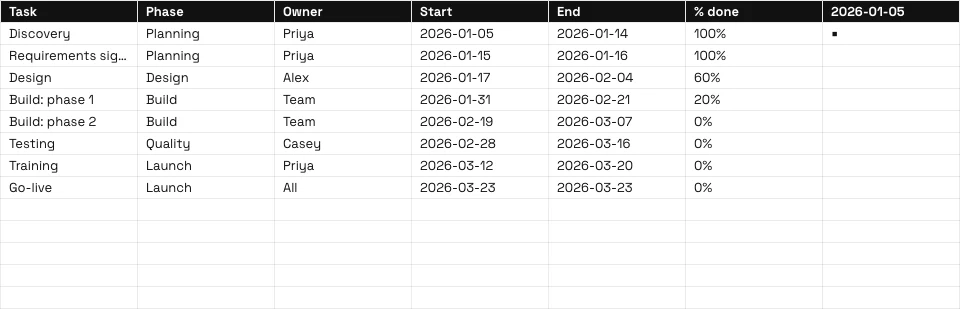
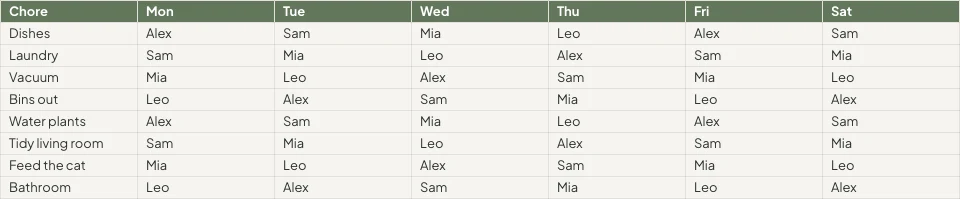

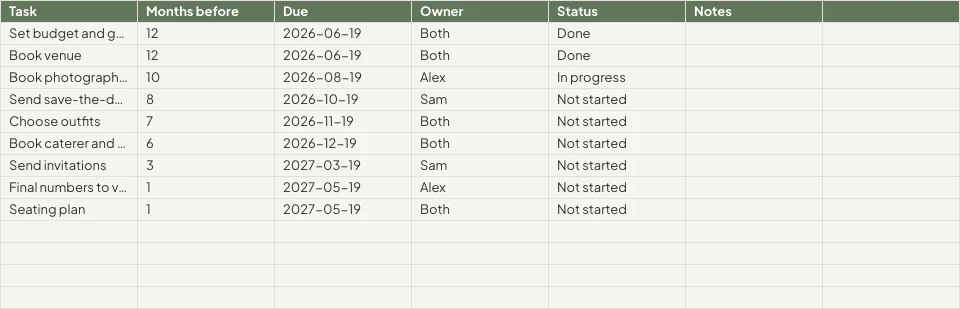
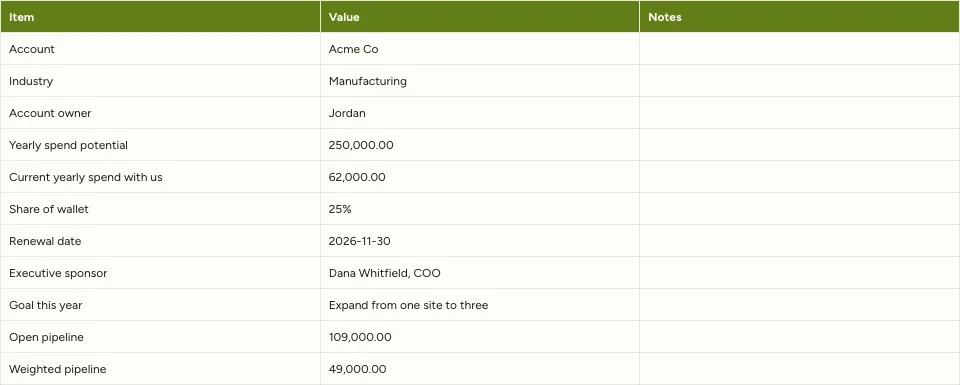

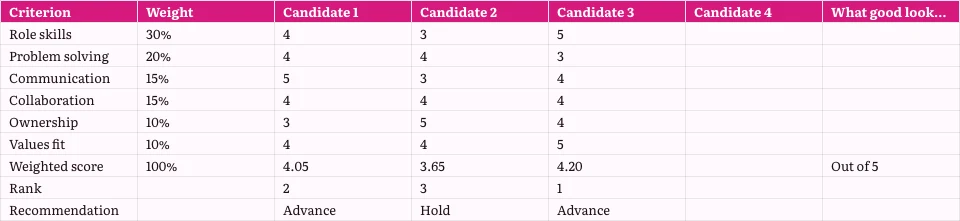
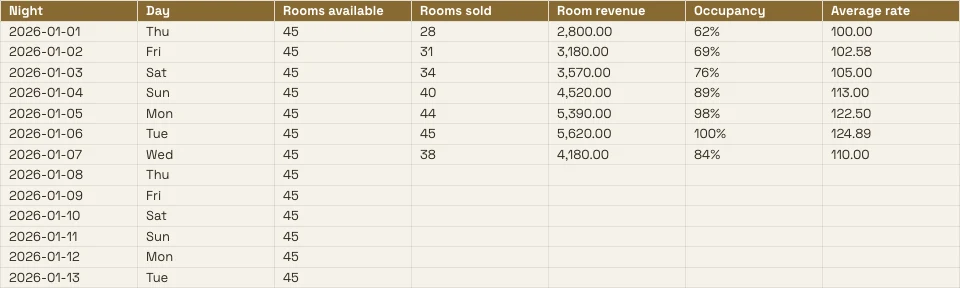
Setiap lembaran kerja yang disimpan oleh perniagaan, dan rekod di belakangnya
Bajet, senarai harga atau jadual adalah fail spreadsheet di sini, dan mana-mana tab boleh dibaca daripada aplikasi yang menyimpan rekod.
The Grid
Rumus, format dan peraturan.
Mula
Kosong, templat atau fail.
Data Dari Calisto
Tab dibaca dari rekod anda.
Analisis
Carta, putaran dan soalan.
Bersama
Sel demi sel, dengan komen.
Kongsi
Orang, pautan, televisyen, fail.
Tindakan
Baris yang menjadi kerja.
Di Telefon
Baca, edit dan komen.
Tulis Rumus, Format Sel dan Tetapkan Peraturan
Taipkan formula daripada 245 fungsi, atau gambarkan keperluan anda di sebelah formula dan dapatkan satu. Format dari chip pada sel yang dipilih atau panel Format. Menu setiap lajur dan baris menyusun, menapis, membekukan, mengumpul dan membersihkan.
Terangkan Satu Formula
Nyatakan keperluan anda, seperti purata lajur D di mana status adalah Aktif, dan formula akan ditulis untuk anda.
Peraturan pada Sel
Pembentukan format bersyarat, warna bergantian, dan pengesahan dengan senarai sebagai chip dan kotak centang.
Senarai Nama dan Paparan Penapis
Namakan julat sekali; simpan paparan tersaring tanpa mengubah milik sesiapa lagi.
- Fees'Projects'!E2:E14Edit
- Hours'Projects'!D2:D14Edit
- OpenProjects'Projects'!A2:F9Edit
- TaxRate'Settings'!B2Edit
- Retainers'Retainers'!A2:D8Edit
- Tiada (Penapis Sendiri Lembaran)
- Open, by client2
- Over 100 hours
- Owen’s projects
- Invoiced this quarter
Setiap Arahan Mengikut Nama
⌘K mencari sebarang arahan dan sebarang fungsi, melalui namanya atau keluarganya.
Cari dan Ganti
Di setiap tab, mengikut sel penuh, mengikut kes atau corak, dan di dalam formula.
Cip untuk Tarikh, Orang dan Fail
Tarikh, hubungan atau fail dari Depot sebagai cip dalam sel.
Bersihkan
Buang duplikat, potong ruang, bahagikan teks ke dalam lajur.
Mula Kosong, Dari Templat atau Dari Fail
Nyatakan borang spreadsheet pada Home dan templat terdekat dibuka, atau pilih templat mengikut jenis dan industri, atau mulakan kosong. Tiada apa-apa disimpan sehingga anda menyimpannya. Buka fail XLSX, ODS, CSV atau TSV, daripada peranti atau daripada Depot, dan rumusnya akan dikira semula.
Cipta Borang Spreadsheet Baru
Bagaimana anda mahu memulakan?
Atau buka fail yang sudah anda ada: XLSX, ODS, CSV atau TSV. Jenis lajur dikesan dan diformat secara automatik.
Pilih FailTerangkan di Halaman Utama
Nyatakan tujuan spreadsheet tersebut, dan templat terdekat akan dibuka dalam tema anda.
Selamat pagi, Chloe.
Isi Tab Dari Rekod Aplikasi Simpan Anda
Kos Tuang, Langsung
Chart It, Pivot It dan Ask It Soalan
Grafik milik buku kerja: tujuh jenis, diletakkan di atas sel, digambar daripada sel seperti yang ada sekarang, dan dipaparkan pada telefon dan pada pautan yang diterbitkan. Jadual pivot merangkum tab ke tab tersendiri.
Carta
Lajur, bar, garis, kawasan, serakan, pai dan donat, diletakkan di atas sel.
Jadual Pusing
Baris, lajur dan nilai diringkaskan ke dalam tab tersendiri.
Tanya Tentang Data Ini
Soalan dalam kata-kata mudah, dijawab dari tab.
Unlimited members paid $18,960, PT Bundle $11,880 and 10-Pack $6,420.
Each Unlimited member paid $1,264 on average, across 15 members.
=AVERAGEIF(B2:B41,"Unlimited",E2:E41)Masukkan Ke Sel Yang DipilihSalin FormulaPadai Pintar dan Kolum Pengelasan Automatik
Satu lajur yang disiapkan dari coraknya; setiap lajur diberi jenis dan format nombornya.
Perbaiki, Ringkaskan atau Terjemahkan
Sel yang dipilih telah diperbaiki, dipendekkan, disesuaikan dengan suara jenama anda, diringkaskan atau diterjemahkan.
Pastel de nata, saído do forno de hora a hora.Tosta mista no pão da Gleba, com queijo da Ilha.Galão cremoso, em copo alto, com leite dos Açores.Bolo de laranja da avó Lurdes, com calda a escorrer.
GantiCuba semulaStatistik Kolom
Kira, jumlah, purata, terendah, tertinggi dan median bagi mana-mana lajur.
- Dipenuhi
- 18
- Kosong
- 2
- Distinct
- 11
- Kesilapan
- 1
- Jumlah
- 14,20,000
- Purata
- 83,529.41
- Median
- 75,000
- Minimum
- 25,000
- Maksimum
- 2,50,000
Edit Bersama, dan Putuskan Siapa Melihat Sel Manakah
Beberapa orang mengedit satu spreadsheet serentak, sel demi sel. Tampal komen pada sel, sebutkan seseorang atau serahkan utas kepada mereka, dan cari jawapan yang perlu anda balas di Home. Setiap simpanan adalah versi yang boleh anda bandingkan dan pulihkan.
Komen pada Sel
Ditetapkan pada sel, dengan balasan dan sebutan, dan diserahkan kepada seseorang untuk dijawab.
Sejarah Versi
Jualan!B2telah berubahJualan!B4telah berubahJualan!D6telah berubahJualan!A9addedGraphic novel workshopJualan!B9added24Jualan!A10removedJualan!C8telah berubahBandingkan dua versi sel demi sel dan pulihkan salah satu.
Julat dan Tab Terpelihara
Satu tab atau julat hanya boleh diedit oleh pemiliknya, atau julat yang memberi amaran sebelum perubahan.
Sel Arahan Data Anda Sembunyi
Peraturan Data Purview menghalang sel daripada mencapai skrin seseorang, dan menjaganya utuh apabila mereka menyimpan.
Notis sebagai Peraturan
Automasi
Langkah yang berjalan sendiri apabila sesuatu berlaku dalam perniagaan anda.
| Automasi | Apabila | Kemudian | 7 hari lepas | Larian terakhir | Status | |
|---|---|---|---|---|---|---|
| Tell the people on a spreadsheet about a new commentComment added | Comment added | Tell the people | 86 | 21/11/2026 11:42 | Aktif | Jeda |
| Tell a person when they are mentioned in a commentPerson mentioned in a comment | Person mentioned in a comment | Tell the person | 41 | 21/11/2026 10:15 | Aktif | Jeda |
| Tell a person when a comment thread is assigned to themComment thread assigned | Comment thread assigned | Tell the person | 23 | 20/11/2026 17:08 | Aktif | Jeda |
| Tell the people in a comment thread about a replyReply in a comment thread | Reply in a comment thread | Tell the people | 52 | 21/11/2026 09:31 | Aktif | Jeda |
| Tell people when a spreadsheet is shared with themSpreadsheet shared | Spreadsheet shared | Tell the people | 9 | 19/11/2026 14:50 | Ditangguhkan | Semula |
| Tell the person who pulls invoices into a sheet that some are overdueOverdue invoices pulled into a sheet | Overdue invoices pulled into a sheet | Tell the person | 3 | 17/11/2026 08:57 | Aktif | Jeda |
Sebahagian, komen, balasan atau sebutan memberitahu orang melalui peraturan yang boleh anda hentikan dalam Automations.
Tukar Baris Menjadi Invois, Tugas, Deck dan Rekod
Hasilkan faktura dalam Ledger dari baris tab, cipta tugasan dalam Dispatch, atau paparkan carta dalam Slides, di mana ia kekal terikat dengan fail spreadsheet ini. Borang yang terikat dengan fail spreadsheet menambah satu baris bagi setiap respons, dengan lajur baharu bagi setiap soalan baharu.
Bil dalam Buku Besar
Garisan tab menjadi faktura yang anda semak dan cipta dalam Ledger.
Invois Sebahagian Dibayar
Butiran faktura
| Penerangan | Kuantiti | Harga Unit | Jumlah |
|---|---|---|---|
| Group stay, 6 rooms, 3 nights | 18 | R 1 650,00 | R 29 700,00 |
| Cape Malay breakfast, guests | 36 | R 145,00 | R 5 220,00 |
| Airport transfers, minibus | 2 | R 950,00 | R 1 900,00 |
| Bo-Kaap walking tour | 12 | R 280,00 | R 3 360,00 |
| Cooking class, Cape Malay | 12 | R 620,00 | R 7 440,00 |
| Late checkout, 6 rooms | 6 | R 250,00 | R 1 500,00 |
Tugas dalam Penghantaran
Tugas dengan penugasan, tarikh akhir dan keutamaan, yang dikaitkan dengan borang spreadsheet.
Carta dalam Slaid
Satu set yang grafnya kekal terikat dengan spreadsheet ini.
Baris Dari Borang
Borang yang dikaitkan menambah satu baris bagi setiap respons.
Baris dalam Automasi
Baris baru bermula dengan peraturan, dan peraturan menambah baris, sekali apa sahaja percubaan semula.
Fatura Tertunggak Ditemui
Tarikan Buku Besar yang mencari faktura lewat memberitahu orang yang menariknya, sebagai peraturan anda boleh berhenti.
Invois Sebahagian Dibayar
Butiran faktura
| Penerangan | Kuantiti | Harga Unit | Jumlah |
|---|---|---|---|
| Group stay, 6 rooms, 3 nights | 18 | R 1 650,00 | R 29 700,00 |
| Cape Malay breakfast, guests | 36 | R 145,00 | R 5 220,00 |
| Airport transfers, minibus | 2 | R 950,00 | R 1 900,00 |
| Bo-Kaap walking tour | 12 | R 280,00 | R 3 360,00 |
| Cooking class, Cape Malay | 12 | R 620,00 | R 7 440,00 |
| Late checkout, 6 rooms | 6 | R 250,00 | R 1 500,00 |
Baca, Edit dan Komen Dari Telefon
Fail spreadsheet yang sama dalam bentuk telefon: edit sel, tapis lajur, isi tab dari rekod anda, jawab komen dan paparkan carta. Spreadsheet yang dikongsi dari aplikasi lain dibuka dalam Sheets.
Tempat Di mana Sheets Menyentuh Segala Hal Lain
3 of these 8 connections are in your plan today; the others are their own apps.
Forms
A linked form adds one row per response, with a new column for each new question.
Depot
Every spreadsheet is in Depot and its Hubs, and a spreadsheet file in Depot opens in Sheets.
Slides
Present in Slides makes a deck whose chart stays linked to the spreadsheet.
Ledger
Ledger’s statements, invoices and transactions fill a tab, and Generate Invoice makes the invoice in Ledger.
Workforce
The team and the schedule fill a tab, read again whenever it is opened.
Dispatch
Create Task makes a task in Dispatch from the spreadsheet.
Deals
Deals’ pipeline fills a tab, and Attach to Deal files the spreadsheet on a deal as a PDF.
Display
A published spreadsheet is shown on a TV as a data table.
Tiada kos tetapan. Bayar apabila mula menggunakan.
Spreadsheets your team works in together.
Calisto Work is one subscription per person for Docs, Sheets, Slides, Forms, Agenda, Equipo, and Depot, with a branded mailbox for each person.
Disyorkan untuk anda
Berfungsi dengan baik bersama.
Calisto Forms
Calisto Depot
Calisto Slides
Calisto Ledger
Calisto Workforce
Calisto Dispatch
Calisto Deals
Calisto Commerce
The CRM: leads routed and claimed, a pipeline on your own stages, quotes as versions and the contracts they become, people and companies, the day’s follow-ups, the handoff after the sale, commissions and the forecast.
Learn more →Calisto Display
Paparan Calisto
Runs the TVs in a business: kitchen displays, pickup and now-serving boards, guest TVs, menu boards, signage and designed screens, with schedules, alerts and performance.
Learn more →Calisto Automations
Disyorkan untuk
Industri yang menjalankan Sheets, dan apa yang masing-masing dijalankan untuknya.
Pembangunan HartanahLaporan
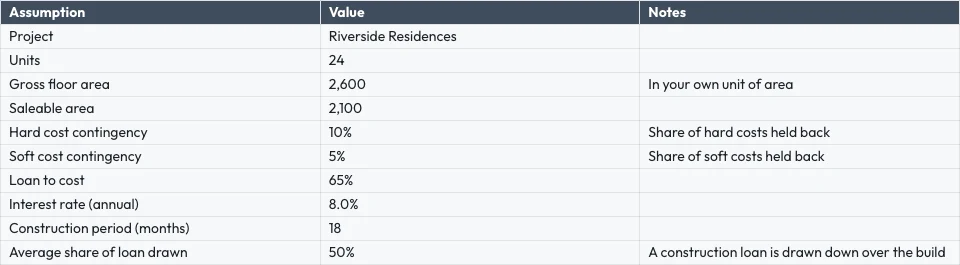
Payment plans, cost tracking, unit reporting.
Pembangunan Hartanah di Calisto →Pereka Grafik & SenimanJob costing sheets
Job costing and retainer tracking.
Pereka Grafik & Seniman di Calisto →Peniaga Runcit Dalam TalianLaporan
Margin, cost and channel reporting.
Peniaga Runcit Dalam Talian di Calisto →Semua yang termasuk dalam Calisto Sheets.
- Calisto’s own spreadsheet engine, with as many tabs as the work needs
- 245 functions by family, found by name in ⌘K
- Describe what you need beside the formula, and get the formula back
- Iterative calculation, set per spreadsheet, so every reader gets the same answers
- Show Formulas, gridlines, Add 1000 Rows, keyboard shortcuts
- Find, and Find and Replace
- The format chip on the selected cells, and one Format panel for everything else
- Number formats in the business’s own currency, percentages, dates and plain numbers; never a currency nobody recorded
- Conditional formatting, alternating colors and color scales
- Data validation: lists shown as chips, tick boxes, numbers, dates, text and custom rules
- Merge, wrap, borders, freeze, hide and group rows and columns
- Each column’s and row’s menu: insert, delete, size, sort, filter, group, stats and clean-up
- Date chips and contact chips that name a customer from your contacts
- Describe it on Home and the closest template opens; or start blank, in a theme, or from a template by type, industry, style and color
- A template is a design worn in a theme; its blanks are asked for before it opens
- Nothing is saved until you save it; leaving with changes asks first
- Open XLSX, ODS, CSV and TSV files, and shared text arrives as a grid
- Open a spreadsheet file from Depot in Sheets
- Make a Copy, Save as Template, Edit Template
- Bookings: every booking, and revenue by channel per currency
- Deals: the open pipeline and what was won
- Payments: transactions
- Inventory: stock on hand, and what is below its reorder point
- Registry: members; Tickets: attendees; Workforce: the team and the schedule
- Ledger Data: the balance sheet, profit and loss, the invoices register and the transaction register
- Catalog Data, and Subscription Metrics (what the business pays Calisto)
- A web address: a public CSV or JSON file
- Live, Manual or Snapshot for each tab, with when it was read
- Money only for people the owner’s settings allow; anyone else reads “Not shared with you”
- Charts kept in the spreadsheet: column, bar, line, area, scatter, pie and donut
- A chart placed over the cells, drawn from the cells as they are now, on every device and the published link
- Pivot tables onto a tab of their own
- Column stats: count, sum, average, lowest, highest and median
- Smart Fill, Auto-Classify Columns and Ask About This Data
- Improve, shorten, summarize or translate the selected cells, or change their tone to your brand’s voice
- Named ranges and filter views
- Editing together, merged cell by cell; everyone in the spreadsheet shown in Share
- Comments pinned to a cell, with replies, mentions and threads handed to someone
- Comments for You on Home: the threads that are yours to answer
- Version history: compare two versions cell by cell, restore, and name a version
- Notices for a share, a comment, a reply, a mention and a handed thread, each a rule you can pause in Automations
- Share with people to view, comment or edit, and change or remove access in place
- Protected tabs and ranges: owner only, or for a range a warning before a change
- Purview’s Data Rules keep a cell from reaching a person’s screen, and keep it intact when they save
- Collections and locks set in Purview apply here too
- Publish a link anyone can open, and take it back
- A published spreadsheet shown on a TV, with Display
- Export XLSX, ODS, CSV, TSV, HTML and PDF, with the page setup, and print
- Send: Email, an Inbox message, Live, a Connect channel, or Attach to Deal (a PDF on the deal)
- Save to a Hub and Folder; every spreadsheet is in Depot
- Copy Link, Star, Details with a description, Trash with 30 days to restore
- Generate Invoice in Ledger from a tab’s lines
- Create Task in Dispatch
- Present in Slides: a deck whose chart stays linked to the spreadsheet
- A linked form adds one row per response, with a new column for each new question
- Automations: a new spreadsheet, a new row, a share and a pulled overdue invoice start rules; a rule adds a row or makes a spreadsheet, each row once whatever the retries
- Refine Design: the theme of a spreadsheet (its colors, the header band, type and row height)
- Brand Check: the words read against your brand guidelines
- The same look on the desk, the phone, the published link, the charts, XLSX and PDF
- The number format new spreadsheets start with, for the business
- Your own preferences, the same in every business: recalculate as you type or on F9, and where Share starts
- Each person chooses which comment notices reach them
- Home, Spreadsheets, Templates and Library in the tab bar; an open spreadsheet fills the screen
- Undo and Redo, Find, the cell’s sheet with its format and filter, Data, Comments and the tabs
- Spreadsheets kept on the device open read-only with no signal; a comment written then is sent later
- Spreadsheets shared from another app open in Sheets
- Notifications that open the comment, with Reply and Mark as Done
- Shortcuts: New Spreadsheet, Recent, Shared with Me and Templates
Questions about Calisto Sheets
XLSX, ODS, CSV dan TSV, dari peranti, dari Depot atau kongsi dari aplikasi lain pada telefon. Formula dikira semula oleh enjin sendiri Calisto. Fail XLS lama tidak dibuka.
Dari rekod yang disimpan oleh aplikasi: tempahan, tawaran, pembayaran, stok, ahli, pemegang tiket, senarai nama dan laporan serta daftar Ledger. Ia membacanya semula setiap kali fail spreadsheet dibuka, Manual menunggu Segarkan, Snapshot tidak pernah berubah. Angka yang mungkin tidak dilihat seseorang membaca "Tidak dikongsi dengan anda".
Ya. Penyuntingan menggabungkan sel demi sel, semua orang dalam lembaran kerja ditunjukkan dalam Kongsi, dan komen boleh dikunci pada sel, menyebut seseorang atau diserahkan kepada mereka.
Lembaran kerja disimpan pada peranti dalam mod baca sahaja, jadi salinan lama tidak pernah menimpa kerja yang lebih baru. Komen yang ditulis tanpa isyarat dihantar apabila sambungan kembali. Pengeditan memerlukan sambungan.
XLSX, ODS, CSV, TSV, HTML dan PDF membawa grid. XLSX, PDF dan HTML juga membawa penampilannya. Grafik dan gambar kekal di Calisto, pada setiap peranti dan pada pautan yang diterbitkan.
Sheets adalah sebahagian daripada Calisto Work, satu langganan per orang. Bahagian harga pada halaman ini membaca katalog langsung. Aplikasi seperti Borang atau Penghantaran yang dibuka ke dalam borang, dihargai dalam aplikasi masing-masing.
@Lucía Hernández Molinos raised the 25 kg sack again. Do we keep 18 or drop to 15 for the week?
Keep 18. Día de Muertos orders start on Thursday.
Masa madre is back in stock at Granos Ruiz. Two packs should cover the sourdough this week.
BalasSelesaikanMantequilla price confirmed with San Ángel for November.
Ditanda sebagai selesaiBalasBuka semula